Data Domain: Postup resetování BMC/iDRAC
Zusammenfassung: Tento článek obsahuje pokyny k ručnímu resetování řadiče BMC (Baseboard Management Controller) nebo řadiče iDRAC (Integrated Dell Remote Access Controller) v systémech Data Domain a PowerProtect DD. Zatímco systém DDOS se může automaticky pokusit o resetování, když jsou zjištěny známé problémy, může být vyžadován ruční zásah, pokud výstrahy přetrvávají. ...
Dieser Artikel gilt für
Dieser Artikel gilt nicht für
Dieser Artikel ist nicht an ein bestimmtes Produkt gebunden.
In diesem Artikel werden nicht alle Produktversionen aufgeführt.
Symptome
Platí pro:
- Všechny systémy Data Domain
Možné příznaky:
- BMC přestane reagovat.
- Řadič iDRAC je offline nebo není dostupný.
- Falešné nebo přechodné výstrahy související s:
- Ventilátory
- Napájení
- Teplotní senzory
- Více snímačů hlavní jednotky hlásí stav "Unavailable","Absent" nebo "Failed".
- Zveřejněno upozornění
-
EVT-ENVIRONMENT-00039: BMC failure has been detected. File system is unchanged.
-
Ursache
BMC nebo iDRAC mohou přestat reagovat kvůli interním chybám nebo nadměrnému provozu, což může vést k zastaralým nebo chybným výstrahám. Reset tyto podmínky vymaže a obnoví funkčnost snímače.
Lösung
Postup resetování BMC/iDRAC u všech systémů DD:
- Vypněte systém Data Domain zadáním příkazu DD-CLI:
-
#system poweroff
-
- Počkejte, až se systém DD řádně vypne.
- Odpojte všechny napájecí kabely od hlavní jednotky / řadiče DD.
- Počkejte 2 minuty.
- Znovu zapojte všechny napájecí zdroje a spusťte systém stisknutím vypínače na předním panelu.
- Pokud problémy s řadičem BMC v systému přetrvávají, obraťte se na poskytovatele podpory.
POZNÁMKA: Postup odstranění statické elektřiny pro server Dell PowerEdge:
Systém Data Domain: DD3300/DD6900/DD9400/DD9900 Postup odstranění blechy platformy (reset BMC) .
Systém Data Domain: DD3300/DD6900/DD9400/DD9900 Postup odstranění blechy platformy (reset BMC) .
Alternativní možnost "měkkého resetu" pro systémy PowerProtect DD:
Grafické uživatelské rozhraní (uživatelské rozhraní) řadiče iDRAC umožňuje provést měkký reset:
- Připojte se k řadiči iDRAC.
- Přihlaste se do rozhraní zadáním uživatelského jména a hesla.
- Výběr: Údržba > , diagnostika > , resetování řadiče iDRAC
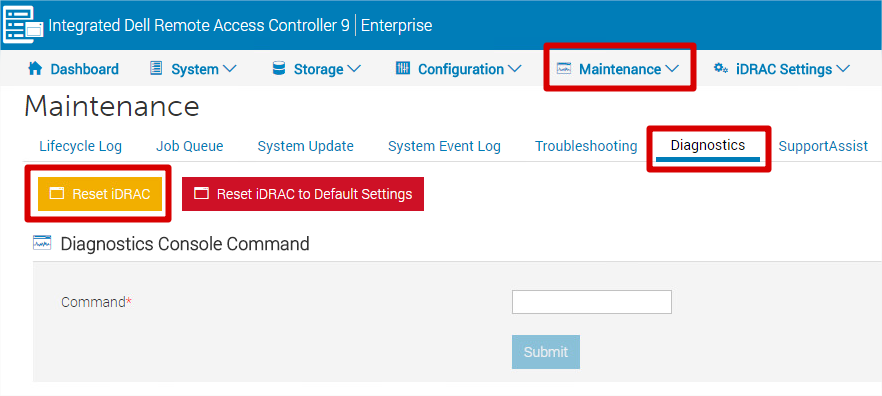
- Řadič iDRAC není několik minut dostupný – výkon systému to neovlivní.
Upozornění: Nevybírejte možnost "Reset iDRAC to Default Settings", pokud nechcete obnovit všechna nastavení (včetně IP adresy, uživatelského jména a hesla) do výchozího továrního nastavení.
Betroffene Produkte
Data Domain, DD OS, DD2200 Appliance, DD2500 ApplianceArtikeleigenschaften
Artikelnummer: 000079739
Artikeltyp: Solution
Zuletzt geändert: 18 Apr. 2026
Version: 7
Antworten auf Ihre Fragen erhalten Sie von anderen Dell NutzerInnen
Support Services
Prüfen Sie, ob Ihr Gerät durch Support Services abgedeckt ist.