如何執行 Dell Data Security 解除安裝程式
Zusammenfassung: 瞭解如何使用 Dell Data Security 解除安裝程式解除安裝 Dell Data Security 和 Dell Data Protection 產品。
Dieser Artikel gilt für
Dieser Artikel gilt nicht für
Dieser Artikel ist nicht an ein bestimmtes Produkt gebunden.
In diesem Artikel werden nicht alle Produktversionen aufgeführt.
Weisungen
註:
- 受影響的產品中列出的產品可能未處於使用中狀態。如需支援產品的最新資訊,請參閱 Dell Data Security 的產品生命週期 (支援結束/壽命結束) 原則。如果您對其他文章有任何問題,請聯絡您的銷售團隊或聯絡 endpointsecurity@dell.com。
- 請參考端點安全性,以取得有關目前產品的其他資訊。
Dell Data Security 解除安裝程式可為列出的 Windows Dell Data Security (先前稱為 Dell Data Protection) 提供簡化的移除方法受影響的產品。
受影響的產品:
- Dell BitLocker Manager
- Dell Data Guardian
- Dell Data Protection | Enterprise Edition
- Dell Data Protection | Personal Edition
- Dell Data Protection | External Media Edition
- Dell Data Protection | Secure Lifecycle
- Dell Data Protection | Cloud Edition
- Dell Data Protection | Endpoint Security Suite Enterprise
- Dell Data Protection | Server Edition
- Dell Data Protection | 安全性工具
- Dell Encryption Enterprise
- Dell Encryption External Media
- Dell Encryption Personal
- Dell Endpoint Security Suite Enterprise
- Dell Full Disk Encryption
- Dell Threat Defense
受影響的版本:
- v8.0.0 及更新版本
受影響的作業系統:
- Windows
如何執行 Dell Data Security 解除安裝程式 https://www.dell.com/support/article/sln307791/
影片長度:00:02:25 (hh:mm:ss)
如有提供,您可以使用此影片播放器上的 CC 圖示來選擇隱藏式輔助字幕 (字幕) 的語言設定。
Dell Data Security 解除安裝程式可透過使用者介面 (UI) 或命令行介面 (CLI) 切換值執行。Dell Data 安全性管理員也可以檢閱解除安裝記錄。如需詳細資訊,請按一下適當的標籤。
請參閱如何下載 Dell Data Security 解除安裝程式,以瞭解取得解除安裝程式的詳細資訊。
UI
- 按兩下 DataSecurityUninstaller.exe 以啟動應用程式。
 注意: DataSecurityUninstaller 需要
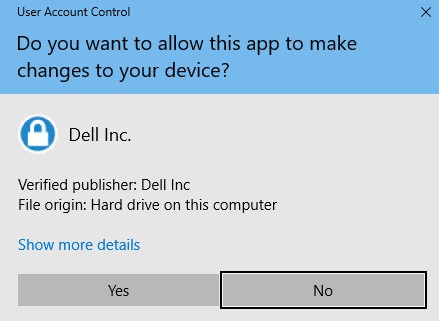
log4net.dllDataSecurityUninstaller 需要 log4net.dll 位於相同資料夾,才能成功執行。 - 如果已啟用使用者帳戶控制 (UAC),請按一下是,以提高系統管理員權限。否則請前往步驟 3。
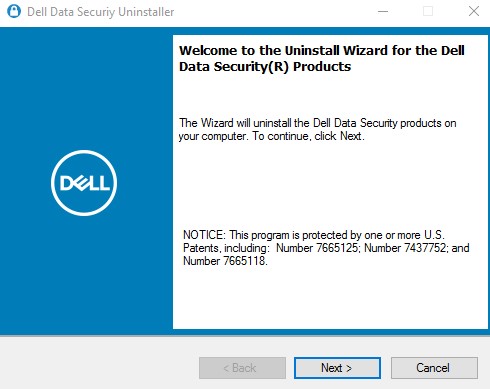
- 在 Dell Data Security 解除安裝程式使用者介面 (UI) 中,按一下下一步以繼續。
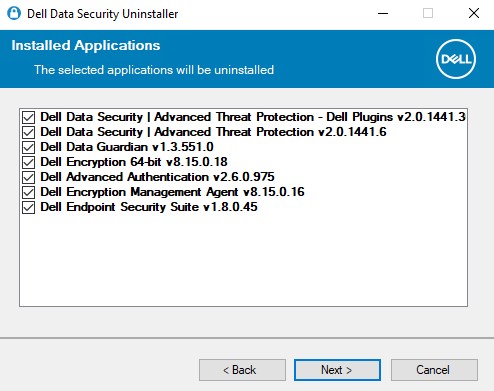
- 您可以選擇清除移除清單中的應用程式核取方塊,然後按一下下一步。
 註:
註:- 系統會自動選取或清除選取所需的相依應用程式。
- 您端點上可用的應用程式可能會與螢幕擷取畫面不同。
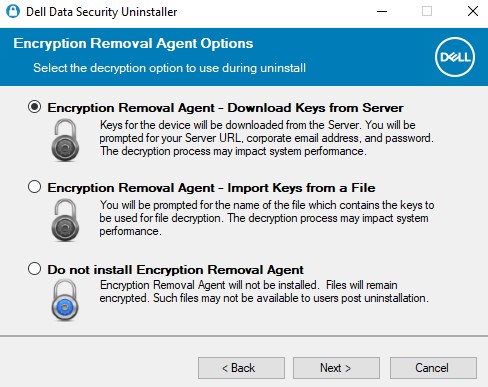
- 若具有 Dell Personal Encryption (先前稱為 Dell Data Protection | Personal Edition) 或 Dell Enterprise Encryption (先前稱為 Dell Data Protection | Enterprise Edition) 原則型加密,請前往步驟 6。否則請前往步驟 7。
- 在「加密代理程式選項 UI」中,選取下列其中一項: 按一下上方的適當連結,以瞭解特定的安裝步驟。
加密移除代理程式 - 從伺服器下載金鑰
- 選取加密移除代理程式 - 從伺服器下載金鑰,然後按一下下一步。
- 填入所列裝置伺服器的鑑識管理員登入資料。填入後,按一下下一步,然後前往步驟 8。
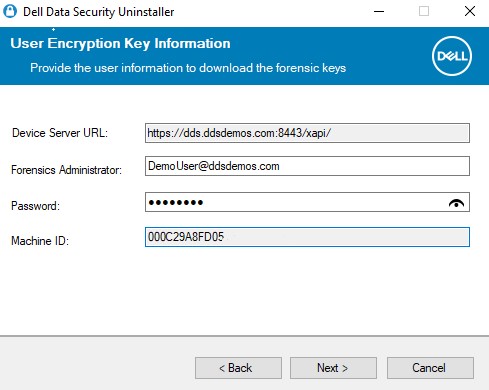 註:
註:- 裝置伺服器 URL 會透過登錄查詢提取至 。
HKLM\SYSTEM\CurrentControlSet\Services\CMGShield REG_SZ: ServletURL。 - 機器 ID 會透過登錄查詢提取至 。
HKLM\SYSTEM\CurrentControlSet\Services\CMGShield REG_SZ: MCID。 - 在您的環境中,裝置伺服器和鑑識管理員會與上方的螢幕擷取畫面不同。
- 鑑識管理員必須以通用主體名稱 (UPN) 格式填入。例如 Jane_Doe@Dell.com 便是 UPN 格式。
- 裝置伺服器 URL 會透過登錄查詢提取至 。
加密移除代理程式 - 從檔案匯入金鑰
- 選取加密移除代理程式 - 從檔案匯入金鑰,然後按一下下一步。
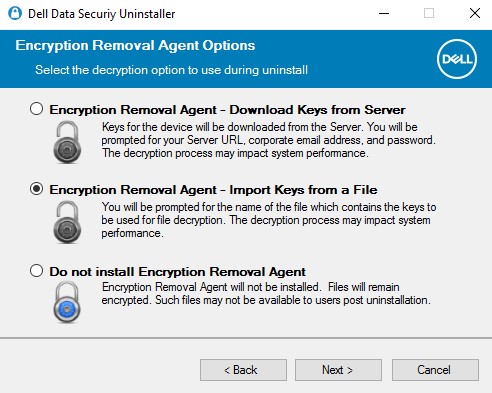
- 瀏覽至鑑識下載的檔案的位置,然後輸入檔案的密碼片語。填入後,按一下下一步,然後前往步驟 8。
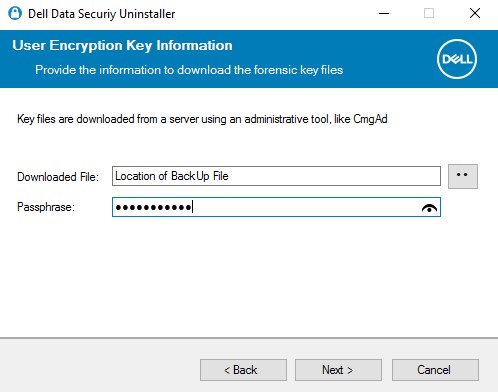
請勿安裝加密移除代理程式
- 選取請勿安裝加密移除代理程式,按一下下一步,然後前往步驟 8。
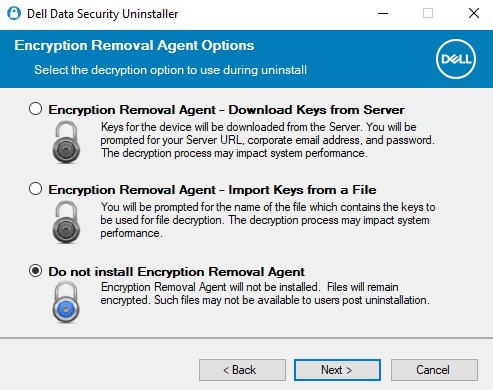 若未安裝加密移除代理程式,會導致端點無法解密。受 SDE 金鑰保護的資料會保持無法使用。在解除安裝之後,將無法受通用或使用者金鑰保護的資料,直到安裝加密移除代理程式。
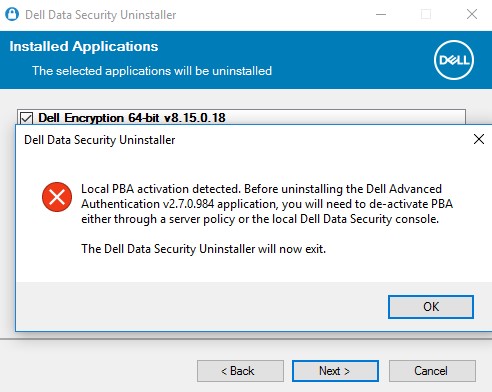
- 如果在端點上佈建了自我加密磁碟機,則必須先停用,才能移除。按一下確定以關閉 Dell Data Security 解除安裝程式。如果已經停用或未使用自我加密磁碟機,請前往步驟 8。
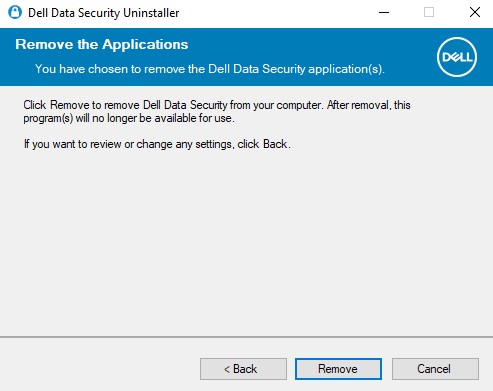
- 按一下移除以解除安裝步驟 4 中所選取的應用程式。
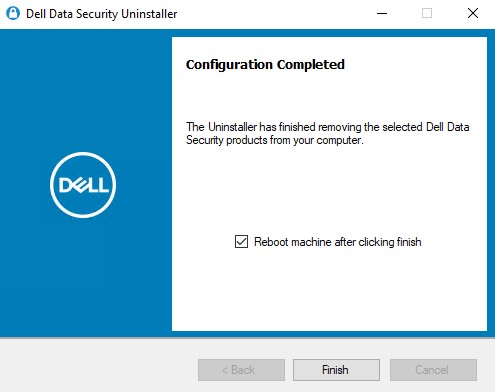
- 完成時,按一下完成以重新開機機器。
 註:
註:- 必須重新開機,才能從開機週期清理移除的應用程式。
- 如果有任何應用程式無法解除安裝,請按一下解除安裝記錄標籤。
- 按一下是以確認您要重新開機機器。

CLI
Dell Data Security 解除安裝程式提供在命令列使用參數與值移除的彈性。
註:
- 參數區分大小寫。
- DataSecurityUninstaller 需要
log4net.dllDataSecurityUninstaller 需要 log4net.dll 位於相同資料夾,才能成功執行。 - 裝置伺服器 URL 會透過登錄查詢提取至 。
HKLM\SYSTEM\CurrentControlSet\Services\CMGShield REG_SZ: ServletURL。 - 機器 ID 會透過登錄查詢提取至 。
HKLM\SYSTEM\CurrentControlSet\Services\CMGShield REG_SZ: MCID。
| 參數 | 值 |
|---|---|
CMG_Decrypt= |
0 0 (不安裝加密移除代理程式) |
CMG_Decrypt= |
1 1 (使用 Dell Security Management Server 下載的金鑰安裝加密移除代理程式) |
CMG_Decrypt= |
2 2 (使用 Enterprise Edition 用戶端鑑識套裝的金鑰安裝加密移除代理程式) |
CMG_Decrypt= |
3 3 (使用 Personal Edition 用戶端鑑識套裝的金鑰安裝加密移除代理程式) |
FORENSIC_ADMIN= |
Dell Security Management Server 的鑑識系統管理員使用名稱。在以下情況下,此選項為必填 CMG_Decrypt 選擇值 1。密碼必須包含在半形引號中 ("")。必須以通用主體名稱 (UPN) 格式填入使用者名稱。例如 Jane_Doe@Dell.com 便是 UPN 格式。 |
FORENSIC_PWD= |
Dell Security Management Server 的鑑識系統管理員密碼。在以下情況下,此選項為必填 CMG_Decrypt 選擇值 1。密碼必須包含在半形引號中 ("")。 |
DA_KM_Path= |
如果發生以下情況,請提供鑑識套裝的位置 CMG_Decrypt 選擇值 2(或 3)。值必須包含在半形引號中。 |
DA_KM_PW= |
如果是鑑識套裝的密碼 CMG_Decrypt 選擇值 2(或 3)。值必須包含在半形引號中。 |
/silent |
在無對話的情況下執行 DataSecurityUninstaller。 CMG_Decrypt 若未定義變數,則預設會設定 CMG_Decrypt 值 3。此參數必須為小寫。 |
NOREBOOT |
解除安裝後不要重新開機。使用 NOREBOOT 旗標不需要交換值或修飾符。 NOREBOOT 旗標 |
LOGFILE_PATH= |
設定解除安裝記錄檔案路徑的選用參數。如果未選擇此選項,則會使用在「解除安裝記錄」標籤下列出的預設位置。密碼必須包含在半形引號中 ("")。 |
LOGFILE_Name= |
若已定義 LOGFILE_PATH,則會用於設定解除安裝記錄的名稱。 LOGFILE_PATH 已定義。密碼必須包含在半形引號中 ("")。 |
CLI 解除安裝範例:
範例 #1
下列範例會執行無 UI 的 DataSecurityUninstaller,並使用鑑識系統管理員 (ExampleUser) 直接從 Dell Security Management Server 下載加密金鑰。解除安裝後,系統會隱藏重新開機的要求。
範例命令列解除安裝:
DataSecurityUninstaller.exe CMG_DECRYPT=1 FORENSIC_ADMIN="ExampleUser" FORENSIC_PWD="Passw0rd" NOREBOOT /silent
範例 #2
下列範例會執行無 UI 的 DataSecurityUninstaller,並使用透過 CMGA 下載之 Dell Security Management Server 預先下載的加密金鑰。CMGAd 是 Dell Encryption 管理公用程式中的一個公用程式,在 Dell Encryption 中可用。解除安裝後,系統會隱藏重新開機的要求。
範例命令列解除安裝:
DataSecurityUninstaller.exe CMG_DECRYPT=2 DA_KM_PATH="C:\Dell\KeyBundle\DeviceName.Domain.com" DA_KM_PW="Passw0rd" NOREBOOT /silent
記錄
根據預設,Dell Data Security 解除安裝程式會將解除安裝記錄輸出至 C:\ProgramData\Dell\Dell Data Protection)。會為每個選取要移除的應用程式產生解除安裝記錄。
DDP_AdvancedThreatProtection_Plugins_Uninstall_MSI.logDDP_AdvancedThreatProtection_Plugins_Uninstall_MSI.log - 包含解除安裝 Dell 附掛程式的相關資訊,這些附掛程式用於從 Advanced Threat Protection 代理程式與 Dell Client Security 架構的通訊。DDP_AdvancedThreatProtection_Uninstall_MSI.logDDP_AdvancedThreatProtection_Uninstall_MSI.log - 包含解除安裝 Advanced Threat Protection 代理程式的相關資訊。DDP_Authentication_Uninstall_MSI.logDDP_Authentication_Uninstall_MSI.log - 包含解除安裝 Advanced Authentication 元件的相關資訊。DDP_ClientSecurityFramework_Uninstall_MSI.logDDP_ClientSecurityFramework_Uninstall_MSI.log - 包含移除 Dell Client Security Framework (Encryption Management Agent) 的相關資訊。DDP_Data_Guardian_Uninstall_MSI.logDDP_Data_Guardian_Uninstall_MSI.log - 包含有關移除 Dell Data Guardian 的相關資訊。DDP_Encryption_Uninstall_MSI.logDDP_Encryption_Uninstall_MSI.log - 包含移除 Dell 原則式加密應用程式的相關資訊。DDP_ESSE_Uninstall.logDDP_ESSE_Uninstall_MSI.log - 若使用 Suite 安裝程式,便會包含移除該安裝程式的相關資訊。DDP_ESSE_Uninstall_MSI.logDDP_ESSE_Uninstall_MSI.log - 若使用 Suite 安裝程式,便會包含移除該安裝程式的相關資訊。DDPUninstall_Main.logDDPUninstall_Main.log - 包含所有嘗試運用 DDS 解除安裝程式的相關解除安裝資訊。DDP_McAfee_Endpoint_Security_Firewall_Uninstall_MSI.logDDP_McAfee_Endpoint_Security_Firewall_Uninstall_MSI.log - 包含解除安裝 Dell Endpoint Security Suite Pro 和 Endpoint Security Suite Enterprise 防火牆元件的相關資訊。DDP_McAfee_Endpoint_Security_Security_Platform_Uninstall_MSI.logDDP_McAfee_Endpoint_Security_Security_Platform_Uninstall_MSI.log - 包含解除安裝 Dell Endpoint Security Suite Pro 和 Endpoint Security Suite Enterprise 基礎 McAfee 元件的相關資訊。DDP_McAfee_Endpoint_Security_Web_Control_Uninstall_MSI.logDDP_McAfee_Endpoint_Security_Web_Control_Uninstall_MSI.log - 包含解除安裝 Dell Endpoint Security Suite Pro 和 Endpoint Security Suite Enterprise Web 控制元件的相關資訊。DDP_ThreatProtection_Uninstall_MSI.logDDP_ThreatProtection_Uninstall_MSI.log - 包含解除安裝 Dell Endpoint Security Suite Pro 和 Endpoint Security Suite Enterprise 的 McAfee 和 Dell Client Security Framework 附掛程式的相關資訊。
Weitere Informationen
Videos
Betroffene Produkte
Dell Data Guardian, Dell Encryption, Dell Security Tools, Dell Threat Defense, Dell Endpoint Security Suite EnterpriseArtikeleigenschaften
Artikelnummer: 000125052
Artikeltyp: How To
Zuletzt geändert: 06 Aug. 2026
Version: 22
Antworten auf Ihre Fragen erhalten Sie von anderen Dell NutzerInnen
Support Services
Prüfen Sie, ob Ihr Gerät durch Support Services abgedeckt ist.