ECS: Unable to Create New Management User When Logged In as AD User
Zusammenfassung: In ECS version 3.6 and later, an AD user or a management user is unable to create a new management user.
Dieser Artikel gilt für
Dieser Artikel gilt nicht für
Dieser Artikel ist nicht an ein bestimmtes Produkt gebunden.
In diesem Artikel werden nicht alle Produktversionen aufgeführt.
Symptome
Management user button under Users tab in ECS UI is unavailable.
Ursache
There are changes in ECS User Management abilities beginning with version 3.6 and later.
See the latest API Documentation at REST-API (SECURITY_ADMIN role is required for creation or deletion of users in ECS).
See the latest API Documentation at REST-API (SECURITY_ADMIN role is required for creation or deletion of users in ECS).
Lösung
By default, both root and emcsecurity users have SECURITY_ADMIN role.
Log in to ECS UI as either root or emcsecurity and assign the user SECURITY_ADMIN role by following the below steps:
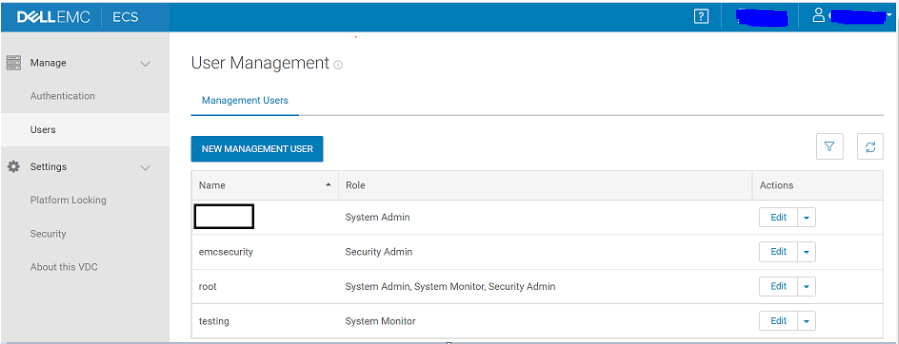
Figure 1: Screenshot of User Management tab to Edit Management User
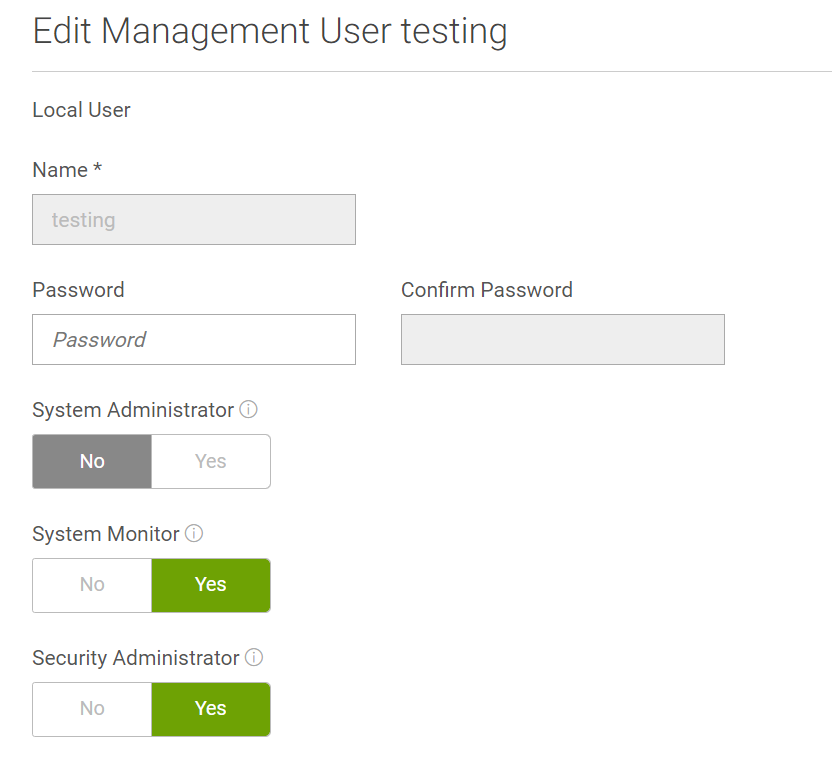
Figure 2: Screenshot of Edit Management User to Add Security Administrator
Log in to ECS UI as either root or emcsecurity and assign the user SECURITY_ADMIN role by following the below steps:
- Select the Management User to which SECURITY_ADMIN role must be assigned by clicking the Edit button.
Figure 1: Screenshot of User Management tab to Edit Management User
- Change the Security Administrator section from NO to YES and Save.
Figure 2: Screenshot of Edit Management User to Add Security Administrator
- Once the SECURITY_ADMIN role is assigned to a user, that particular user can create a New Management User.
Betroffene Produkte
Elastic Cloud StorageArtikeleigenschaften
Artikelnummer: 000200621
Artikeltyp: Solution
Zuletzt geändert: 05 Juni 2023
Version: 4
Antworten auf Ihre Fragen erhalten Sie von anderen Dell NutzerInnen
Support Services
Prüfen Sie, ob Ihr Gerät durch Support Services abgedeckt ist.