NVE: Configure AFTD fails: The user 'root' does not own the contents of the device
Zusammenfassung: Configure NetWorker advanced file type device (AFTD) on Isilon network file share (NFS) fails error "The user 'root (uid=0)' does not own the contents of the device"
Dieser Artikel gilt für
Dieser Artikel gilt nicht für
Dieser Artikel ist nicht an ein bestimmtes Produkt gebunden.
In diesem Artikel werden nicht alle Produktversionen aufgeführt.
Symptome
Configure NetWorker AFTD on Isilon NFS share fails.
Error: The user 'root (uid=0)' does not own the contents of device '<name>'
Ursache
Since NetWorker Virtual Edition (NVE) does not support NFSv3, Isilon has to enable the NFSv4 along with the default version 3. There is a "root user mapping" setting in NFSv4. By default, the mapping is set to "nobody." This causes the NFS client failing to write on the share.
Lösung
- Log in to the Isilon OneFS admin UI as root.
- Click drop down tab "Protocols" -> "UNIX sharing (NFS)" -> Check or highlight the NFS exports sharing Path "<nfs mount>" -> Click Action "View/Edit" -> Click "Edit Export" -> Browse down to "root user mapping" click "Use custom" -> check "Do not map root users" -> Save changes
- Click drop down tab "Zone settings" -> Ensure that the "Enable NFSv4 no names" is checked.
- Log in to NVE as admin, then switch to root:
sudo su -(Alternatively, the below commands can be run as admin, but you must usesudo)
Umount the NFS mount, mount it again.umount /<mount point>mount -t nfs <Isilon host>:/ifs/<nfs mount> /<mount point>
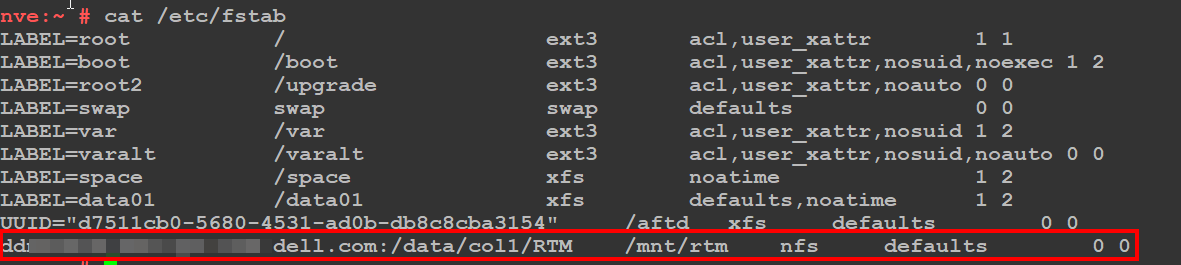
NOTE: Create an
/etc/fstab entry on the NVE to make the mountpoint persistent across system reboots. The below screenshot is a general example of a persistent NFS mountpoint.
- Log in to the NetWorker Management Console (NMC) as the NetWorker Administrator
- Configure the AFTD with the device configuration wizard.
Betroffene Produkte
NetWorkerProdukte
NetWorker FamilyArtikeleigenschaften
Artikelnummer: 000206193
Artikeltyp: Solution
Zuletzt geändert: 06 Apr. 2026
Version: 2
Antworten auf Ihre Fragen erhalten Sie von anderen Dell NutzerInnen
Support Services
Prüfen Sie, ob Ihr Gerät durch Support Services abgedeckt ist.