Erros de configuração inicial do Dell Networking Edge Gateway no Windows
Zusammenfassung: Às vezes, ligar o Edge Gateway durante a execução do Windows pode resultar em erros na configuração inicial.
Dieser Artikel gilt für
Dieser Artikel gilt nicht für
Dieser Artikel ist nicht an ein bestimmtes Produkt gebunden.
In diesem Artikel werden nicht alle Produktversionen aufgeführt.
Symptome
Ao inicializar o Edge Gateway executando o Windows pela primeira vez, não será possível fazer a configuração inicial. Nesses casos, o dispositivo pode mostrar o seguinte erro:

Ursache
Essa mensagem de erro é resultado de um determinado bit do Registro ser sinalizado incorretamente.
Lösung
Para se recuperar desse erro:
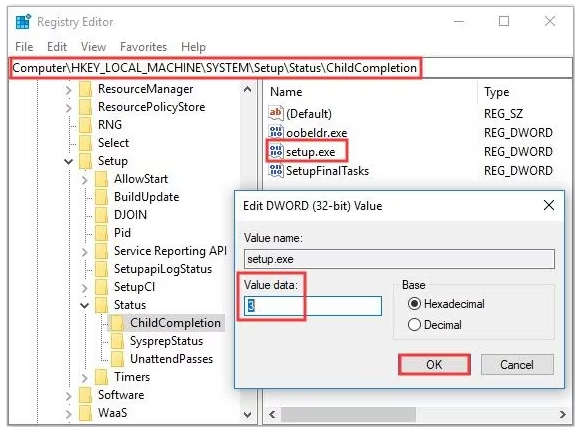
- Abra o prompt de comando usando as teclas "Shift" + "F10"
- Inicie o "Editor do Registro" digitando: "regedit" e pressionando Enter.
- No regedit, navegue até o seguinte objeto
-
HKEY_LOCAL_MACHINE\SYSTEM\Setup\Status\ChildCompletion
- Editar setup.exe
- Altere "Dados do valor" de 1 para 3
-
- Quando as edições forem concluídas, clique em "OK" para salvar as alterações
- Feche o Regedit e reinicialize o sistema no prompt de comando com:
-
shutdown /r
-
Betroffene Produkte
Dell Edge Gateway 3200, Dell Edge Gateway 5200Artikeleigenschaften
Artikelnummer: 000226062
Artikeltyp: Solution
Zuletzt geändert: 05 Juni 2025
Version: 3
Antworten auf Ihre Fragen erhalten Sie von anderen Dell NutzerInnen
Support Services
Prüfen Sie, ob Ihr Gerät durch Support Services abgedeckt ist.