Effetti di Windows Studio mancanti su un notebook Dell
Zusammenfassung: Informazioni su come ripristinare gli effetti di Windows Studio mancanti su un notebook Dell.
Dieser Artikel gilt für
Dieser Artikel gilt nicht für
Dieser Artikel ist nicht an ein bestimmtes Produkt gebunden.
In diesem Artikel werden nicht alle Produktversionen aufgeführt.
Symptome
Le opzioni di Windows Studio Effects potrebbero non essere disponibili nella sezione Dispositivo video USB in Impostazioni.
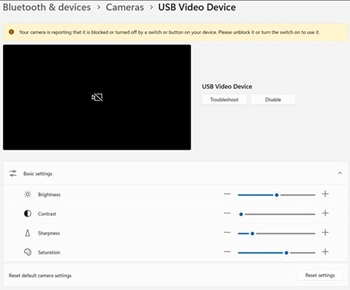
Piattaforme interessate:
- Dell 14 DC14255
- Dell Pro 14 Essential PV14255
- Dell Pro 14 PC14255
- Dell Pro 16 PC16255
Ursache
Non sono disponibili informazioni sulla causa.
Lösung
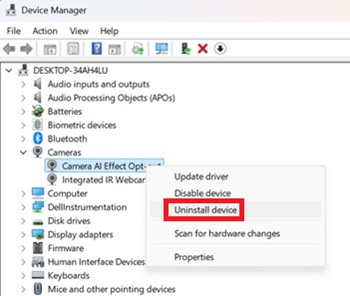
- Aprire Gestione dispositivi. Cliccare con il pulsante destro del mouse su Camera AI Effect Opt-out e selezionare Uninstall device.
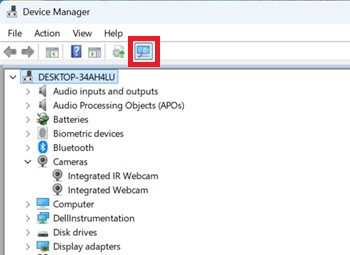
- Premere il pulsante di scansione per verificare che la webcam IR integrata esista.
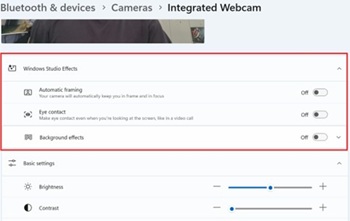
- Verificare che le opzioni di Windows Studio Effects siano disponibili in Impostazioni.
Betroffene Produkte
Dell 14 DC14255, Dell Pro 14 PC14255, Dell Pro 16 PC16255, Dell Pro 14 Essential PV14255Artikeleigenschaften
Artikelnummer: 000407521
Artikeltyp: Solution
Zuletzt geändert: 24 Mai 2026
Version: 2
Antworten auf Ihre Fragen erhalten Sie von anderen Dell NutzerInnen
Support Services
Prüfen Sie, ob Ihr Gerät durch Support Services abgedeckt ist.