How to Grant Full Disk Access for the CrowdStrike Falcon Sensor
Summary: Learn step-by-step instructions to grant full disk access for the CrowdStrike Falcon Sensor.
Αυτό το άρθρο ισχύει για
Αυτό το άρθρο δεν ισχύει για
Αυτό το άρθρο δεν συνδέεται με κάποιο συγκεκριμένο προϊόν.
Δεν προσδιορίζονται όλες οι εκδόσεις προϊόντων σε αυτό το άρθρο.
Instructions
Full Disk Access is required to protect all data on macOS Mojave (10.14.5) and later. This article describes how to enable full disk access for the CrowdStrike Falcon Sensor.
Affected Products:
- CrowdStrike Falcon Sensor
Affected Operating Systems:
- macOS Mojave (10.14.5) and Later
On September 24, 2018, Apple released macOS Mojave (10.14). This operating system update includes a new security feature that is called Full Disk Access. Full Disk Access blocks third-party applications from accessing certain file paths and may prevent the CrowdStrike Falcon Sensor from fully protecting a device.
Note: Dell Technologies recommends using CrowdStrike Falcon Sensor v5.22.10306 or later. For more information, reference How to Download the CrowdStrike Falcon Sensor.
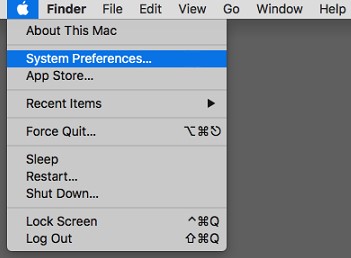
- On the desktop menu bar, click the Apple icon and then select System Preferences.
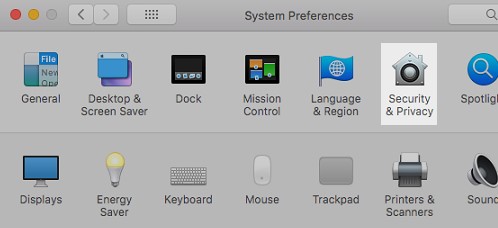
- In the System Preferences menu, double-click Security & Privacy.
- On the Privacy tab, select Full Disk Access.
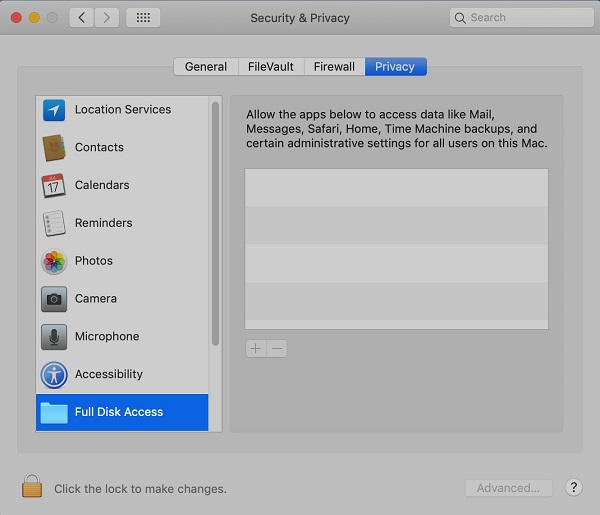
- If needed, click the padlock icon and provide credentials for a local administrator account (not an Apple ID) to allow changes.

- Click the + button to the right of the highlighted Full Disk Access.

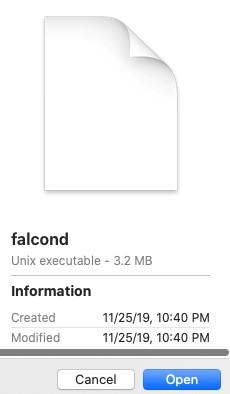
- Press CMD + SHIFT + G, type
/Library/CS/falcond, and then click Go. - Select
falcondand then click Open.
- Exit the Security & Privacy preferences.
Επηρεαζόμενα προϊόντα
CrowdStrikeΙδιότητες άρθρου
Article Number: 000125501
Article Type: How To
Τελευταία τροποποίηση: 01 Σεπ 2026
Version: 13
Βρείτε απαντήσεις στις ερωτήσεις σας από άλλους χρήστες της Dell
Υπηρεσίες υποστήριξης
Ελέγξτε αν η συσκευή σας καλύπτεται από τις Υπηρεσίες υποστήριξης.