Cloudlink sftp backup store error “auth fail” fixing
Summary: Resolving error “Auth fail” when testing access to an sftp backup store.
Αυτό το άρθρο ισχύει για
Αυτό το άρθρο δεν ισχύει για
Αυτό το άρθρο δεν συνδέεται με κάποιο συγκεκριμένο προϊόν.
Δεν προσδιορίζονται όλες οι εκδόσεις προϊόντων σε αυτό το άρθρο.
Symptoms
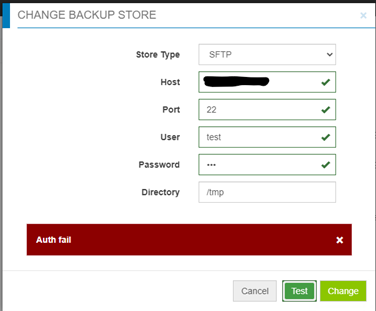
Auth fail” when testing access to an sftp backup store:
Cause
- Password is incorrect.
- Password authentication on the target server is disabled (only Challenge response is enabled) - Cloudlink is using password authentication for sftp backup store, but not challenge response.
Resolution
If it is not the incorrect password case, check the file /etc/ssh/sshd_config on the target server, find “PasswordAuthentication” setting.
If PasswordAuthentication is set to “no”, change to “yes”, then restart the ssh service.
For example: “systemctl restart sshd.service”.
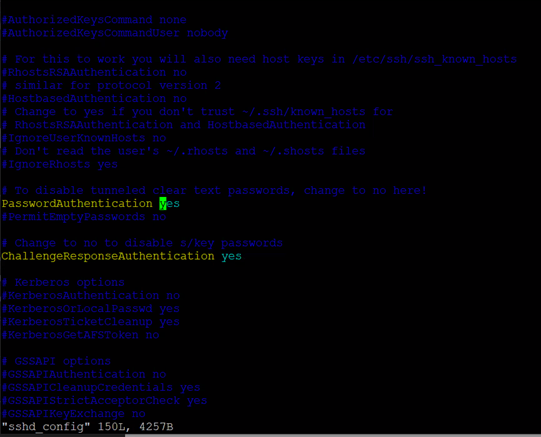
If PasswordAuthentication is set to “no”, change to “yes”, then restart the ssh service.
For example: “systemctl restart sshd.service”.
Επηρεαζόμενα προϊόντα
CloudLink SecureVM, CloudLinkΙδιότητες άρθρου
Article Number: 000210190
Article Type: Solution
Τελευταία τροποποίηση: 16 Μαΐ 2026
Version: 6
Βρείτε απαντήσεις στις ερωτήσεις σας από άλλους χρήστες της Dell
Υπηρεσίες υποστήριξης
Ελέγξτε αν η συσκευή σας καλύπτεται από τις Υπηρεσίες υποστήριξης.