Data Science Software Application Stops Responding When Installing
Summary: Information about install issues with the Data Science Software (DSS) application in Ubuntu 24.04.
Αυτό το άρθρο ισχύει για
Αυτό το άρθρο δεν ισχύει για
Αυτό το άρθρο δεν συνδέεται με κάποιο συγκεκριμένο προϊόν.
Δεν προσδιορίζονται όλες οι εκδόσεις προϊόντων σε αυτό το άρθρο.
Symptoms
When you install the DSS application, it stops responding on the "Waiting for GPU operator validations to pass…" screen for over 48 hours. This happens after connecting to the Internet and clicking "Install" to set up the Dell Data Science software stack.
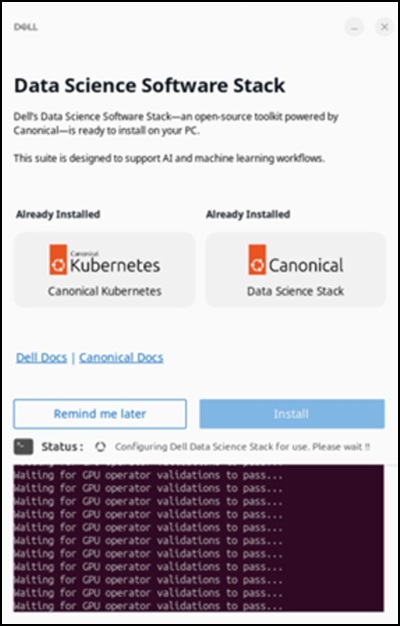
Affected Systems:
- Precision 5860 Tower
- Precision 7875 Tower
- Precision 7960 Rack
- Precision 7960 Tower
- Dell Pro Max Micro FCM2250
- Dell Pro Max Slim FCS1250
- Dell Pro Max Tower T2 FCT2250
Affected Operating System:
- Ubuntu 24.04
Cause
Network restrictions within the China region limit access to the Snap Store and prevents a successful download of the DSS application.
Resolution
Using a Virtual Private Network (VPN) is recommended to ensure that the download completes successfully. After connecting to the VPN, click the "Install" option in the DSS application.

Επηρεαζόμενα προϊόντα
Dell Pro Max Micro FCM2250, Dell Pro Max Slim FCS1250, Dell Pro Max Tower T2 FCT2250, Precision 5860 Tower, Precision 7960 Rack, Precision 7875 Tower, Precision 7960 TowerΙδιότητες άρθρου
Article Number: 000453914
Article Type: Solution
Τελευταία τροποποίηση: 02 Ιουλ 2026
Version: 2
Βρείτε απαντήσεις στις ερωτήσεις σας από άλλους χρήστες της Dell
Υπηρεσίες υποστήριξης
Ελέγξτε αν η συσκευή σας καλύπτεται από τις Υπηρεσίες υποστήριξης.