PowerProtect: Upgrade fails with UPG0126
Summary: Upgrading PowerProtect Data Manger (PPDM) fails with error UPG0126 - Unable to update one or more disruptive PowerProtect Data Manager sub-components. This happens when the VMware account used to register vCenter to PPDM does not have required permissions. ...
Symptoms
Upgrading PowerProtect Data Manager fails with error:
UPG0126 - Unable to update one or more disruptive PowerProtect Data Manager sub-components.
NAS Protection Engines update failed: Unable to update protection engine 'proxy01.domain.com' - AutoUpgrade request unsuccessful.
Unable to AutoUpgrade vProxy
Unable to deploy vProxy proxy01.domain.com.
Unable to deploy VM.
Unable to delete the vProxy 'proxy01.domain.com' from the vCenter server.
Unable to delete the vProxy VM 'proxy01.domain.com' from the vCenter server.
ServerFaultCode: Permission to perform this operation was denied.
Cause
The VMware account used to register vCenter to PPDM does not have the required permissions.
Resolution
The account used to register your vCenter with PPDM is missing permissions.
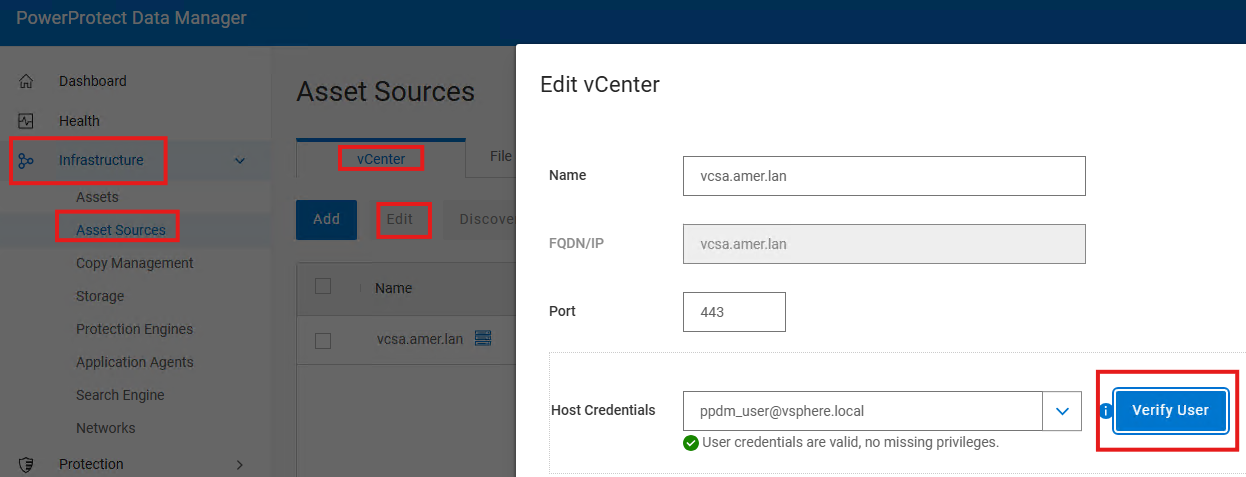
Use the Verify User function in PPDM: Select: Infrastructure > Asset Sources > vCenter > Edit > Verify User.
.
For a full list of vCenter permissions required, see the "Specify the required privileges for a dedicated vCenter user account" section of the PowerProtect Data Manager Virtual Machine User Guide.
PPDM Documentation:
https://www.dell.com/support/product-details/en-us/product/enterprise-copy-data-management/docs