DiskPart Failed to create a primary partition
Summary: Adding TDEV in a SG, then re-scanning from Host Side. However the Diskpart failed to create a primary partition on the corresponding disk. Found the Remote Procedure Call (RPC) Locator service is stopped. ...
This article applies to
This article does not apply to
This article is not tied to any specific product.
Not all product versions are identified in this article.
Symptoms
Adding TDEV in an SG, then re-scanning from the Host side. However, the Diskpart failed to create a primary partition on the corresponding disk.
Successfully added the TDEV (05C0) in a Storage Group(SG) exists in Masking View(MV) where the Initiator Group includes 2 supported Qlogic HBAs.
After a successful Re-scan from the Windows 2K8 Server using the Diskpart utility, the diskpart command failed to create a primary partition on this Disk.
DISKPART> create partition primary
DiskPart has encountered an error: The media is write-protected. See the System Event Log for more information.
From the System Event log: Error: VDS fails to write boot code on a disk during clean operation. Error code: 80070013@02070008
C:\> sympd listSymmetrix ID: 00019670XXXX Device Name Dir Device---------------------------- ------- ------------------------------------- CapPhysical Sym SA :P Config Attribute Sts (MB)---------------------------- ------- ----------- --------------------------------------------\\.\PHYSICALDRIVE4 005C0 01D:005 TDEV N/Grp'd RW 2049
Found Device 05C0 in a ready state and also ready on the FA ports:
C:\> symdev show 05C0......Device Status : Ready (RW)Device SA Status : Ready (RW)..........
Cause
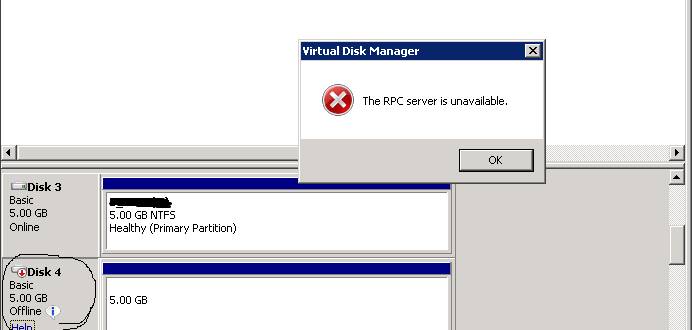
From the Disk Management Panel, found that Disk 4 is offline. However when trying to bring the Disk Online (Right Click>Online), the operation fails with the Error:The RPC Server is unavailable.
Resolution
From the Services panel, found the Remote Procedure Call (RPC) Locator service is stopped. After starting this service, customer is able to bring the Disk Online and then able to create the primary partition successfully from Diskpart command line.

DISKPART> create partition primary
DiskPart succeeded in creating the specified partition.
Additional Information
Description of (RPC):
The RPCSS service is the Service Control Manager for COM and DCOM servers. It performs object activations requests, object exporter resolutions and distributed garbage collection for COM and DCOM servers. If this service is stopped or disabled, programs using COM or DCOM will not function properly. It is strongly recommended that you have the RPCSS service running
Description of (RPC) Locator:
In Windows 2003 and earlier versions of Windows, the Remote Procedure Call (RPC) Locator service manages the RPC name service database. In Windows Vista and later versions of Windows, this service does not provide any functionality and is present for application compatibility.
The RPCSS service is the Service Control Manager for COM and DCOM servers. It performs object activations requests, object exporter resolutions and distributed garbage collection for COM and DCOM servers. If this service is stopped or disabled, programs using COM or DCOM will not function properly. It is strongly recommended that you have the RPCSS service running
Description of (RPC) Locator:
In Windows 2003 and earlier versions of Windows, the Remote Procedure Call (RPC) Locator service manages the RPC name service database. In Windows Vista and later versions of Windows, this service does not provide any functionality and is present for application compatibility.
Affected Products
Solutions EnablerProducts
Solutions Enabler, VMAX3 SeriesArticle Properties
Article Number: 000016974
Article Type: Solution
Last Modified: 14 Mar 2025
Version: 3
Find answers to your questions from other Dell users
Support Services
Check if your device is covered by Support Services.