Dell Unity: How to troubleshoot synchronous replication problems
Summary: A general guide on troubleshooting synchronous replication problems (User Correctable)
This article applies to
This article does not apply to
This article is not tied to any specific product.
Not all product versions are identified in this article.
Instructions
This is a general guide on troubleshooting synchronous replication problems.
Synchronous Replication Configuration
- Identify the proper Sync Replication fiber-channel (FC) ports.
- Directly connect the FC ports of the source and destination together or use zoning through an FC switch.
- Create Sync Replication Management (SRM) interfaces on both arrays.
- Establish the replication connection.
- Create replication sessions.
Synchronous Replication Connection Problems
- Wrong sync replication ports used
The sync replication port is reserved by default to the lowest FC role on the array.
The priority goes as follows:
The priority goes as follows:
-
- CNA Port 4 (If the CNA ports are configured as FC). [Not an option in higher Unity XT Models]
- IO Module 0 Port 0 (If IO module 0 is an FC Module).
- IO Module 1 Port 0 (If IO module 0 is an FC Module).
The current replication port can be identified through Unisphere or uemcli:
Unisphere UI
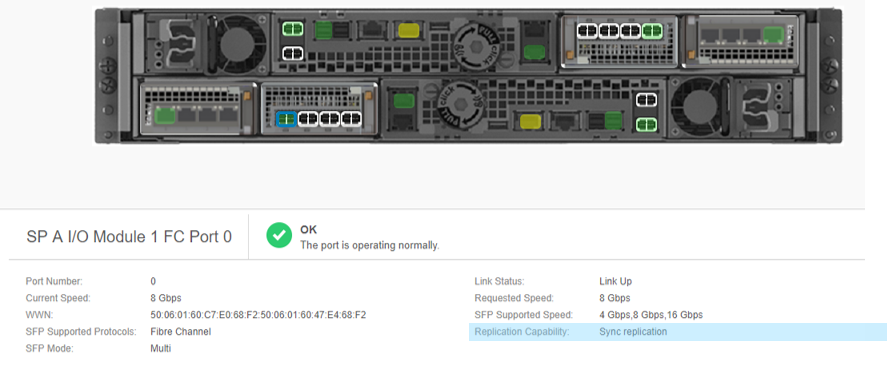
(Figure1: I/O Module 1 Port 0 is the port on the array with the lowest numbered FC port)
The Replication Capability is shown as: Sync Replication.
UEMCLI
The Replication Capability is shown as: Sync Replication.
UEMCLI
12:52:40 service@spa:~> uemcli /net/port/fc show -filter "ID,Name,Replication capability"
5:    ID                      = spb_iom_1_fc0
      Name                    = SP B I/O Module 1 FC Port 0
      Replication capability  = Sync replication
8:    ID                      = spa_iom_1_fc0
      Name                    = SP A I/O Module 1 FC Port 0
      Replication capability  = Sync replication
root@spa:/cores/service>uemcli /remote/sys show -detail
2:    ID                           = RS_8
      Name                         = unity450F
      Operational status           = OK (0x2)
      Health state                 = OK (5)
      Health details               = "Communication with the replication host is established. No action is required."
      Synchronous FC ports         = spb_iom_1_fc0, spa_iom_1_fc0
- Improper Zoning
- In order to get a successful Synchronous replication connection, either connect the FC ports from the two arrays directly through and FC cable or through an FC switch after configuring proper zoning.
- A main issue that causes a lot of sync replication connection and session issues is cross-zoning configuration.
- The proper zoning implies that Source-SPA should be zoned together only with Destination-SPA and Source-SPB should be zoned only with Destination-SPB.
- If there was ever cross-zoning in place, and even if it were corrected, the four SPs should be rebooted to resolve any issues with configuring sync replication.
- Common symptoms for cross-zoning are (1) Replication connection cannot be verified. (2) Connection is established but all the replication sessions created automatically go into "Lost Sync Communication".
- Once the cross-zoning is rectified, sessions for resources owned by SPB might still fail. Reboot all the SPs one by one in order to correct the issue.
If you are unsure about the current zoning, please refer to this KB and escalate this problem to Dell support.
- Sync Replication Management Interface problems
For a working sync replication connection, two SRM Interfaces per Unity array (1/SP) must be created. Communication on these interfaces must be allowed through port 5085 (port 5086 if Unity OE 5.5.0 or later).
The SRM Interface is responsible for session management. It is created on a virtual port that exists on the physical management port on the array.
To verify the SRM configuration on your array, run the below command on each SP and ensure that the proper IP is assigned and that the interface is UP.
#ip addr show dev srm
11: srm@mgmt: <BROADCAST,MULTICAST,UP,LOWER_UP> mtu 1500 qdisc noqueue state UP group default
    link/ether xx:xx:xx:xx:xx:xx brd ff:ff:ff:ff:ff:ff
    inet 10.x.x.x/24 scope global srm
       valid_lft forever preferred_lft forever
    inet6 xxx:xxx:xxx:xxx:xxx/64 scope link
       valid_lft forever preferred_lft forever
After that, check the remote connectivity to this IP from the remote array on port 5085 (port 5086 if Unity OE 5.5.0 or later). Whether through a simple telnet or if on Unity OE 4.5 or higher, use svc_networkcheck -tpc instead.
service@spb:~/user# svc_networkcheck -tpc 10.x.x.x 5085
=== SP status: Normal Mode, Master SP ===
======================= [spb][Wed Sep 18 20:09:44 UTC 2019] Beginning Run  =======================
 --- INFO: the tcp listening port 10.x.x.x@5085 is available.
======================= [spb][Wed Sep 18 20:09:44 UTC 2019] End of Run  =======================
If the port is unavailable, check your network configuration.
- Unity Management Interface connection problems
Similar to the above check, communication between the two array management IPs must be allowed on port 443 (protocols TCP and TLS).
service@spb:~/user> svc_networkcheck -tpc 10.x.x.x 443
=== SP status: Normal Mode, Master SP ===
======================= [spb][Wed Sep 18 20:12:26 UTC 2019] Beginning Run  =======================
 --- INFO: the tcp listening port 10.x.x.x@443 is available.
======================= [spb][Wed Sep 18 20:12:26 UTC 2019] End of Run  =======================
- Initial synchronization performance.
When performing an initial synchronization (a newly created replication session), the transfer is subject to throttling [~40MB/s by default]. This can be changed to either low: ~20MB/s or high:~160MB/s using svc_dataprotection
However, this throttling cannot be disabled. This is by design to ensure that if there are hosts connected to the sync replication FC port, that the access is not impacted.
Set a sync rate to the session:
  svc_dataprotection -r repsess -a syncrate=high -s 81604378625_FNM00151702100_0000_81604378625_FNM00151702099_0000

  Set a sync rate to ALL sync sessions:
  svc_dataprotection -r repsess -a syncrate=low -s ALL

  Show a sync rate of the session:
  svc_dataprotection -r repsess -a showsyncrate -s 42949673102_FCNCH0972C30C3_0000_42949673096_FCNCH0972C30C3_0000

  List ALL sync replication sessions with each sync rate:
  svc_dataprotection -r repsess -a showsyncrate -s ALL

  Show cg replication sessions with each member sync rate:
  svc_dataprotection -r repsess -a showsyncrate -s 81604378625_FNM00151702100_0000_81604378625_FNM00151702099_0000
- Performance impact on LUNs/Filesystems that are being synchronously replicated.
Synchronous replication waits until the host writes are written to the destination before an acknowledgment is sent to the host. Thus if there is any latency on the link, this affects the performance.
Escalate to Dell support if performance issues on sync-replicated resources are suspected.
Affected Products
Dell EMC Unity FamilyProducts
Dell EMC Unity FamilyArticle Properties
Article Number: 000019787
Article Type: How To
Last Modified: 07 Oct 2025
Version: 3
Find answers to your questions from other Dell users
Support Services
Check if your device is covered by Support Services.