Dell Unity: Come configurare FTP e SFTP con tutte le funzioni
Summary: Questo articolo spiega come configurare il protocollo FTP (File Transfer Protocol) e SFTP (Secure File Transfer Protocol) per i server NAS sugli array Dell Unity.
This article applies to
This article does not apply to
This article is not tied to any specific product.
Not all product versions are identified in this article.
Instructions
Per abilitare e configurare FTP da Unisphere (interfaccia utente):
Accedere a Unisphere > File > NAS Servers > Edit > Sharing Protocols FTP>: 
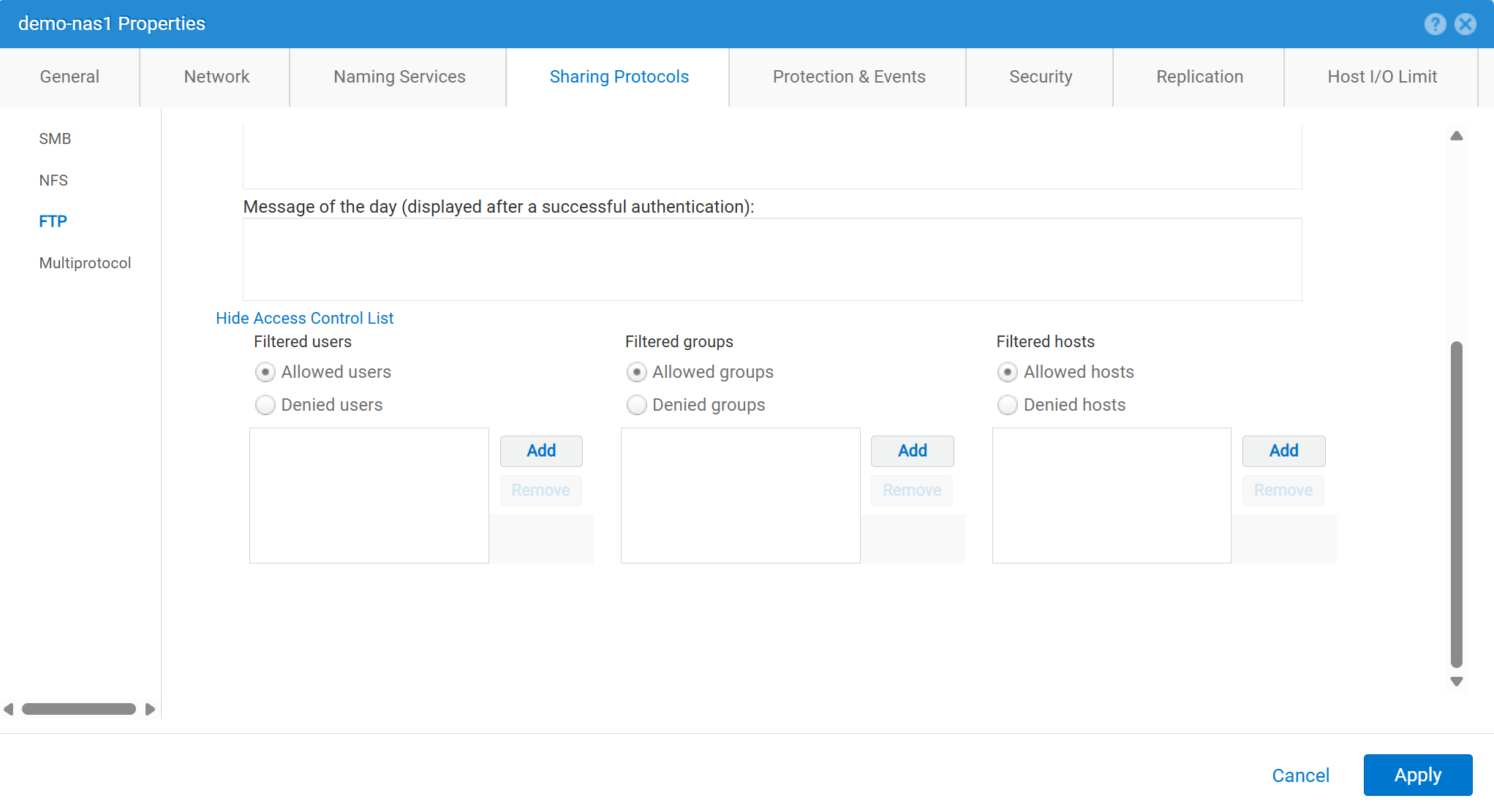
Per abilitare e configurare FTP da Unisphere (interfaccia utente):
service@spa spa:~> uemcli -no -u admin -p mypasswd /net/nas/ftp -server nas_8 set -ftpEnabled yes -sftpEnabled yes -anonymousUserEnabled yes -cifsUserEnabled yes -unixUserEnabled yes
Operation completed successfully.


Note : Refer to "uemcli /net/nas/ftp -help" for all other available options
Per accedere come utente FTP:
Se il server NAS dispone di un dominio aggiunto Server CIFS (Common Internet File System), l'utente di dominio può effettuare l'accesso con uno dei seguenti elementi:
domain\user or user@domain

Example (domain name is EXAMPLE):
EXAMPLE\user100 or user100@example.com
Se il server NAS è un server CIFS standalone su Unity, il metodo seguente consente l'accesso:
servername\user or user@servername or local\user or user@local

Example (standalone nas server name is MYCIFS):

MYCIFS\user100 or user100@mycifs or local\user100 or user100@local

C:\>ftp ftp02
Connected to ftp02
220 NASFTP FTP server (EMC:upc_Unity_6_HF5_upcBuilder:9328432) ready.
User ( ftp02   :( none)): Local\administrator
331 Password required for Local\administrator.
Password:
230- No directory! Logging in with home=/nasftp_fs01.
230 NT User Local\administrator logged in.
ftp>
Se il server NAS viene utilizzato per Solo NFS (Network File System), Unity richiede un servizio directory (come LDAP (Lightweight Directory Access Protocol) o NIS (Network Information Service)) per l'autenticazione utente. I file locali possono essere utilizzati anche se non sono disponibili LDAP o NIS (che richiedono la configurazione manuale di utente/password).
C:\>ftp ftp02
Connected to ftp02
220 FTP02 FTP server (EMC:upc_Unity_6_HF5_upcBuilder:9328432) ready.
User (ftp02 :(none)): user100
331 Password required for user100.
Password:
230 UNIX User user100 logged in.
ftp> ls
200 PORT command successful.
150 Opening ASCII mode data connection for 'file list'.
lost+found
etc
publicftp
226 Transfer complete.
ftp: 29 bytes received in 0.00Seconds 29000.00Kbytes/sec.
ftp> bye
221 Goodbye.
Accesso anonimo (chiamato anche ftp):
C:\>ftp ftp02
Connected to ftp02
220 FTP02 FTP server (EMC:upc_Unity_6_HF5_upcBuilder:9328432) ready.
User (ftp02  :(none)): anonymous
331 Guest login ok, type your name as password.
Password:
230 Guest login ok, access restrictions apply.
ftp> _
Per configurare gli utenti locali:

I dettagli dell'utente devono essere immessi in questo modo:
01:42:18 service@spa spa:~> cat passwd
# The passwd file contains the users who can access the NAS server.
#
# Each line of the passwd file defines a user and has the format:
#   username:password:uid:gid:gcos
# where:
# - username is the user's login name.
#   When querying for Windows users, the system checks for CIFS usernames without domain extensions.
# - password is an empty field. The encrypted password for the user is in the
# corresponding entry in the shadow file.
# - uid is the user's unique numerical ID for the system.
# - gid is the unique numerical ID of the group to which the user belongs.
#
# user:password:uid:gid:gcos:homedir:
ftp:ffX6M7x34lzYI:2000:2000::/fs01:
user100:ffX6M7x34lzYI:2001:2001::/fs01:
user200:l8Yykofh8ckbU:2002:2002:
user300:ABVmdrEehFnsI:2002:2002:QLs4hM#3w2s1drrYowsXsaPMuz:/fs01/publicftp:
user400:QQueVwnnAFCjc:2003:2003:PZraGM#K321ldrWKowssLaPVgp::
usertest:eeRJFmFoGS4lw:2004:2004::/fs01/publicftp:
usertest2:8II12yC6iqFEY:2004:2004::/fs01/publicftp:
Utilizzare UEMCLI per scaricare:
uemcli -u admin -p password -download /net/nas/server -name server_name -type passwd


EXAMPLE:
03:37:51 service@spa spa:~> uemcli -u admin -p mypasswd -upload -f /home/service/passwd /net/nas/server -name FTP02 -type passwd

Uploaded 962 byte of 962 byte [ 100.0% ] -PROCESSING-
Operation completed successfully.
Usa UEMCLI per caricare:
uemcli -u admin -p password -upload -f /cores/service/passwd /net/nas/server -name server_name -type passwd


EXAMPLE:
03:37:40 service@spa spa:~> uemcli -download -f /cores/service/passwd /net/nas/server -name FTP02 -type passwd

Downloaded 962 byte of 962 byte [ 100.0% ] -STALLED-
Operation completed successfully.
Additional Information
Note:
- Affinché l'utente anonimo funzioni, deve essere presente un utente denominato
ftpaUIDdeve essere definito nel provider di directory o nei file locali.- Esempio per i file locali:
ftp:*:1000:1000::/fs01/publicftp:
- Esempio per i file locali:
- Se si utilizza Local Files, il campo password può essere generato utilizzando
openssl(direttamente da Unity):- Esempio:
User user100, Password to be "Password123#", uid and gid as 3000, homedir as /fshomedir/data - Questo comando utilizza l'algoritmo della password basato su SHA256. utilizzare il comando
'openssl passwd -6 Password123#'se è necessario l'algoritmo della password basato su SHA512.
- Esempio:
$ openssl passwd Password123#
Warning: truncating password to 8 characters              <-- note, it takes only 1st 8 char
9QWNQEDjvlRog
$ openssl passwd
Password:                     <-- password can be typed here if not to be seen
Verifying - Password:
yT4C/OPx6AHXM
Entry on "passwd" file should be: user100:9QWNQEDjvlRog:3000:3000::/fshomedir/data:- SFTP richiede che la directory principale sia di proprietà dell'utente che ha effettuato l'accesso.
- In questo modo è possibile bloccare un utente anonimo.
- SFTP potrebbe non riuscire se
LACPviene utilizzato.- Se la porta 22 appare bloccata, fare riferimento a Dell Unity: Unity SFTP non funziona quando LACP è abilitato.
Affected Products
Dell EMC Unity, Dell EMC Unity Family |Dell EMC Unity All Flash, Dell EMC Unity HybridProducts
Dell EMC Unity FamilyArticle Properties
Article Number: 000021919
Article Type: How To
Last Modified: 28 Oct 2025
Version: 7
Find answers to your questions from other Dell users
Support Services
Check if your device is covered by Support Services.