Dell Unity:すべての機能を備えたFTPおよびSFTPの設定方法
Summary: この記事では、Dell Unityアレイ上のNASサーバーのファイル転送プロトコル(FTP)とセキュア ファイル転送プロトコル(SFTP)を構成する方法について説明します。
This article applies to
This article does not apply to
This article is not tied to any specific product.
Not all product versions are identified in this article.
Instructions
Unisphere(UI)からFTPを有効にして設定するには、次の手順を実行します。
Unisphere > File > NAS Serversに移動し>FTP>>共有プロトコルを編集します。 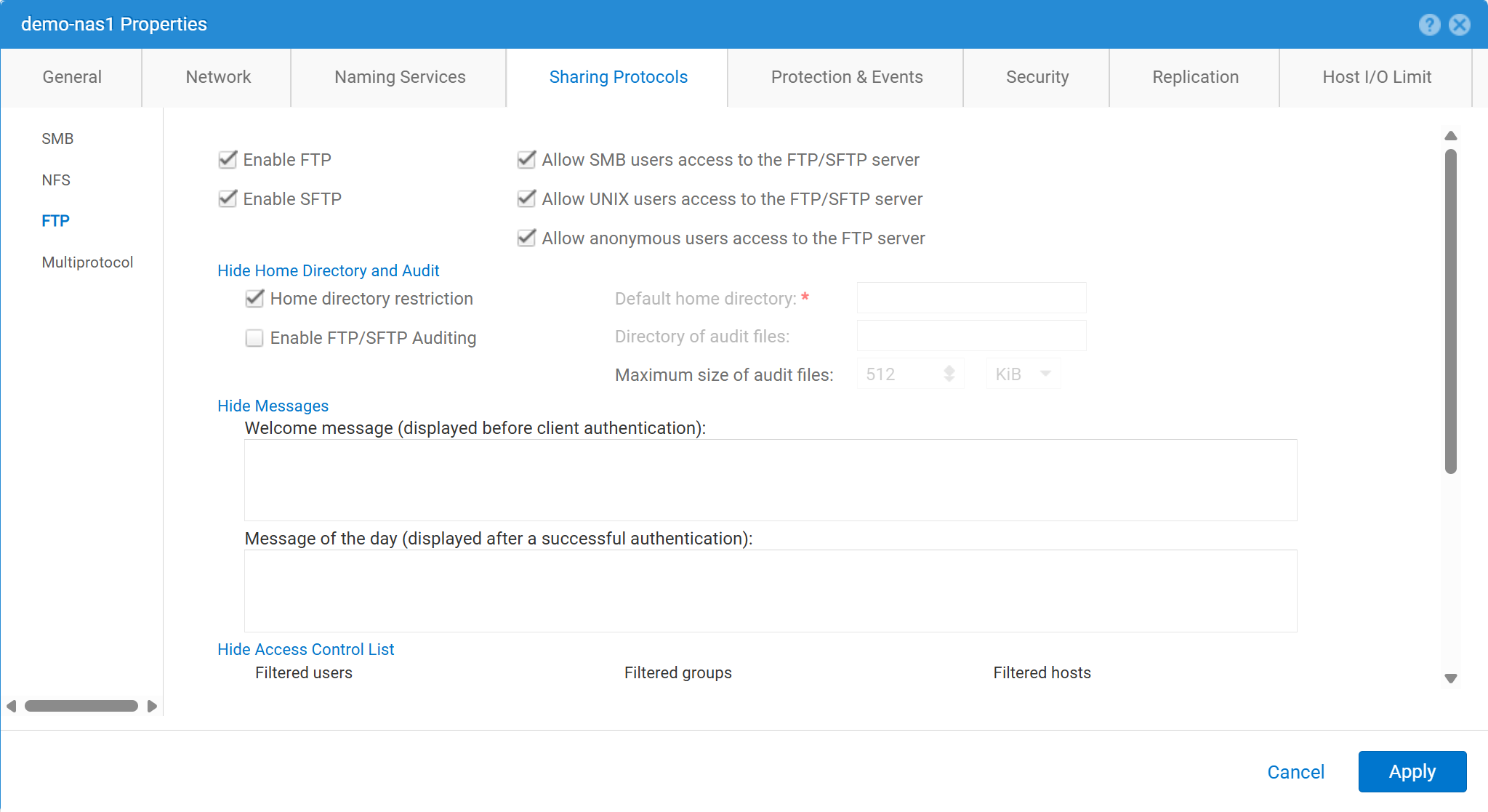

Unisphere(UI)からFTPを有効にして設定するには、次の手順を実行します。
service@spa spa:~> uemcli -no -u admin -p mypasswd /net/nas/ftp -server nas_8 set -ftpEnabled yes -sftpEnabled yes -anonymousUserEnabled yes -cifsUserEnabled yes -unixUserEnabled yes
Operation completed successfully.


Note : Refer to "uemcli /net/nas/ftp -help" for all other available options
FTPユーザーとしてログインするには、次の手順を実行します。
NASサーバーに参加しているドメインがある場合 共通インターネット ファイル システム (CIFS)サーバーの場合、ドメイン ユーザーは次のいずれかとしてログインできます。
domain\user or user@domain

Example (domain name is EXAMPLE):
EXAMPLE\user100 or user100@example.com
NASサーバーがUnity上のスタンドアロンCIFSサーバーである場合は、次の方法でログインを許可します。
servername\user or user@servername or local\user or user@local

Example (standalone nas server name is MYCIFS):

MYCIFS\user100 or user100@mycifs or local\user100 or user100@local

C:\>ftp ftp02
Connected to ftp02
220 NASFTP FTP server (EMC:upc_Unity_6_HF5_upcBuilder:9328432) ready.
User ( ftp02   :( none)): Local\administrator
331 Password required for Local\administrator.
Password:
230- No directory! Logging in with home=/nasftp_fs01.
230 NT User Local\administrator logged in.
ftp>
NASサーバーが Network File System (NFS)のみの場合、Unityではユーザー認証にディレクトリー サービス(Lightweight Directory Access Protocol (LDAP)やNetwork Information Service (NIS)など)が必要です。ローカル ファイルは、LDAPまたはNISが使用できない場合にも使用できます(手動でユーザー/パスワードを構成する必要があります)。
C:\>ftp ftp02
Connected to ftp02
220 FTP02 FTP server (EMC:upc_Unity_6_HF5_upcBuilder:9328432) ready.
User (ftp02 :(none)): user100
331 Password required for user100.
Password:
230 UNIX User user100 logged in.
ftp> ls
200 PORT command successful.
150 Opening ASCII mode data connection for 'file list'.
lost+found
etc
publicftp
226 Transfer complete.
ftp: 29 bytes received in 0.00Seconds 29000.00Kbytes/sec.
ftp> bye
221 Goodbye.
匿名ログイン(ftpとも呼ばれます):
C:\>ftp ftp02
Connected to ftp02
220 FTP02 FTP server (EMC:upc_Unity_6_HF5_upcBuilder:9328432) ready.
User (ftp02  :(none)): anonymous
331 Guest login ok, type your name as password.
Password:
230 Guest login ok, access restrictions apply.
ftp> _
ローカル ユーザーを設定するには、次の手順を実行します。

ユーザーの詳細は、次のように入力する必要があります。
01:42:18 service@spa spa:~> cat passwd
# The passwd file contains the users who can access the NAS server.
#
# Each line of the passwd file defines a user and has the format:
#   username:password:uid:gid:gcos
# where:
# - username is the user's login name.
#   When querying for Windows users, the system checks for CIFS usernames without domain extensions.
# - password is an empty field. The encrypted password for the user is in the
# corresponding entry in the shadow file.
# - uid is the user's unique numerical ID for the system.
# - gid is the unique numerical ID of the group to which the user belongs.
#
# user:password:uid:gid:gcos:homedir:
ftp:ffX6M7x34lzYI:2000:2000::/fs01:
user100:ffX6M7x34lzYI:2001:2001::/fs01:
user200:l8Yykofh8ckbU:2002:2002:
user300:ABVmdrEehFnsI:2002:2002:QLs4hM#3w2s1drrYowsXsaPMuz:/fs01/publicftp:
user400:QQueVwnnAFCjc:2003:2003:PZraGM#K321ldrWKowssLaPVgp::
usertest:eeRJFmFoGS4lw:2004:2004::/fs01/publicftp:
usertest2:8II12yC6iqFEY:2004:2004::/fs01/publicftp:
UEMCLIを使用したダウンロード:
uemcli -u admin -p password -download /net/nas/server -name server_name -type passwd


EXAMPLE:
03:37:51 service@spa spa:~> uemcli -u admin -p mypasswd -upload -f /home/service/passwd /net/nas/server -name FTP02 -type passwd

Uploaded 962 byte of 962 byte [ 100.0% ] -PROCESSING-
Operation completed successfully.
UEMCLIを使用したアップロード:
uemcli -u admin -p password -upload -f /cores/service/passwd /net/nas/server -name server_name -type passwd


EXAMPLE:
03:37:40 service@spa spa:~> uemcli -download -f /cores/service/passwd /net/nas/server -name FTP02 -type passwd

Downloaded 962 byte of 962 byte [ 100.0% ] -STALLED-
Operation completed successfully.
Additional Information
メモ:
- 匿名ユーザーが機能するには、
ftpとUIDディレクトリー プロバイダーまたはローカル ファイルで定義する必要があります。- ローカル ファイルの例:
ftp:*:1000:1000::/fs01/publicftp:
- ローカル ファイルの例:
- ローカル ファイルを使用する場合は、パスワード フィールドを次を使用して生成できます。
openssl(Unityから直接):- Example:
User user100, Password to be "Password123#", uid and gid as 3000, homedir as /fshomedir/data - このコマンドは、SHA256ベースのパスワード アルゴリズムを使用します。コマンド
'openssl passwd -6 Password123#'SHA512ベースのパスワードアルゴリズムが必要な場合。
- Example:
$ openssl passwd Password123#
Warning: truncating password to 8 characters              <-- note, it takes only 1st 8 char
9QWNQEDjvlRog
$ openssl passwd
Password:                     <-- password can be typed here if not to be seen
Verifying - Password:
yT4C/OPx6AHXM
Entry on "passwd" file should be: user100:9QWNQEDjvlRog:3000:3000::/fshomedir/data:- SFTPでは 、ログインしているユーザーがホーム ディレクトリーを所有している必要があります。
- これにより、匿名ユーザーがブロックされる可能性があります。
- SFTPは、次の場合に失敗する可能性があります
LACPが使用されます。- ポート22がブロックされていると思われる場合は、「 Dell Unity: LACPが有効になっている場合、Unity SFTPは機能しません。
Affected Products
Dell EMC Unity, Dell EMC Unity Family |Dell EMC Unity All Flash, Dell EMC Unity HybridProducts
Dell EMC Unity FamilyArticle Properties
Article Number: 000021919
Article Type: How To
Last Modified: 28 Oct 2025
Version: 7
Find answers to your questions from other Dell users
Support Services
Check if your device is covered by Support Services.