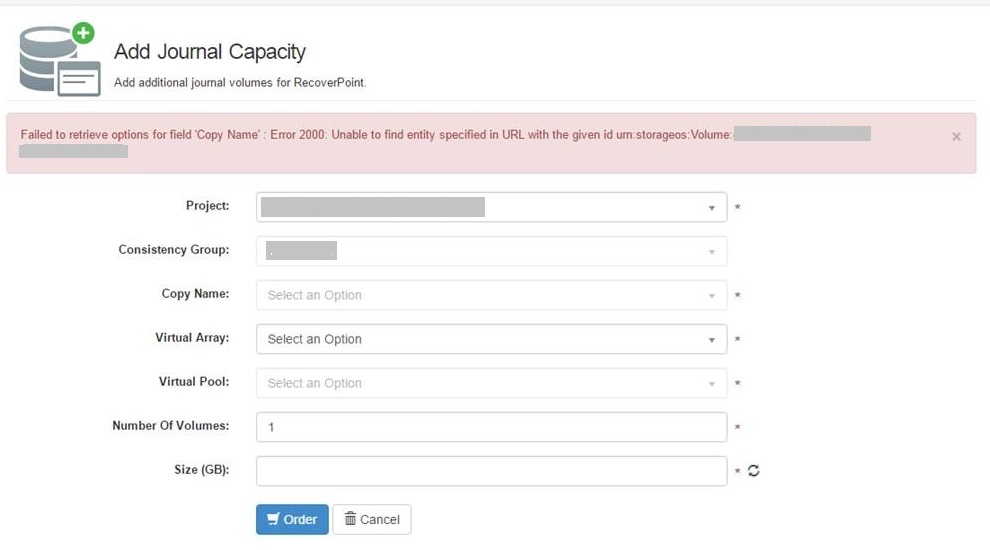
ViPR Controller: ViPR fails to add a journal capacity because it fails to retrieve options for field 'Copy Name' : Error 2000: Unable to find entity specified in URL with the given id <Volume-URN>
Summary: couldnt add a capacity journal
This article applies to
This article does not apply to
This article is not tied to any specific product.
Not all product versions are identified in this article.
Symptoms
The following conditions and system behavior may be observed with the issue:
- When trying to add a journal volume to a consistency group, after selecting the project and the consistency group, the "Copy Name" Field is greyed out and ViPR returns the error:
Cause
- Service Catalog "Add Journal Capacity" adds RecoverPoint journal capacity to a RecoverPoint consistency group. You can use a different Virtual Array and Virtual Pool from the ones used for the original copy creation.
- You first select the project that owns the consistency group to which you want to add journal capacity, only the copies associated with the selected consistency group are available for selection.
- ViPR fails to retrieve the names of the copy volumes (target volumes) because it can't retrieve one of the target volumes. ViPR returns the that volume URN in the error message.
- The volume is referenced as a target for a source volume but it doesn't have an entry in ViPR DB. Both the source and target volumes are stale and not present on the backend array causing ViPR to fail to retrieve them.
Resolution
- The issue can be resolved by deleting the source volume from ViPR inventory only.
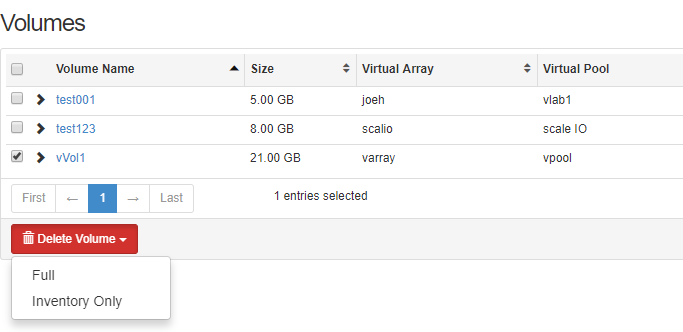
- You should be able to run the order "Add Journal Capacity" successfully after deleting the stale volume from ViPR DB.
Article Properties
Article Number: 000065703
Article Type: Solution
Last Modified: 20 Nov 2020
Version: 2
Find answers to your questions from other Dell users
Support Services
Check if your device is covered by Support Services.