Dirty Shutdown Resulting Performance Counter in AWCC to Display Abnormally in Alienware Area-51m
Summary: Learn about the performance counter that displays abnormally in Alienware Command Center due to a dirty shutdown on the Alienware Area-51m.
This article applies to
This article does not apply to
This article is not tied to any specific product.
Not all product versions are identified in this article.
Symptoms
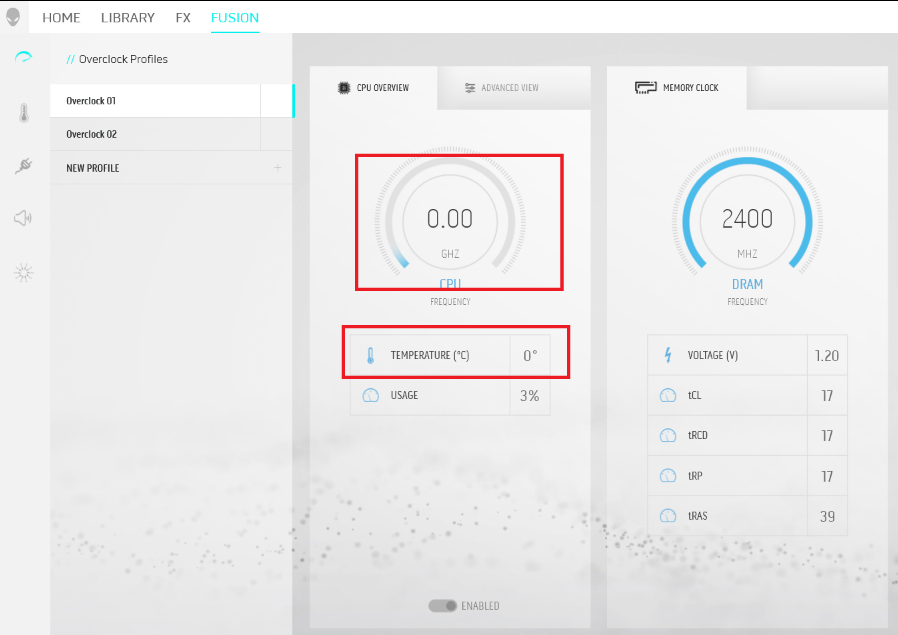
The performance counter occasionally displays as 0 value after performing a dirty (force) shutdown action on their Alienware Area-51.
Cause
Force shutdown causes the registry to corrupt and results in the counter to display abnormally.
Resolution
Follow the steps below to rebuild the registry.
Caution: If done incorrectly, modifying the Windows registry can lead to data loss or operating system corruption. Dell Technologies recommends that you back up data before proceeding with any Windows Registry edit. It is also recommended that a full backup of the Windows registry is made before starting the edit. See Windows registry information for advanced users for additional information.
for additional information.
- Run the Command Prompt with Admin’s Privilege by right-click CMD and select Run as Administrator.
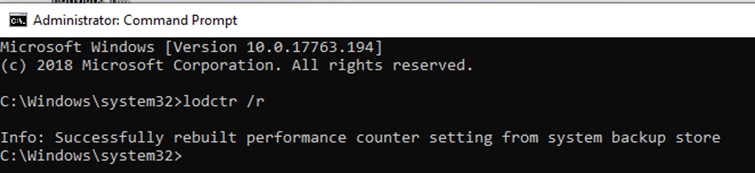
- Go to C:\Windows\System32 folder and type lodctr /r, press Enter key to perform the command.
- The performance counter setting rebuilds itself. Quit CMD after the rebuild progress is completed.
- Restart the computer and relaunch the Alienware Command Center again (AWCC).
- Check on the value, and now it is back to normal.
Affected Products
Alienware Area-51mArticle Properties
Article Number: 000128426
Article Type: Solution
Last Modified: 10 June 2025
Version: 8
Find answers to your questions from other Dell users
Support Services
Check if your device is covered by Support Services.