Dell Parts and Repairs Selector
Summary: The Dell Parts and Repairs selector show what Dell-certified memory, storage, drives, media, batteries, parts, and upgrades are available for purchase.
This article applies to
This article does not apply to
This article is not tied to any specific product.
Not all product versions are identified in this article.
Instructions
To determine what parts and repairs are available for your Dell devices, perform the following steps.
- Browse to the Dell Support Homepage.
- Identify your Dell device.
- Select the listing for your computer under View This PC.
Note: When there is no listing for your computer under View This PC, select Download & Install SupportAssist, which automatically identifies your computer for you. Follow the prompts to download and install SupportAssist. For more information, go to the Dell SupportAssist page.
- Enter the Service Tag, Dell Product ID, or Model, select the Search button, and then select your computer from the list.
- Select Browse all products: You must select the type of device you have, the brand name, and then the product model.
Note: For more information, see How to find the product model number of your Dell computer.
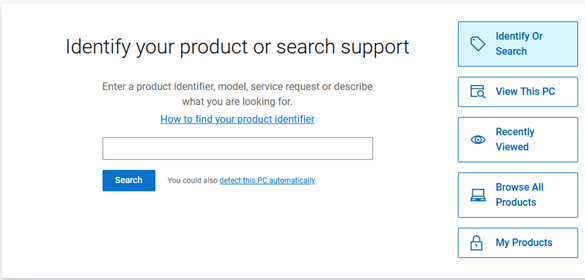
- Select the listing for your computer under View This PC.
- When you get to the product support page for your computer, select the Parts & Repairs tab on the left.
 Note: Depending on your country or region, you get different options on what parts are available for your computer. When there is not a Parts & Repairs tab, then no parts are available in your country or region.
 - Select which kind of parts that you are interested in to see which ones are available.
Affected Products
Alienware, Inspiron, OptiPlex, Vostro, XPS, G Series, G Series, Alienware, Dell Pro, Dell Pro Max, Dell Pro Premium, Inspiron, Latitude, Vostro, XPS, Fixed Workstations, Mobile WorkstationsArticle Properties
Article Number: 000130752
Article Type: How To
Last Modified: 31 July 2025
Version: 14
Find answers to your questions from other Dell users
Support Services
Check if your device is covered by Support Services.