Dell Networking X series: How to locate the service tag
Summary: How to locate the service tag in Dell Networking X series switches.
This article applies to
This article does not apply to
This article is not tied to any specific product.
Not all product versions are identified in this article.
Symptoms
This article explains how to locate service tags in the X1000 & X4000 series switches.
Overview
1. What is a service tag?
2. How to identify the service tags in X1000 & X4000 series switches
3. Method 1: From the label printed on the switch
4. Method 2: Using webGUI (Only in managed mode)
What is a service tag?
The Service Tag is a seven character alphanumeric code.
Dell uses this product identifier to access information about your device's specific tech specs and warranty so that we can provide personalized support options.
How to identify the service tags in the X1000 & X4000 series?
There are two methods to find the service tags.
Method 1: From the label printed on the switch
The Express Service Code and Service Tag are found on the front of the system by pulling out the pull-out information tag. The pull-out tag is located on the far right edge of the switch face, except for on the X1008.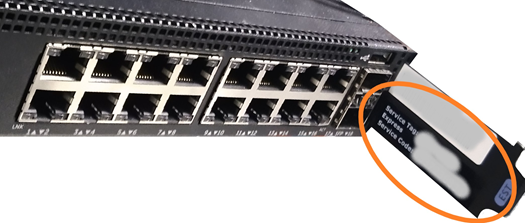
 For X1008, there is a printed label on the body of the switch. If not available, please use the method 2.
Method 2: Using webGUI (Only in managed mode)
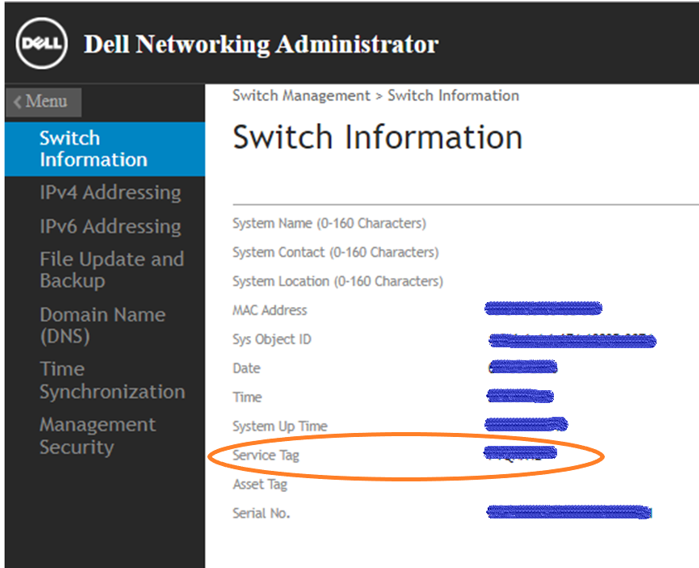
You can get the service tag of the X1000 & X4000 series from the webGUI.
We must have management access to switch for this method.
If it is an unmanaged switch, please use the below link to set up basic management for X1000 and X4000 series switches.
If it is an unmanaged switch, please use the below link to set up basic management for X1000 and X4000 series switches.
-
Log in to the webGUI.
-
From the Dashboard, select Switch Management and then Switch information.
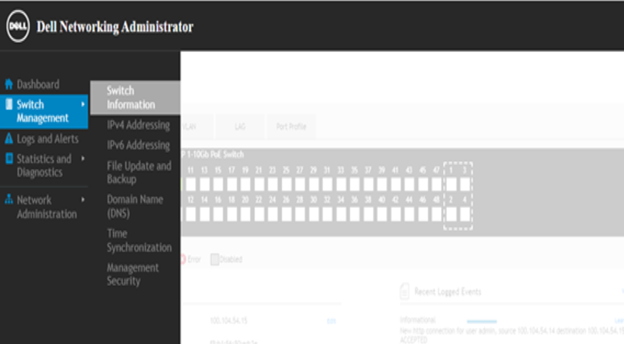
3. In switch information, we can find the service tag of the switch.
Cause
.
Resolution
.
Affected Products
Dell Networking X1000 Series, Dell Networking X4000 SeriesArticle Properties
Article Number: 000135724
Article Type: Solution
Last Modified: 10 Apr 2025
Version: 4
Find answers to your questions from other Dell users
Support Services
Check if your device is covered by Support Services.