某些戴尔笔记本电脑上的笔记本电脑电池电量未超过 55%
Summary: 某些戴尔笔记本电脑电池电量不能超过 55%。查找故障处理步骤以解决电池电量未超过 55% 时的电池充电问题。
This article applies to
This article does not apply to
This article is not tied to any specific product.
Not all product versions are identified in this article.
Symptoms
您可能会发现,戴尔笔记本电脑上的电池电量未超过 55%。
Cause
如果 BIOS 设置中缺少 所有权日期 ,则会导致这种情况。
Resolution
从戴尔驱动程序和下载更新到最新的BIOS版本可解决此问题。将BIOS更新完为最新版本后,按以下说明进行操作。
要了解如何更新戴尔笔记本电脑上的 BIOS,请参阅戴尔知识库文章 BIOS 更新指南(英文版)。
-
下载并安装最新的BIOS。请参阅戴尔知识库文章 BIOS 更新指南。
-
重新启动笔记本电脑,然后在出现戴尔徽标屏幕时,点击 F2 进入 BIOS 设置。
-
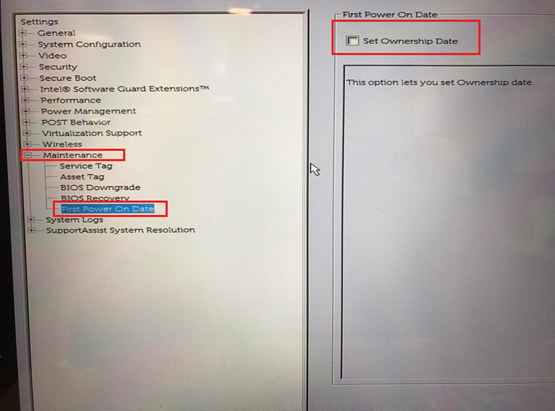
在左侧窗格中,展开 维护 并选择 首次开机日期。
-
在右窗格中,选择Set Ownership Date(设置所有权日期)。
-
单击Apply(应用)和Exit(退出)。
-
重新启动笔记本电脑,然后在出现戴尔徽标屏幕时,点击 F2 进入 BIOS 设置。验证 首次开机日期 是否不再列出,并且拥有日期已更新。

-
笔记本电脑会对电池充满电。
Additional Information
Affected Products
Inspiron 3158 2-in-1, Inspiron 13 5368 2-in-1, Inspiron 13 5379 2-in-1, Inspiron 7353 2-in-1, Inspiron 7359 2-in-1, Inspiron 13 7368 2-in-1, Inspiron 14 3459, Inspiron 14 3468, Inspiron 14 Gaming 7467, Inspiron 15 3559, Inspiron 15 3567
, Inspiron 15 3568, Inspiron 15 5568 2-in-1, Inspiron 15 5579 2-in-1, Inspiron 15 Gaming 7567, Inspiron 7568 2-in-1, Inspiron 15 7569 2-in-1, Inspiron 17 7773 2-in-1, Inspiron 17 7778 2-in-1, Latitude 7212 Rugged Extreme Tablet, Latitude 7285 2-in-1, XPS 13 9360, XPS 13 9365 2-in-1, XPS 13 9370, XPS 15 9560
...
Article Properties
Article Number: 000144108
Article Type: Solution
Last Modified: 25 Nov 2025
Version: 10
Find answers to your questions from other Dell users
Support Services
Check if your device is covered by Support Services.