Microsoft Deployment Tools 2013 Update 2 Contains an Issue in the UEFI Deployment Sequence
Summary: Information about resolving an issue in Microsoft Deployment Tools 2013 Update 2.
This article applies to
This article does not apply to
This article is not tied to any specific product.
Not all product versions are identified in this article.
Symptoms
MDT 2013 Will Not Image
While using Microsoft Deployment Toolkit (MDT) 2013 Update 2, you may encounter a situation where the computer will not image if the BIOS is configured in the UEFI mode despite having the UEFI option selected in MDT 2013.
The logs indicate an error of "UEFI=false,"
Cause
Research has determined this is occurring because the "Format and Partition Disk (UEFI)" property is not working correctly.
Resolution
Microsoft Deployment Toolkit 2013 Edit
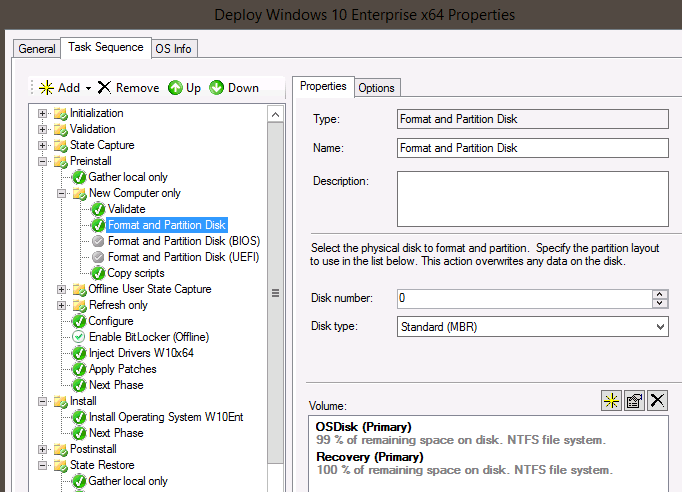
Microsoft Deployment Toolkit (MDT) 2013 Update 2 requires a manual edit to the formatting script in order to image through UEFI. Follow the steps below.
- Cut and paste "Format and Partition Disk" from an older existing task sequence.
- Disable the BIOS and UEFI "Format and Partition Disk" steps and paste the "Format and Partition Disk."
- Internal MDT scripts will automatically convert the drive to GPT mode and work with UEFI.
Article Properties
Article Number: 000145255
Article Type: Solution
Last Modified: 22 Aug 2025
Version: 5
Find answers to your questions from other Dell users
Support Services
Check if your device is covered by Support Services.