VPLEX:show-use-hierarchy cliコマンド エラー: <device name>という名前のデバイスがありません
Summary: この記事では、レッグがミラーに再接続されたときに、show-use-hierarchyコマンドでその名前のデバイスがないことが報告される問題について説明します。
This article applies to
This article does not apply to
This article is not tied to any specific product.
Not all product versions are identified in this article.
Symptoms
「show-use-hierarchy」コマンドは、同じ名前でレッグが再接続された後にデバイスの詳細を取得できません。
同じミラー レッグを再接続した後、「show-use-hierarchy」コマンドが「No device with the name <device name>」というエラーで失敗します
このエラーの例:
VPlexcli:/>show-use-hierarchy distributed-storage/distributed-devices/device_EAST_UNITY_NONPROD_255
show-use-hierarchy: <<show-use-hierarchy distributed-storage/distributed-devices/device_EAST_UNITY_NONPROD_255>>の評価に失敗しました。
原因: 属性 'used-by' の値を取得できません。
原因: ファームウェア コマンド エラー。
原因: <デバイス名>という名前のデバイスがありません。
Cause
NA
Resolution
1. エラーを報告しているデバイスを一覧表示し、正常かどうかを確認します。
Example:
VPlexcli:/>ll /distributed-storage/distributed-devices/device_EAST_UNITY_NONPROD_255
属性:
名前 値
---------------------- ---------------------------------
application-consistent false
auto-resume true
block-count 1342177280
block-size
4Kcapacity 5T
clusters-involved [cluster-1, cluster-2]
geometry raid-1
health-indications []
health-state ok
locality distributed
operational-status ok
rebuild-allowed true
rebuild-eta -
rebuild-progress -
rebuild-status done
rebuild-type full
rule-set-name cluster-2-detaches
service-status running
stripe-depth -
system-id device_EAST_UNITY_NONPROD_255
thin-capable false
transfer-size 2M
仮想ボリュームdevice_EAST_UNITY_NONPROD_255_vol
属性:
名前 値
---------------------- ---------------------------------
application-consistent false
auto-resume true
block-count 1342177280
block-size
4Kcapacity 5T
clusters-involved [cluster-1, cluster-2]
geometry raid-1
health-indications []
health-state ok
locality distributed
operational-status ok
rebuild-allowed true
rebuild-eta -
rebuild-progress -
rebuild-status done
rebuild-type full
rule-set-name cluster-2-detaches
service-status running
stripe-depth -
system-id device_EAST_UNITY_NONPROD_255
thin-capable false
transfer-size 2M
仮想ボリュームdevice_EAST_UNITY_NONPROD_255_vol
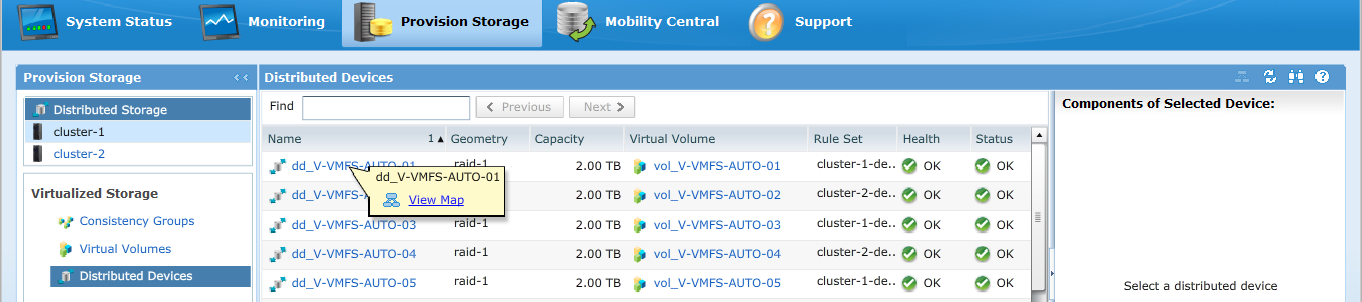
2.GUIで、デバイス階層が表示されているかどうかを確認します。
ある。GUIから確認するには、次の手順に従います。
i. [Provision storage] -- [Distributed] -- [Distributed Devices]に移動します
ii.分散デバイス名を選択し、DD名を右クリックして、次に示すように[View map]オプションをクリックします。
GUIマップ ビューの例:
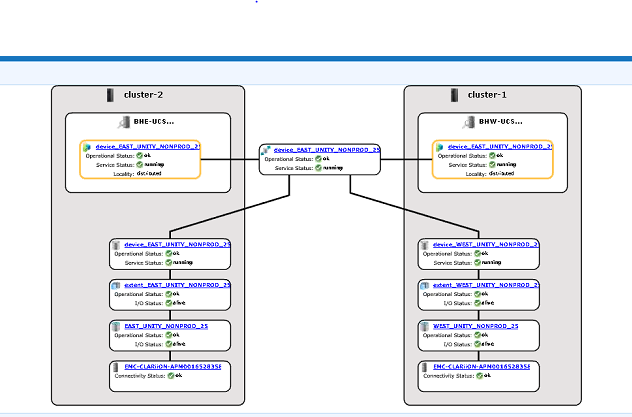
3.デバイスがマップ ビューに存在する場合、次の回避策に従います。
ある。次のコマンドを使用して、管理コンソールを再起動します。
service@managementserver:~>sudo /etc/init.d/VPlexManagementConsole restart
Restarting EMC VPlex Management Console... done
Restarting EMC VPlex Management Console... done
b.または、管理コンソールを再起動する方法については、以下のKBAを参照してください。
KBA 000040517: https://www.dell.com/support/kbdoc/en-uk/000040517/vplex-how-to-restart-vplexmanagementconsole-to-refresh-vplex-cli-gui
デバイス マップがGUIに表示できない場合、またはVPLEX管理コンソールで問題が解決しなかった場合は、VPLEXサポートとのライブ チャットを開いてください。
手記:サポートとのチャットを開くには 、[https://www.dell.com/support/ サポート ]ページで黒いメニュー バーが表示されたら、[サポートに問い合わせ]をクリックします。メニュー バーの右端にある[サポートに問い合わせる]をクリックすると、[連絡先情報]ページに移動します。画面の右側に[Dell EMC管理チャット]と表示されます。この選択肢をクリックすると、[ライブ チャット]ページに移動します。最初のステップとして、[Select Chat Topic]フィールドから右側のドロップダウン矢印をクリックし、チャットの関連トピックを選択します。次に、指示された手順に従って、各質問/選択に必要な情報を入力します。
Additional Information
このコンテンツは、次の言語に翻訳されています。
| https://downloads.dell.com/TranslatedPDF/AR-SA_533945.pdf |
| https://downloads.dell.com/TranslatedPDF/DE_533945.pdf |
| https://downloads.dell.com/TranslatedPDF/ES_533945.pdf |
| https://downloads.dell.com/TranslatedPDF/ES-XL_533945.pdf |
| https://downloads.dell.com/TranslatedPDF/FR_533945.pdf |
| https://downloads.dell.com/TranslatedPDF/IT_533945.pdf |
| https://downloads.dell.com/TranslatedPDF/JA_533945.pdf |
| https://downloads.dell.com/TranslatedPDF/KO_533945.pdf |
| https://downloads.dell.com/TranslatedPDF/NL_533945.pdf |
| https://downloads.dell.com/TranslatedPDF/PT_533945.pdf |
| https://downloads.dell.com/TranslatedPDF/PT-BR_533945.pdf |
| https://downloads.dell.com/TranslatedPDF/RU_533945.pdf |
| https://downloads.dell.com/TranslatedPDF/SV_533945.pdf |
| https://downloads.dell.com/TranslatedPDF/ZH-CN_533945.pdf |
| https://downloads.dell.com/TranslatedPDF/ZH-TW_533945.pdf |
Affected Products
VPLEX SeriesProducts
VPLEX Series, VPLEX VS1, VPLEX VS6Article Properties
Article Number: 000168361
Article Type: Solution
Last Modified: 07 Oct 2025
Version: 4
Find answers to your questions from other Dell users
Support Services
Check if your device is covered by Support Services.