SourceOneファイル アーカイブ: ファイル アーカイブ アクティビティが作成されると、コンソールの[アクティビティ サマリー]の下にエラーが表示される
Summary: ユーザーは、[組織のポリシー]でファイル アーカイブの詳細を一覧表示できませんでした。コンソールに「EMC SourceOneは、アクティビティー タイプのサマリー データを表示するために必要な1つ以上のコンポーネントのロードに失敗しました」というエラーが表示されます。
This article applies to
This article does not apply to
This article is not tied to any specific product.
Not all product versions are identified in this article.
Symptoms
ファイル アーカイブ アクティビティーを作成すると、SourceOneコンソールのアクティビティーの概要にエラーが報告されます。
EMC SourceOne failed to load one or more components required to display summary data for the activity type
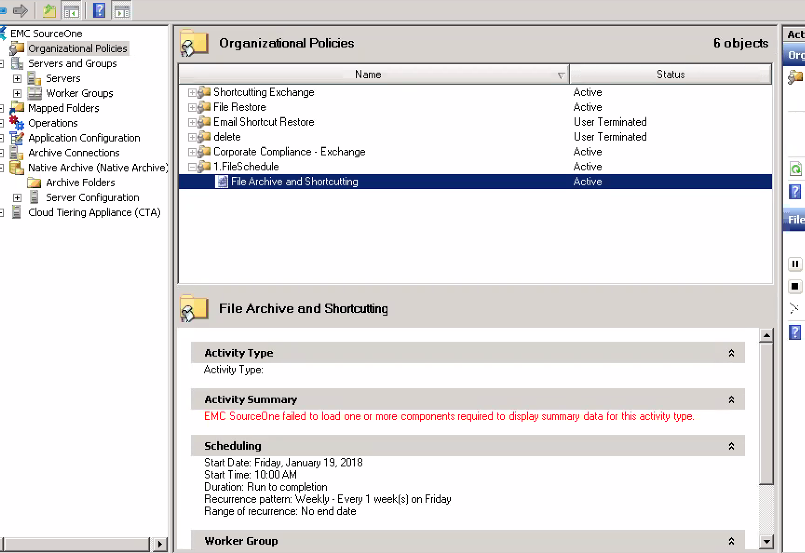
SourceOneマスター サーバーの「<SourceOne Installation Directory>\Logs」フォルダーのExMMCAdmin.dll.logを確認します。ファイルはDLLをアーカイブしますが、見つかりません
例えば:
Attempting to load plugin for taskType.id <-1788567307> by name
<..\..\SOFile\SOFileUI.dll>, mgr type <EMC.EX.SOFileUI.FileArchiveUIMgr>...

Plugin did not return a name for taskType.id <-1788567307> - using default <>...
Cause
「EMC SourceOne Business Component Extensions for File Archiving」コンポーネントがSourceOneワーカー マシンに正しくインストールされていません。
Resolution
ES1_FileArchiveBCESetup.exeインストール キットを使用して、「EMC SourceOne Business Component Extensions for File Archiving」モジュールをSourceOneワーカー マシンにインストールします。
Article Properties
Article Number: 000168797
Article Type: Solution
Last Modified: 25 June 2025
Version: 5
Find answers to your questions from other Dell users
Support Services
Check if your device is covered by Support Services.