AppSync:當新增儲存系統時,UI 中未顯示 PowerMax 陣列
Summary: 使用者的 PowerMax 陣列未顯示在新增儲存系統精靈「選取 PowerMax/VMAX3 陣列」的步驟 3 中。
This article applies to
This article does not apply to
This article is not tied to any specific product.
Not all product versions are identified in this article.
Symptoms
第一次嘗試將 PowerMax 陣列新增至 AppSync 4.0 時,沒有陣列可供選取。
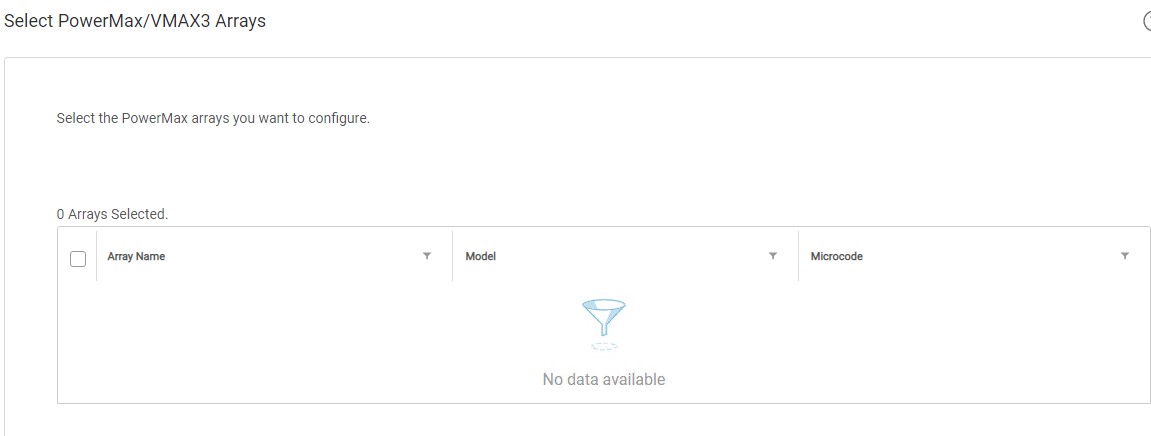
使用者的 PowerMax 陣列會在 PowerMax (U4P) UI 的 Unisphere 中顯示。
獨立 U4P 主機正在使用中。
Cause
具體原因不明。
Resolution
因應措施:
重新開機 U4P 伺服器解決了本文所解決的問題。
此因應措施可能適用於某些環境。如果 U4P 服務重新開機後問題仍然存在,請向 Dell EMC 技術支援部門開立服務要求。
重新開機 U4P 伺服器解決了本文所解決的問題。
此因應措施可能適用於某些環境。如果 U4P 服務重新開機後問題仍然存在,請向 Dell EMC 技術支援部門開立服務要求。
Additional Information
此 KB 僅與 AppSync 4.0 版及更新版本相關。
AppSync 4.0 使用 Unisphere for PowerMax 與 VMAX3 和 PowerMax 陣列通訊。
AppSync 4.0 使用 Unisphere for PowerMax 與 VMAX3 和 PowerMax 陣列通訊。
Affected Products
AppSyncProducts
AppSyncArticle Properties
Article Number: 000170231
Article Type: Solution
Last Modified: 19 Sept 2025
Version: 3
Find answers to your questions from other Dell users
Support Services
Check if your device is covered by Support Services.