Add A Domain in Office 365
Summary: This article serves as a guide to add domain in Office 365.
This article applies to
This article does not apply to
This article is not tied to any specific product.
Not all product versions are identified in this article.
Instructions
Get Started
Adding your domain is easy. To add a domain, follow these steps:
- Log in to Microsoft Online Portal.
- Select Go to setup from the landing page.
- If you are unable to click Go to setup, go to Management > Domains > Add a Domain to start a manual setup.
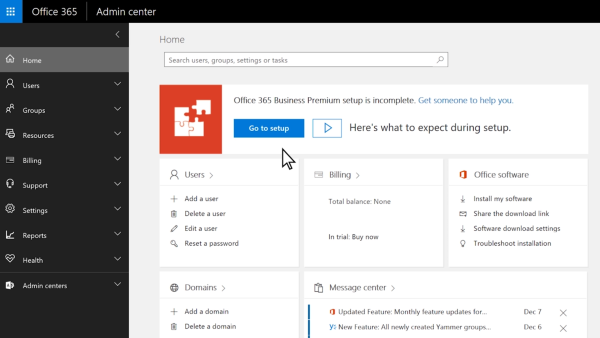
- Enter the vanity domain name that you own and want to use.

- Select Next to confirm.
Note: If your domain's nameservers point to GoDaddy (that is if GoDaddy is your domain's DNS host), Office 365 can automatically set up the DNS records of your Office 365 services (which includes verifying your domain) for you at GoDaddy. This is the simplest option if you have a GoDaddy domain; alternatively, you can opt (in the wizard) to add the records manually yourself.
Additional Resource:

Affected Products
Microsoft 365 from DellArticle Properties
Article Number: 000184563
Article Type: How To
Last Modified: 17 July 2025
Version: 7
Find answers to your questions from other Dell users
Support Services
Check if your device is covered by Support Services.