RecoverPoint for VMs:日志收集失败,并显示“No system information was collected”
Summary: RecoverPoint for Virtual Machines 中的日志收集似乎失败,并显示错误“No system information was collected”
This article applies to
This article does not apply to
This article is not tied to any specific product.
Not all product versions are identified in this article.
Symptoms
在 RecoverPoint for Virtual Machines (VMs) 中运行日志收集,完成并显示消息 "No system information was collected"
用户找不到在 RecoverPoint Appliance (RPA) /info 位置上创建的日志收集文件 (sysInfo*.tar)。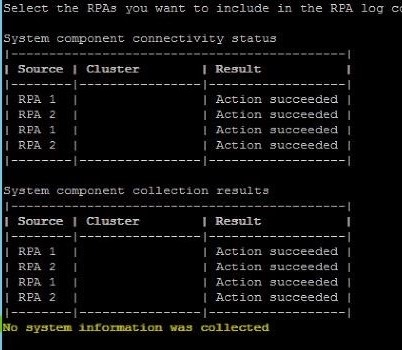
Cause
Dell Technologies 工程部门正在调查此问题,并且正在调查根本原因。
Resolution
解决方法:
已看到每个 RecoverPoint Appliance (RPA) 都可以使用收集,并且每个 RPA 在以下位置下保存其自己的日志收集的副本:
/home/collector/sysInfo/sysInfo.{Site}.KBox{RPA ID}.{Date}.tar.gz
启用 root 访问权限后,可以使用 SCP/WinSCP 直接下载这些日志。
要在 RPA 上启用 root 访问权限,请使用以下命令以管理员身份登录: ssh/putty -> [2] Setup -> [8] Advanced options -> [2] Security options -> [3] Enable/Disable root access.
根密码与管理员密码相同。
可能的预防性解决方法:
从用户连接到的群集以外的其他站点收集日志时,会出现此问题。
仅为会话连接到的群集(站点)运行日志收集。
因此,对于有三个站点的客户 — A、B 和 C(可并行执行):
- 连接到群集 A 上的站点 IP,为站点 A 上的任何 RPA 运行日志收集
- 连接到群集 B 上的站点 IP,为站点 B 上的任何 RPA 运行日志收集
- 连接到群集 C 上的站点 IP,为站点 C 上的任何 RPA 运行日志收集
分辨率:
Dell Technologies 工程部门正在调查此问题。目前正在开发永久修复。请联系 Dell Technologies 客户支持中心 或您的服务代表寻求帮助,并提供此解决方案 ID。
Additional Information
此问题出现在 RecoverPoint for VMs 5.3 SP1 和 5.3 SP1 Patch1 及更高版本上。
Affected Products
RecoverPoint for Virtual MachinesArticle Properties
Article Number: 000189073
Article Type: Solution
Last Modified: 30 Apr 2025
Version: 8
Find answers to your questions from other Dell users
Support Services
Check if your device is covered by Support Services.