Dell Encryption 제거 프로그램이 활성 부팅 전 인증으로 인해 일반 오류와 함께 실패함
Summary: 이 문서에서는 활성 PBA(Pre-Boot Authentication)가 있는 엔드포인트에서 Dell Encryption 제거 프로그램의 오류에 관해 설명합니다.
This article applies to
This article does not apply to
This article is not tied to any specific product.
Not all product versions are identified in this article.
Symptoms
영향을 받는 제품:
- Dell Encryption Self-Encrypting Drive Manager
- Dell Full Disk Encryption
영향을 받는 버전:
- v10.6 이상
영향을 받는 운영 체제:
- Windows
Cause
부팅 전 인증이 활성화된 엔드포인트에서 Dell Encryption 제거 프로그램 실행 파일(C:\Program Files (x86)\Dell\Dell Data Protection\DataSecurityUninstaller.exe)을 사용하여 Dell Encryption을 제거하려고 하면 일반 오류와 함께 제거 프로그램이 즉시 종료됩니다.
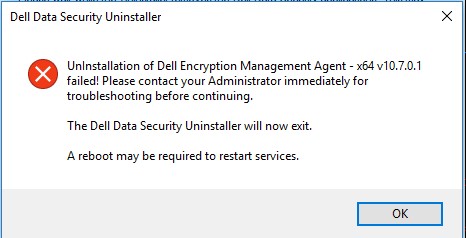
C:\ProgramData\Dell\Dell Data Protection\의 DDPUninstall_Main.log에는 오류에 대한 추가 정보가 표시되지 않습니다.
2021-07-22 14:31:24,873 [3] INFO  CommonLib.Log - Worker.UninstallApps: Beginning uninstall for Dell Encryption Management Agent - x64 v10.7.0.1

2021-07-22 14:31:24,873 [3] DEBUG CommonLib.Log - MSIPackage.InstallApplication: Starting install of Dell Encryption Management Agent - x64 v10.7.0.1 version  with command line - C:\Windows\system32\msiexec.exe /x "{2D4F7762-D922-4F2C-85FB-07B0E17EA5F8}" /qn REBOOT=ReallySuppress  /l*v "C:\ProgramData\dell\Dell Data Protection\DDP_ClientSecurityFramework_Uninstall_MSI.log"

2021-07-22 14:31:28,373 [3] INFO  CommonLib.Log - MSIPackage.InstallApplication: Installation of Dell Encryption Management Agent - x64 v10.7.0.1 complete. Return code = 1603

2021-07-22 14:31:28,373 [3] ERROR CommonLib.Log - UnInstallation of Dell Encryption Management Agent - x64 v10.7.0.1 failed! Please contact your Administrator immediately for troubleshooting before continuing.
DDP_ClientSecurityFramework_Uninstall_MSI.log를 확인하면 제거 시도 시 아래 오류를 읽을 수 있습니다.
MSI (s) (C4:F4) [14:31:28:279]: Product: Dell Encryption Management Agent - x64 -- The PBA must be deactivated prior to uninstall. Retry this uninstallation after the PBA is deactivated.

The PBA must be deactivated prior to uninstall. Retry this uninstallation after the PBA is deactivated.
Resolution
Dell Full Disk Encryption 또는 Dell Encryption Self-Encrypting Drive Manager로 보호되는 엔드포인트에서 Dell Encryption 제거 프로그램을 실행하려면 먼저 사전 부팅 인증을 비활성화해야 합니다.
사전 부팅 인증을 비활성화하려면 Dell Encryption Enterprise 고급 설치 가이드를 참조하십시오.
Affected Products
Dell EncryptionArticle Properties
Article Number: 000190605
Article Type: Solution
Last Modified: 08 Aug 2024
Version: 8
Find answers to your questions from other Dell users
Support Services
Check if your device is covered by Support Services.