Dell Encryption Uninstaller, Etkin Önyükleme Öncesi Kimlik Doğrulaması Nedeniyle Genel Bir Hata Veriyor
Summary: Bu makalede, etkin Önyükleme Öncesi Kimlik Doğrulama (PBA) özellikli uç noktalarda Dell Encryption Kaldırma Aracının başarısız olması açıklanmaktadır.
This article applies to
This article does not apply to
This article is not tied to any specific product.
Not all product versions are identified in this article.
Symptoms
Etkilenen Ürünler:
- Dell Encryption Self-Encrypting Drive Manager
- Dell Full Disk Encryption
Etkilenen Sürümler:
- v10.6 ve Sonraki Sürümler
Etkilenen İşletim Sistemleri:
- Windows
Cause
Dell Encryption'ı kaldırmaya çalışırken etkin Önyükleme Öncesi Kimlik Doğrulama özellikli uç noktalarda Dell Encryption Uninstaller yürütülebilir dosyası (C:\Program Files (x86)\Dell\Dell Data Protection\DataSecurityUninstaller.exe) kullanırsanız kaldırma işlemi genel bir hatayla anında çıkış yapar.
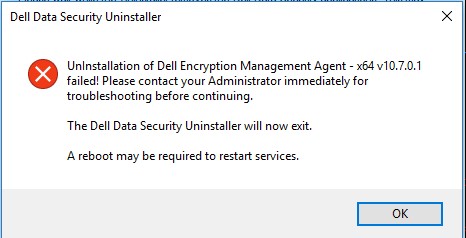
C:\ProgramData\Dell\Dell Data Protection\ yolundaki DDPUninstall_Main.log dosyası, hata hakkında ek bilgi görüntülemez.
2021-07-22 14:31:24,873 [3] INFO  CommonLib.Log - Worker.UninstallApps: Beginning uninstall for Dell Encryption Management Agent - x64 v10.7.0.1

2021-07-22 14:31:24,873 [3] DEBUG CommonLib.Log - MSIPackage.InstallApplication: Starting install of Dell Encryption Management Agent - x64 v10.7.0.1 version  with command line - C:\Windows\system32\msiexec.exe /x "{2D4F7762-D922-4F2C-85FB-07B0E17EA5F8}" /qn REBOOT=ReallySuppress  /l*v "C:\ProgramData\dell\Dell Data Protection\DDP_ClientSecurityFramework_Uninstall_MSI.log"

2021-07-22 14:31:28,373 [3] INFO  CommonLib.Log - MSIPackage.InstallApplication: Installation of Dell Encryption Management Agent - x64 v10.7.0.1 complete. Return code = 1603

2021-07-22 14:31:28,373 [3] ERROR CommonLib.Log - UnInstallation of Dell Encryption Management Agent - x64 v10.7.0.1 failed! Please contact your Administrator immediately for troubleshooting before continuing.
DDP_ClientSecurityFramework_Uninstall_MSI.log dosyası kontrol edildiğinde kaldırma denemesi sırasında aşağıdaki hata okunabilir.
MSI (s) (C4:F4) [14:31:28:279]: Product: Dell Encryption Management Agent - x64 -- The PBA must be deactivated prior to uninstall. Retry this uninstallation after the PBA is deactivated.

The PBA must be deactivated prior to uninstall. Retry this uninstallation after the PBA is deactivated.
Resolution
Dell Encryption Uninstaller'ı Dell Full Disk Encryption veya Dell Encryption Self-Encrypting Drive Manager ile korunan bir uç noktada çalıştırmak için öncelikle Önyükleme Öncesi Kimlik Doğrulamayı devre dışı bırakmanız gerekir.
Önyükleme Öncesi Kimlik Doğrulamayı devre dışı bırakmak için bkz. Dell Encryption Enterprise Gelişmiş Kurulum Rehberi.
Affected Products
Dell EncryptionArticle Properties
Article Number: 000190605
Article Type: Solution
Last Modified: 08 Aug 2024
Version: 8
Find answers to your questions from other Dell users
Support Services
Check if your device is covered by Support Services.