PowerStore: Inconsistent Logical Unit Numbers between hosts could result in data access or data consistency issues
Summary: Mismatched Logical Unit Numbers can result in a Data Unavailable or Data Loss (DU/DL) scenario.
This article applies to
This article does not apply to
This article is not tied to any specific product.
Not all product versions are identified in this article.
Symptoms
In some configurations such as Boot from SAN, a Storage Administrator is required to map PowerStore volumes to individual hosts instead of Host Groups.
PowerStore does not currently support mapping volumes individually to a host which is already a member of a Host Group.
When mapping volumes to hosts as opposed to Host Groups, the Administrator must manually assign matching Logical Unit Numbers for each volume to each host.
This topic is covered in the PowerStore Host Configuration Guide under the Boot from SAN section:
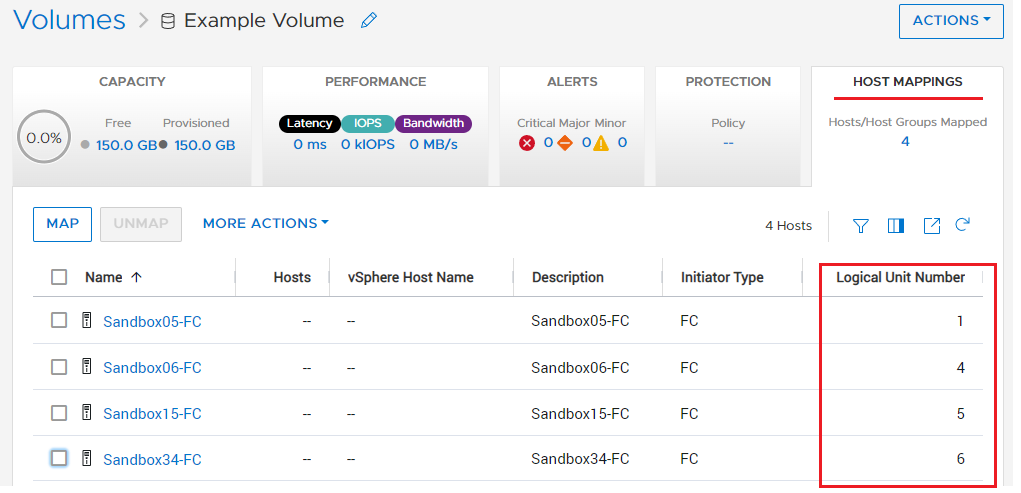
You can view all Logical Unit Numbers from PowerStore Manager from the volumes section, and then the HOST MAPPINGS tab.
This is an example of a problematic setup (mismatched Logical Unit Numbers):
PowerStore does not currently support mapping volumes individually to a host which is already a member of a Host Group.
When mapping volumes to hosts as opposed to Host Groups, the Administrator must manually assign matching Logical Unit Numbers for each volume to each host.
This topic is covered in the PowerStore Host Configuration Guide under the Boot from SAN section:
"Follow these guidelines for clustered boot from SAN mapping:
-
For every physical host, there should be one host in the PowerStore Manager. Do not create a host group.
-
Boot LUNs are mapped only for the specific host.
-
Shared LUNs are mapped to all hosts in the cluster. The user must keep the same LUN ID across the cluster for shared LUNs."
How to identify the issue:
You can view all Logical Unit Numbers from PowerStore Manager from the volumes section, and then the HOST MAPPINGS tab.
This is an example of a problematic setup (mismatched Logical Unit Numbers):
Cause
In cluster environments, different hosts should access the same shared volume with the same Logical Unit Numbers.
Mismatched Logical Unit Numbers can result in a Data Unavailable or Data Loss (DU/DL) scenario.
Mismatched Logical Unit Numbers can result in a Data Unavailable or Data Loss (DU/DL) scenario.
Resolution
Depending on the size and scope of the environment and the ability to add or separate host initiators, one of the two following options may be used:
1) The Storage Admin must match Logical Unit Numbers for each volume for each host.
2) If available, for each host, connect additional and redundant FC ports to the fabrics. Use the newly visible WWNs to create new host objects in PowerStore and associate the host object to a Host Group. Use the host group for mapping all current and future data volumes (not the boot volumes).
1) The Storage Admin must match Logical Unit Numbers for each volume for each host.
- Work with each host individually while in maintenance mode.
- Unmap all volumes from the host, leaving only the boot from SAN volume, typically LUN 0.
- Re-Map the shared data volumes to the host and assign the Logical Unit Numbers manually.
- Rescan host HBAs and verify storage accessibility.
- Reboot the host to ensure proper boot, and confirm accessibility and Logical Unit Numbers.
- Exit maintenance mode.
- Repeat steps 1 through 6 on all remaining hosts, making sure that the Logical Unit Numbers are consistent for each volume for all hosts.
- Incorporate this work flow of manual Logical Unit Number matching between all hosts for any future volume mappings.
2) If available, for each host, connect additional and redundant FC ports to the fabrics. Use the newly visible WWNs to create new host objects in PowerStore and associate the host object to a Host Group. Use the host group for mapping all current and future data volumes (not the boot volumes).
- Work with each host individually while in maintenance mode.
- Unmap all data volumes from the host, leaving only the boot from SAN LUN, typically LUN 0.
- Provision and zone additional redundant WWNs from the host to the PowerStore following best practices.
- Using the newly visible initiator port IDs, create a new Host and Host Group.
- Map all shared data volumes to the new Host Group and use the option to Automatically Generate the Logical Unit Number.
- Rescan host HBAs and verify storage accessibility.
- Reboot host to ensure proper boot and confirm data accessibility.
- Exit maintenance mode.
- Repeat steps 1 through 8 on all remaining hosts by adding the newly created host object to the new Host Group.
- Map all new data volumes to the Host Group.
Additional Information
If you are creating these volumes for the first time, you are presented with this guidance:

Videos
Affected Products
PowerStoreArticle Properties
Article Number: 000191503
Article Type: Solution
Last Modified: 12 Jan 2023
Version: 4
Find answers to your questions from other Dell users
Support Services
Check if your device is covered by Support Services.