VxRail: Upgrading vCenter to 7.0 U3c or Later Fails Due to Potential Driver Conflict
Summary: Upgrading a vCenter version 7.0u3c or later may trigger a precheck indicating a potential driver conflict.
This article applies to
This article does not apply to
This article is not tied to any specific product.
Not all product versions are identified in this article.
Symptoms
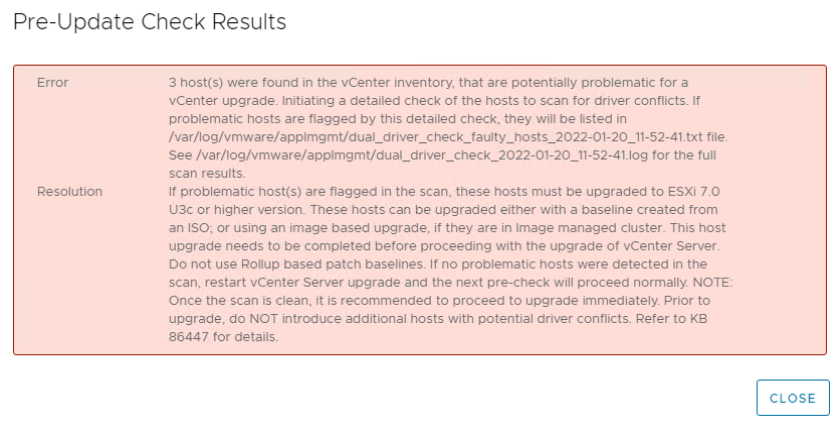
Attempting to upgrade vCenter managing VxRail cluster 7.0.240, 7.0.241, or 7.0.300 to vCenter version 7.0 U3c or above may fail the precheck with the following error.
Cause
Performing an upgrade of a customer-managed vCenter to version 7.0 U3c and above triggers a new precheck before vCenter is updated.
This precheck checks if hosts are susceptible to a known driver rename issue outlined in the following VMware KB:
Upgrading vCenter Server 7.0 fails during precheck with "Hosts were found in the vCenter Inventory that is potentially problematic for a vCenter upgrade" (86447)
The precheck checks if any hosts have the problematic i40enu driver (known as the "dual i40en driver conflicts"). VxRail 7.0.240/7.0.241 clusters are checked to see if they have been configured with vLCM. For more details on the nature of this issue see the above VMware KB article.

Note: This issue is present VxRail clusters managed by a customer-managed vCenter server.
VxRail Clusters with a VxRail deployed vCenter do not have this issue as it is fixed during a VxRail upgrade.
VxRail Clusters with a VxRail deployed vCenter do not have this issue as it is fixed during a VxRail upgrade.
Resolution
Impacted hosts must be upgraded which fixes the issue before upgrading the customer-managed vCenter version. VxRail engineering has released VxRail version 7.0.320 which fixes impacted hosts before the vCenter upgrade is attempted. Again this applies for VxRail clusters running VxRail versions 7.0.240, 7.0.241, or 7.0.300.
The recommended upgrade strategies are outlined below:
- Customer managed vCenter which has multiple VxRail or non-VxRail ESXi clusters. Upgrade ALL VxRail and non-VxRail clusters first and then upgrade vCenter.
- Customer managed vCenter which has both VxRail or non-VxRail ESXi clusters and VxRail Satellite nodes, upgrade VxRail and non-VxRail clusters first, then upgrade VxRail Satellite nodes, finally upgrade vCenter.
Note: The vSAN disk group or VMware vSphere Distributed Switch (vDS) versions are not upgraded to the latest versions in this scenario. They both require vCenter to be upgraded first. They must be manually updated after both the VxRail and vCenter upgrades have been completed. See the following VMware documentation which outlines how to upgrade both:
Affected Products
VxRail SoftwareArticle Properties
Article Number: 000195322
Article Type: Solution
Last Modified: 26 Aug 2025
Version: 8
Find answers to your questions from other Dell users
Support Services
Check if your device is covered by Support Services.