NVP vProxy:無法在 Linux 虛擬機器上安裝 FLR 代理程式。
Summary: 在受 NetWorker VMware Protection (NVP) vProxy 裝置保護的 Linux 虛擬機器 (VM) 檔案層級復原 (FLR) 期間。FLR 掛載失敗,表示未安裝 FLR 代理程式,且虛擬機器不允許安裝。
This article applies to
This article does not apply to
This article is not tied to any specific product.
Not all product versions are identified in this article.
Symptoms
簡要說明此問題的症狀。
- 在 FLR 期間,會指定一個非 root 帳戶。
- FLR 是從 NetWorker Management Console (NMC) 或 Dell EMC Data Protection Restore 用戶端啟動。
- 在還原精靈的掛載輸出中會看到以下錯誤。
159373:nsrvproxy_flr: vProxy Log: 2022-02-08T11:49:06Z ERROR: [@(#) Build number: 153] Cannot connect to vProxy Agent: Unable to connect to ':9613': dial tcp :9613: connect: connection refused
159373:nsrvproxy_flr: vProxy Log: 2022-02-08T11:49:06Z INFO: [@(#) Build number: 153] FLR Agent is not installed on VM
159373:nsrvproxy_flr: vProxy Log: 2022-02-08T11:49:06Z INFO: [@(#) Build number: 153] Set custom attribute 'Dell EMC vProxy FLR Session' value for object vm-XX to ''.
159373:nsrvproxy_flr: vProxy Log: 2022-02-08T11:49:06Z INFO: [@(#) Build number: 153] Unlocked virtual machine.
159373:nsrvproxy_flr: vProxy Log: 2022-02-08T11:49:06Z INFO: [@(#) Build number: 153] Disconnected from session on vCenter 'XXXXX'.
159373:nsrvproxy_flr: vProxy Log: 2022-02-08T11:49:06Z ERROR: [@(#) Build number: 153] FLR Agent is not installed on the virtual machine and the request does not allow installation.
152793:nsrvproxy_flr: vProxy Log Ends
vProxy 的掛載記錄位置:
- /opt/emc/vproxy/runtime/logs/vflrd/
- /opt/emc/vproxy/runtime/logs/recycle/vflrd/
NetWorker 伺服器的掛載記錄位置:
- /nsr/logs/adhoc/nsrvproxy_flr
- /nsr/logs/recover/recover_name (若從 NMC 執行,且已儲存還原工作階段)。
目標 VM 上的 FLR 代理程式位置為:
- /opt/emc/vproxyra/
Cause
造成此問題的可能性有許多,以下列出其中幾種:
- 未安裝 FLR 代理程式。如果使用者沒有安裝 FLR 代理程式所需的必要權限 (或環境的安全性較高),則可能會發生這種情況。
- 代理程式可能已安裝,但 FLR 掛接使用者可能無法執行用來驗證 FLR 代理程式安裝的自動化指令檔。
- 目標 VM 上安裝了防毒軟體,封鎖了 FLR 代理程式的安裝。
Resolution
確認已安裝 FLR 代理程式。確保 FLR 掛接程序的使用者可以執行確認代理程式安裝的指令檔。
1.使用掛接 FLR 期間使用的登入資料登入 Linux 虛擬機器,並開啟 Shell 主控台。
2.執行以下命令,以確認是否已安裝代理程式,且使用者擁有使用代理程式的權限: /opt/emc/vproxyra/bin/vflragentc
vflragetc
[admin@rhel-client01 ~]$ /opt/emc/vproxyra/bin/vflragentc
vflragentc program started
AgentResponse:{"Protocol":1,"AgentVersion":{"Release":"4.4.0-14_1","BuildNumber":"1","BuildStamp":"2025-08-22T06:06:47Z"},"Mountpoint":"","OutputFile":"","IncomingDir":"","UpgradeFile":"","Filename":"","ErrorMessage":"An agent command must be specified.","ActivityLog":"","AppAgentData":{"Protocol":0,"Agent":"","Version":{"Complete":"","Numbers":null,"Build":"","Comment":""},"MetadataValues":null,"MetadataFiles":null,"DownloadFiles":null,"FilesList":null,"WorkDir":"","Operation":0,"MonitorData":null,"AppData":"","BrowseResults":null,"Utilization":null}}
注意:如果此命令傳回錯誤,請確認非 root 使用者帳戶具有 NetWorker VMware 整合指南中所列的必要作業系統權限。
3.如果已安裝代理程式,請驗證其是否已啟動: /opt/emc/vproxyra/bin/vflragent status
4.如果代理程式未在執行中,請嘗試啟動: /opt/emc/vproxyra/bin/vflragent start
如果以前未在此 VM 上安裝代理。可使用 root 帳戶,在 FLR 復原程式期間安裝 FLR 代理程式。安裝代理程式後,即可使用非 root 帳戶執行後續的 FLR。非 root 使用者必須擁有在 NetWorker VMware 整合指南中記錄的適當作業系統許可權,網址為:NetWorker 支援 |手冊與文件
NetWorker Web 使用者介面 (NWUI) 方法
如果 NWUI 伺服器已安裝在 NetWorker 環境中,您可以在 FLR 期間指定使用提高權限執行。此選項不適用於 NMC 或 Data Protection Restore 用戶端。
https://NetWorker_Server:9090/nwui
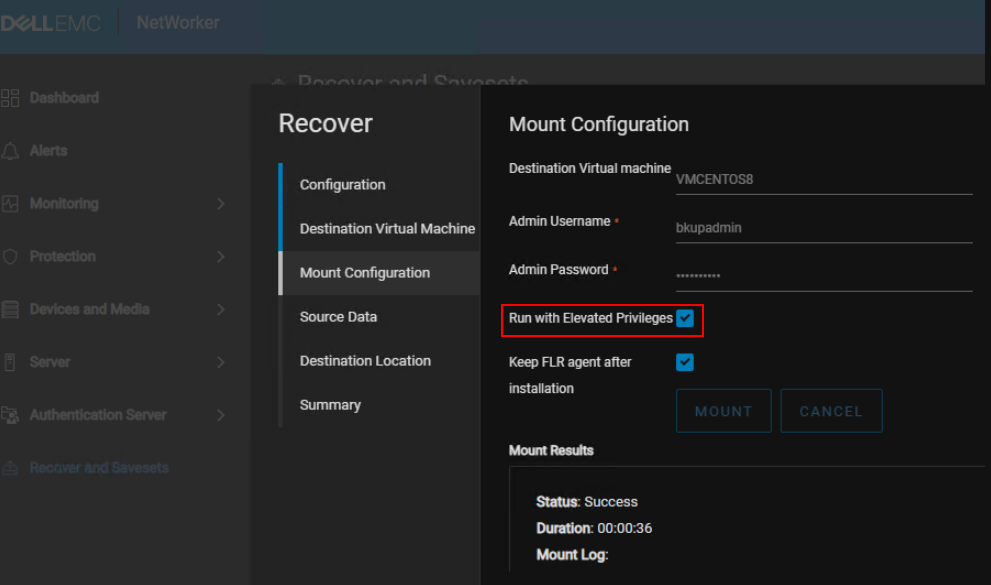
確認 NWUI 是否已安裝在 NetWorker 伺服器上 (NetWorker Virtual Edition 預設已包含):
Linux:
rpm -qa | grep lgtonwui
Windows:
wmic product get name, version, vendor | find "Web UI Server"
手動安裝方法
如果 FLR 程序無法安裝代理程式,請將其從 vProxy 裝置複製到目標虛擬機器,並使用作業系統命令在本機安裝。
1.開啟 SSH 工作階段至您要安裝 FLR 代理程式的 VM。
2.使用安全複製協定 (
scp) 命令,將 FLR 代理程式從 vProxy 複製到 VM:
scp admin@vPROXY_ADDRESS:/opt/emc/sw-repo/vflragent/linux/emc*.rpm TARGET-DOWNLOAD-DIRECTORY
範例:
[admin@rhel-client01 ~]$ scp admin@nsr-vproxy01:/opt/emc/sw-repo/vflragent/linux/emc*.rpm .
The authenticity of host 'nsr-vproxy01 (192.168.9.151)' can't be established.
ED25519 key fingerprint is SHA256:ZsV1JnrdzQ2DdcY1gH9bOrCFnEgBsABruninvAGaPEg.
This key is not known by any other names
Are you sure you want to continue connecting (yes/no/[fingerprint])? yes
Warning: Permanently added 'nsr-vproxy01' (ED25519) to the list of known hosts.
admin@nsr-vproxy01's password:
emc-vProxy-FLRAgent-4.4.0-14_1.x86_64.rpm                                                                                    100%   19MB 153.7MB/s   00:00
[admin@rhel-client01 ~]$
注意:此命令會將 FLR 代理程式複製到目標 Linux VM 上的 FLR 使用者主目錄。或者,您可以開啟連接至 vProxy 裝置的 SSH 工作階段,並將 FLR 代理程式 scp 至 Linux VM。命令範例:
scp /opt/emc/sw-repo/vflragent/linux/emc*.rpm VM_USERNAME@VM_ADDRESS:~
3.使用 FLR 使用者的登入資料,登入已複製代理程式的 Linux 虛擬機器。
4.執行下列命令以安裝 FLR 代理程式:
sudo rpm -ivh emc*.rpm
[admin@rhel-client01 ~]$ sudo rpm -ivh emc*.rpm
[sudo] password for admin:
warning: emc-vProxy-FLRAgent-4.4.0-14_1.x86_64.rpm: Header V3 RSA/SHA256 Signature, key ID ff48d101: NOKEY
Verifying...                          ################################# [100%]
Preparing...                          ################################# [100%]
Updating / installing...
   1:emc-vProxy-FLRAgent-4.4.0-14_1   ################################# [100%]
5.確認已安裝代理程式:
6.執行安裝後指令檔:
7.確認 FLR 使用者可以執行代理程式驗證命令:
rpm -qa | grep -i flragent
6.執行安裝後指令檔:
sudo /opt/emc/vproxyra/bin/postinstall.sh
7.確認 FLR 使用者可以執行代理程式驗證命令:
/opt/emc/vproxyra/bin/vflragentc
[admin@rhel-client01 ~]$ /opt/emc/vproxyra/bin/vflragentc
vflragentc program started
AgentResponse:{"Protocol":1,"AgentVersion":{"Release":"4.4.0-14_1","BuildNumber":"1","BuildStamp":"2025-08-22T06:06:47Z"},"Mountpoint":"","OutputFile":"","IncomingDir":"","UpgradeFile":"","Filename":"","ErrorMessage":"An agent command must be specified.","ActivityLog":"","AppAgentData":{"Protocol":0,"Agent":"","Version":{"Complete":"","Numbers":null,"Build":"","Comment":""},"MetadataValues":null,"MetadataFiles":null,"DownloadFiles":null,"FilesList":null,"WorkDir":"","Operation":0,"MonitorData":null,"AppData":"","BrowseResults":null,"Utilization":null}}
Additional Information
Affected Products
NetWorkerArticle Properties
Article Number: 000198224
Article Type: Solution
Last Modified: 17 Nov 2025
Version: 8
Find answers to your questions from other Dell users
Support Services
Check if your device is covered by Support Services.