Connectrix: DCNM 11.5(4) error: "Command failed: Invocation failed... ...upon applying and testing Call Home configuration
Summary: DCNM 11.5(4) error: "Command failed: Invocation failed; nested exception is: javax.ejb.EJBException: java.lang.NullPointerException" upon applying and testing Call Home configuration.
This article applies to
This article does not apply to
This article is not tied to any specific product.
Not all product versions are identified in this article.
Symptoms
Data Center Network Manager (DCNM) 11.5(4) shows the below message upon applying and testing Call Home configuration.
Command failed: Invocation failed; nested exception is: .ejb.EJBException: java.lang.NullPointerException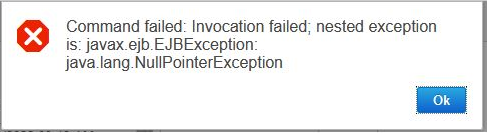
Cause
Error occurs after an upgrade to DCNM 11.5.4 or a fresh deployment of DCNM 11.5.4. So far, this behavior is seen on Windows and OVA DCNM deployments.
Resolution
This is a cosmetic issue with the software. It should still work as expected.
Workaround:
- After configuring Call home, press "Apply" button instead of "Apply and Test" as demonstrated in the image below.
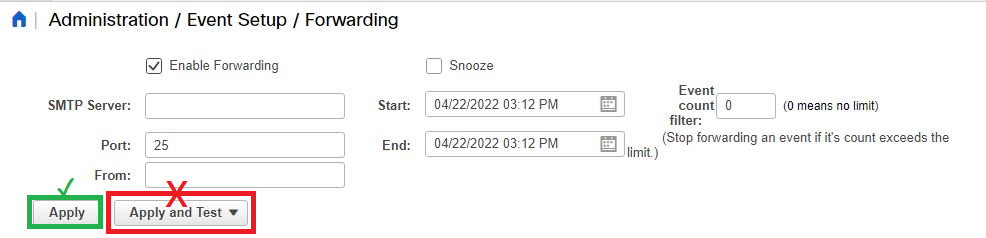
- After applying the configuration, generate a trap from the switch using the Call Home Test CLI command below:
MDS-switch# test pfm snmp test-trap fan
- If the feature is working correctly, the user should receive an email test alert to the email address that is configured.
No other actions are required.
Resolution: Cisco confirmed this BUG has been fixed in version 12.0.2f. If planning to upgrade, they recommend the latest 12.1.2 or the n-1 version 12.1.1e.
Article Properties
Article Number: 000198795
Article Type: Solution
Last Modified: 05 Aug 2025
Version: 8
Find answers to your questions from other Dell users
Support Services
Check if your device is covered by Support Services.