PowerEdge: Intermittent "Fetching data" Notifications from OMIMSWAC
Summary: In the Azure Stack HCI environment, when clicking "Cluster" on the OMIMSWAC plug-in, an error notification is occurred with "Fetching Data"
This article applies to
This article does not apply to
This article is not tied to any specific product.
Not all product versions are identified in this article.
Symptoms
The OMIMSWAC plugin version is 2.3.0.
This issue happening after clicking cluster and before showing dashboard info
Error: Cannot read properties of undefined (reading 'nodeName)
Captured image: 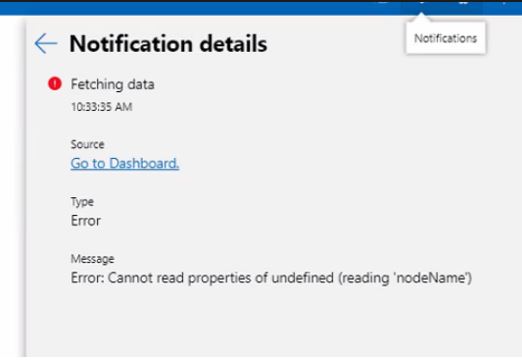
Cause
This issue can be happened many of reason.
However if the issue happened intermittently and all the function is working properly then it is not an issue on OMIMSWAC.
It is occurred due to misconfiguration of the network on the host.
So we must check all the network configuration is set correctly. (DNS/NIC Teaming/Switch)
Resolution
It is due to misconfiguration of network teaming on each of nodes in the Azure Stack HCI cluster.
This issue has been resolved after fixing the network teaming configuration.
Affected Products
OpenManage Integration with Microsoft Windows Admin Center, OpenManage Integration with Microsoft Windows Admin Center, PowerEdge R440, PowerEdge R450, PowerEdge R540, PowerEdge R550, PowerEdge R640, PowerEdge R6415, PowerEdge R650, PowerEdge R650xs
, PowerEdge R6515, PowerEdge R6525, PowerEdge R660, PowerEdge R660xs, PowerEdge R6615, PowerEdge R6625, PowerEdge R740, PowerEdge R740XD, PowerEdge R740XD2, PowerEdge R7415, PowerEdge R7425, PowerEdge R750, PowerEdge R7515, PowerEdge R7525, PowerEdge R760, PowerEdge R760XA, PowerEdge R760xd2, PowerEdge R760xs, PowerEdge R7615, PowerEdge R7625, PowerEdge R840, PowerEdge R860, PowerEdge R940, PowerEdge R960
...
Article Properties
Article Number: 000202990
Article Type: Solution
Last Modified: 08 Oct 2025
Version: 2
Find answers to your questions from other Dell users
Support Services
Check if your device is covered by Support Services.