Dell Unity: After upgrade, the Hot Spare Policy for traditional pool is not being met warning message is observed. (User Correctable)
Summary: After upgrading code 5.2.1.0.5.013 or higher, Unisphere reports warning message regarding the spare drive policy.
This article applies to
This article does not apply to
This article is not tied to any specific product.
Not all product versions are identified in this article.
Symptoms
After upgrading the array OE code, Unisphere reports warning message regarding the Hot Spare policy.
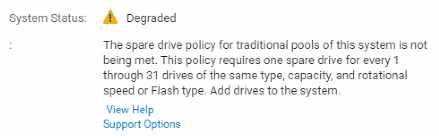
In the Data Collects, you can see instances of the violation being called out:
TRiiAGE_full_ECOM.txt:
A       10/26/24 19:03:20.000 isSparePolicyViolated     cemtracer_health INFO: Hot spare policy of DiskGroupID=dg_24 is violated. [C4CB_StorageSystemHealth.cpp:875]
A       10/28/24 17:51:26.000 isSparePolicyViolated     cemtracer_health INFO: Hot spare policy of DiskGroupID=dg_24 is violated. [C4CB_StorageSystemHealth.cpp:875]
TRiiAGE_full_SPlogs.txt:
B       10/19/24 02:14:26.981 CoreProvisionSvc   5200a6 [ERROR] Audit: The spare drive policy for traditional pools is not being met. Add a minimum of 1 1.8 TB SAS 10K drives to the system.
B       10/21/24 17:42:11.020 CoreProvisionSvc   5200a7 [INFO] Audit: The system has 1.8 TB SAS 10K drives, which is enough to meet the spare drive policy for traditional pools.
SPx/EMC/CEM/log/cemtracer.log:
A 10/26/24 07:36:39.000 isSparePolicyViolated cemtracer_health INFO: Hot spare policy of DiskGroupID=dg_24 is violated. [C4CB_StorageSystemHealth.cpp:875]
A 10/28/24 08:07:03.000 isSparePolicyViolated cemtracer_health INFO: Hot spare policy of DiskGroupID=dg_24 is violated. [C4CB_StorageSystemHealth.cpp:875]
SPx\EMC\CEM\log\cemtracer_health_services.log:
03 Nov 2024 12:22:34  - [Health] INFO - {0:672637:49317478}[21732|4329|e5fffb40][isSparePolicyViolated @ ../../../components/providers/osls/Health/src/C4CB_StorageSystemHealth.cpp:875] Hot spare policy of DiskGroupID=dg_24 is violated.
03 Nov 2024 12:23:34  - [Health] INFO - {0:672696:799062102}[21732|4329|e5fffb40][isSparePolicyViolated @ ../../../components/providers/osls/Health/src/C4CB_StorageSystemHealth.cpp:875] Hot spare policy of DiskGroupID=dg_24 is violated.
03 Nov 2024 12:28:51  - [Health] INFO - {0:673013:665903359}[21732|718|e59ffb40][isSparePolicyViolated @ ../../../components/providers/osls/Health/src/C4CB_StorageSystemHealth.cpp:875] Hot spare policy of DiskGroupID=dg_24 is violated.
03 Nov 2024 12:28:51  - [Health] INFO - {0:673013:814940102}[21732|4329|e5fffb40][isSparePolicyViolated @ ../../../components/providers/osls/Health/src/C4CB_StorageSystemHealth.cpp:875] Hot spare policy of DiskGroupID=dg_24 is violated.
Cause
The warning messages will report on the traditional pool when the Hot Spare Policy is not being met. According to Hot Spare Policy, there should be 1 spare drive for every 31 drives of the same type, capacity, and rotational speed or Flash type.
In certain scenarios, it has been seen that the warning message does not appear until after an upgrade. In those scenarios, it was a system drive (DPE Disk 0 through DPE Disk 3) that faulted in the past. System drives are not allowed to be a Hot Spare. When a system drive fails and then replaced, the Hot Spare count will be down by one drive.
Resolution
First determine if there are any unbound drives available (excluding System Drives DPE Disk 0 through DPE Disk 3):
- In Unisphere, navigate to Settings > Storage configuration > Drives.
- Look in the column "Unconfigured Available" to see if there are any drives available for the specific drive type.
- If there are available drives, try restarting management services.
- Reference KBA 000019458 Dell Unity: How to Restart or Failover the Management Services (User Correctable)
- If there are drives within the "Unconfigured Available" column and restarting Management Services does not resolve the warning message, reach out to Unity Support for further assistance.
Check History of drive failures to determine if a System Drive (DPE Disk 0 through DPE Disk 3) failed in the past,
- From the Pool properties > Drives page, verify if any of the system drives are part of the pool. The first 4 drives of every Dell Unity system are called the system drives (DPE Disk 0 through DPE Disk 3). Dell Unity OE also uses capacity from these 4 drives to store copies of configuration information and other critical system data.
- Example: DPE Disk 0 through 2 are part of a pool while DPE Disk 3 is showing unbound. Review past disk replacements to verify if DPE Disk 3 was replaced.
- If the system drive has failed in the past and is still in an unbound state, there is a possibility that is the cause of the warning message, as it will leave the Hot Spare policy 1 drive short.
- When a system drive fails, the user data will be copied to a Hot Spare of same type. When that system drive is replaced, the OE will not allow the system drive to become a hot spare. The Unity system will not automatically copy back the user data to the system drive. In order regain a hot spare drive, Unity support will need to be engaged to manually copy the user data back to the system drive.
- Reference the Dell EMC Unity: Best Practices Guide page 17, section 2.2.4 "System Drives" for more details.
- If your issue matches the system drive scenario, there are 2 options to resolve the warning message.
- Option 1: Add more drives to the array to allow for another hot spare
- Option 2: Copy the user data back from the original Hot Spare to the new System Drive. If this is the choice, reach out to support and reference this KB article with your option.
Affected Products
Dell EMC Unity, Dell EMC Unity Family |Dell EMC Unity All Flash, Dell EMC Unity Family, Dell EMC Unity HybridArticle Properties
Article Number: 000207645
Article Type: Solution
Last Modified: 22 Jan 2026
Version: 9
Find answers to your questions from other Dell users
Support Services
Check if your device is covered by Support Services.