PowerProtect Cyber Recovery ||CyberSense: スクラッチ ストレージ構成を適切にセットアップする方法
Summary: デフォルトでは、スクラッチ ストレージの作成中にプールを編集します。[Do not use more:]フィールドは値0を保持します。 [送信]を選択する前に、このフィールドを空白にし、ゼロを含めないでください。
This article applies to
This article does not apply to
This article is not tied to any specific product.
Not all product versions are identified in this article.
Instructions
以下の制限があるスクラッチ ストレージは、ジョブ分析の完了に時間がかかります。
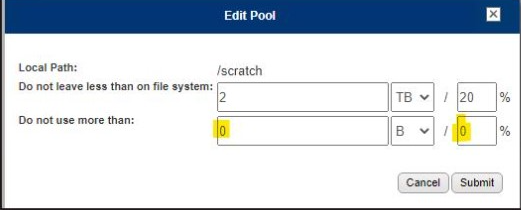
ここに示すように、「ゼロ」を削除して修正します。

変更を行った後、[送信]をクリックします。
2023/05/12 01:38:37 notice: [7f3fda7fe700] fcacheAlloc: not enough space for 346 bytes of
[/opt/ie/var/mnt/dispatch/crawl_TG2lR0/
PP_-_CC_-_Data_VMs_-_All_Disks-aaaaa-46c1a/PLCTLP-d30d52f0-0891-403a-9ab3-a25785b2f173/
Backups/12a81d2a-0087-4e9e-b9b6-866e5e1cb602/503a5c1b-a47e-9556-6deb-8b4ccc8eaef1/
1683824429512032045/vm-2017-disk-key-1234.vmdk]
ここに示すように、「ゼロ」を削除して修正します。
変更を行った後、[送信]をクリックします。
Additional Information
2023/05/12 01:38:37 notice: [7f3fda7fe700] fcacheAlloc: not enough space for 346 bytes of [/opt/ie/var/mnt/dispatch/crawl_TG2lR0/PP_-_CC_-_Data_VMs_-_All_Disks-ppdm-46c1a/PLCTLP-d30d52f0-0891-403a-9ab3-a25785b2f173/Backups/12a81d2a-0087-4e9e-b9b6-866e5e1cb602/503a5c1b-a47e-9556-6deb-8b4ccc8eaef1/1683824429512032045/vm-2017-disk-key-2053.vmdk]
Affected Products
Cyber Recovery SeriesProducts
Data Backup & Protection Software, Data Protection SuiteArticle Properties
Article Number: 000214234
Article Type: How To
Last Modified: 25 Sept 2023
Version: 2
Find answers to your questions from other Dell users
Support Services
Check if your device is covered by Support Services.