PowerProtect Cyber Recovery || CyberSense: 스크래치 스토리지 구성을 올바르게 설치하는 방법
Summary: 기본적으로 스크래치 스토리지를 생성하는 동안 풀을 편집하면 "Do not use more than:" 필드에 값 0이 유지됩니다. 이 필드는 비어 있어야 하며 "제출"을 선택하기 전에 0을 포함하지 않아야 합니다.
This article applies to
This article does not apply to
This article is not tied to any specific product.
Not all product versions are identified in this article.
Instructions
아래 제한 사항이 있는 스크래치 스토리지는 작업 분석을 완료하는 데 오랜 시간이 소요됩니다.
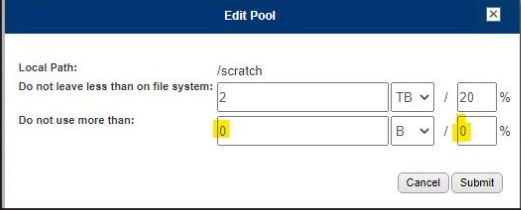
여기에
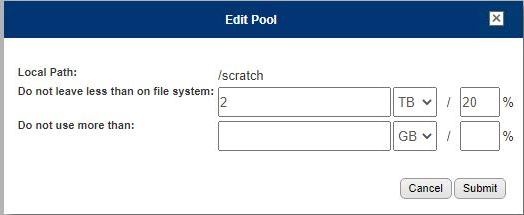
표시된 것처럼 "0"을 삭제하여 수정합니다. 변경한 후 제출을 클릭하십시오.
2023/05/12 01:38:37 notice: [7f3fda7fe700] fcacheAlloc: not enough space for 346 bytes of
[/opt/ie/var/mnt/dispatch/crawl_TG2lR0/
PP_-_CC_-_Data_VMs_-_All_Disks-aaaaa-46c1a/PLCTLP-d30d52f0-0891-403a-9ab3-a25785b2f173/
Backups/12a81d2a-0087-4e9e-b9b6-866e5e1cb602/503a5c1b-a47e-9556-6deb-8b4ccc8eaef1/
1683824429512032045/vm-2017-disk-key-1234.vmdk]
여기에
표시된 것처럼 "0"을 삭제하여 수정합니다. 변경한 후 제출을 클릭하십시오.
Additional Information
2023/05/12 01:38:37 notice: [7f3fda7fe700] fcacheAlloc: not enough space for 346 bytes of [/opt/ie/var/mnt/dispatch/crawl_TG2lR0/PP_-_CC_-_Data_VMs_-_All_Disks-ppdm-46c1a/PLCTLP-d30d52f0-0891-403a-9ab3-a25785b2f173/Backups/12a81d2a-0087-4e9e-b9b6-866e5e1cb602/503a5c1b-a47e-9556-6deb-8b4ccc8eaef1/1683824429512032045/vm-2017-disk-key-2053.vmdk]
Affected Products
Cyber Recovery SeriesProducts
Data Backup & Protection Software, Data Protection SuiteArticle Properties
Article Number: 000214234
Article Type: How To
Last Modified: 25 Sept 2023
Version: 2
Find answers to your questions from other Dell users
Support Services
Check if your device is covered by Support Services.