No Boot or No Post After Updating BIOS to v1.9.0 on Alienware m16 R1 and Alienware m18 R1
Summary: This article describes how to recover an Alienware m16 R1 or Alienware m18 R1 from a no boot after updating to BIOS v1.9.0.
This article applies to
This article does not apply to
This article is not tied to any specific product.
Not all product versions are identified in this article.
Symptoms
Affected Platforms:
- Alienware m16 R1
- Alienware m18 R1
Some users may notice that their computers do not boot after updating to BIOS v1.9.0. Users may also report that they are prompted with the HTTP(s) Boot Menu after updating to BIOS v1.9.0.
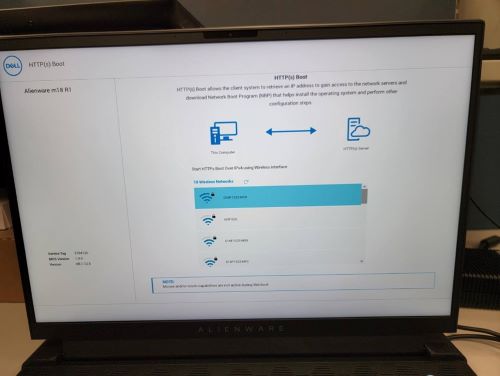
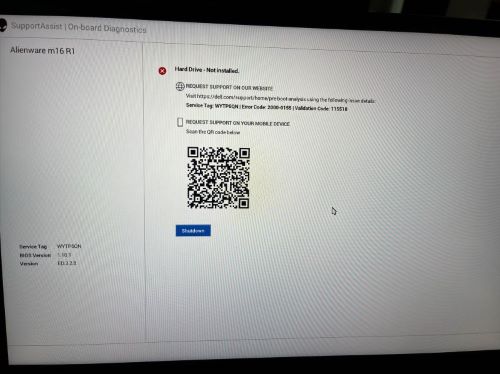
If the user set the SATA/NVMe Operation mode to AHCI/NVMe before updating to BIOS v1.9.0, they will find BIOS storage SATA/NVMe Operation Option is reset to Disabled after updating to BIOS v1.9.0. No boot drives are available, and the computer cannot boot to the operating system.
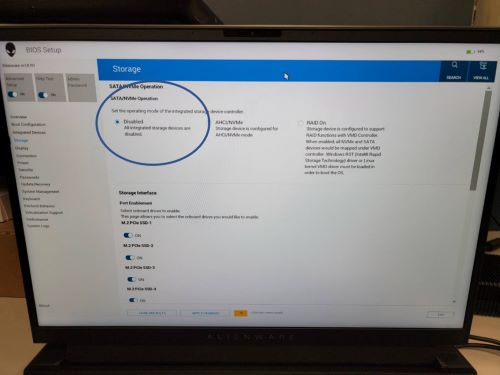
Cause
This is a side effect after fixing an issue where the SATA/NVMe Operation mode cannot be set to Disabled. Both Disabled and AHCI/NVMe modes are using the same SETUP Variable before v1.9.0. BIOS v1.9.0 separates these modes into different variables. This causes the AHCI/NVMe mode to be identified as Disabled.
Resolution
Workaround:
Guide end users to set the storage mode back to AHCI/NVME in the BIOS setup and then computer can boot to the operating system.
- Ensure that the computer is turned off
- Press the power button and instruct the user to repeatedly press the F2 key to enter the BIOS. This should allow the computer to enter the BIOS Setup menu
- On the left side menu, guide the customer to select the Storage Menu
- In the SATA/NVMe Operation section, guide the customer to select the AHCI/NVMe Mode. If prompted with a Warning, select Yes.
- Guide the customer to click Apply Changes at the bottom of the BIOS Menu
- Click Exit at the Bottom of the BIOS Menu. If prompted with, Warning Do you want to save changes select Yes.
- The computer should boot into the operating system, it may or may not restart more than once.
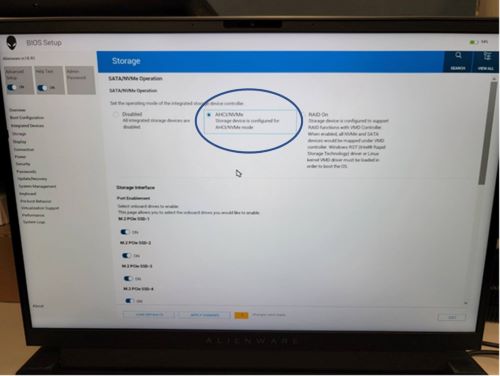
Dell Technologies recommends users keep RAID On mode in BIOS Setup. This issue does not happen on RAID On as this is the default setting from the factory.
Affected Products
Alienware m16 R1, Alienware m18 R1Article Properties
Article Number: 000215852
Article Type: Solution
Last Modified: 18 May 2026
Version: 7
Find answers to your questions from other Dell users
Support Services
Check if your device is covered by Support Services.