Windows Hello Login Fails on Latitude 7440 Laptop Running Win10
Summary: The following article provides information about a failure with the Windows Hello application on your Latitude 7440 laptop. Your laptop reports an on-screen error message when your laptop has both a Wide Wireless Area Network (WWAN) card fitted and is running Windows 10. ...
This article applies to
This article does not apply to
This article is not tied to any specific product.
Not all product versions are identified in this article.
Symptoms
Windows 10 Hello on-screen error message reported at the log in screen
You may see the following on-screen error messages at the Windows Hello log-in screen on your Latitude 7440 laptop:
Couldn't turn on the camera.
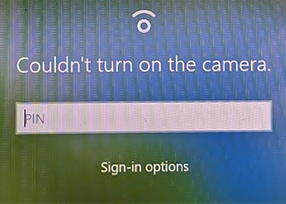
Something went wrong.

These are seen under the following circumstances:
- The laptop is running the Windows 10 operating system
- The laptop has a WWAN card installed
- The laptop is in Battery-mode
- A USB Type-C AC adapter is connected to the laptop
- The laptop camera's Infrared (IR) light does not blink
- The following error message is seen in the notification area when you have logged in at the second attempt once the log in screen times out:
SIM Card removed.
Cause
Dell worked on the problem with Microsoft. There are multiple devices that must be initialized after the boot process. (For example: The webcam, WWAN Modem, Fingerprint Reader and so on.)
- The Windows 11 operating system initializes the devices in parallel which is faster overall.
- However, with Windows 10 the operating system initializes the devices one after the other (sequentially) and this takes more time.
Slight delays in the initialization of individual devices begin to add up. It reaches an amount which is over the threshold of Windows Hello and the above-mentioned errors show up because the camera is not ready in time.
Resolution
Microsoft resolved the problem with Windows 11 Build 25251.1000main.221118-1142 (and newer). However, there are no plans by Microsoft to implement the fix into the Windows 10 operating system.
You can use one of the following workarounds:
- Windows Hello Login works if you click the Windows Hello Sign-in button
- Windows Hello Login works once the log in screen times out and you can use the touchpad, keyboard, or touch screen to bring the log in screen back
- Windows Hello Login works if you update to Windows 11
- Windows Hello Login works if you disable the WWAN modem in Windows Device Manager
- Windows Hello Login works when you connect the laptop through one of the WD19 series of Dell Docking Stations
Affected Products
Latitude 7440Article Properties
Article Number: 000216604
Article Type: Solution
Last Modified: 26 Feb 2025
Version: 5
Find answers to your questions from other Dell users
Support Services
Check if your device is covered by Support Services.