Thunderbolt Peripherals Connected to Dell Docking Station WD19, WD19TB, or WD22TB4 Not Working
Summary: This article provides information about how to correctly use Thunderbolt 3 and 4 peripherals connected to the Dell Docking Station WD19, WD19TB, or WD22TB4.
This article applies to
This article does not apply to
This article is not tied to any specific product.
Not all product versions are identified in this article.
Symptoms
Thunderbolt peripherals when connected to the Dell Docking Station WD19, WD19TB, or WD22TB4 does not work or works intermittently.
For example, when the Dell U3224KB monitor is connected to the Dell Docking Station WD19, WD19TB, or WD22TB4 using Thunderbolt connection, the monitor’s integrated webcam, or USB devices such as webcam, keyboard, mouse connected to the monitor does not work or works intermittently.
Affected Monitor:
- Dell U3224KB
Affected Docks:
- Dell Dock WD19
- Dell Thunderbolt Dock - WD19TB
- Dell Thunderbolt Dock - WD22TB4
Cause
The wrong port may be used on the Dell Docking Station WD19, WD19TB, or WD22TB4.
Resolution
If you intend to connect a Thunderbolt 3 or 4 peripherals to the Dell Docking Station WD19, WD19TB, or WD22TB4 using Thunderbolt connection, ensure to use the Thunderbolt port on the Dell Docking Station WD19, WD19TB, or WD22TB4 (Port 11 in Figure 1). This port has a "lightning" icon. Do not use any other USB Type-C pot (Port 1 and 7 in Figure 1).
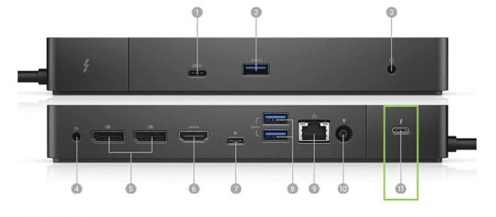
Figure 1. Connectivity Options
| 1. USB-C 3.1 Gen2 | 2. USB-A 3.1 Gen1 with PowerShare | 3. Combo Audio/Headset | 4. Audio Out |
| 5. DisplayPort 1.4 | 6. HDMI 2.0b | 7. USB-C Multifunction DisplayPort | 8. Dual USB-A 3.1 Gen1 |
| 9. Gigabit Ethernet RJ45 | 10. Power In | 11. Thunderbolt 3 |
For additional information about using and troubleshooting the WD22TB4, see these Dell Knowledge Base articles:
Affected Products
Dell Dock WD19, Dell Thunderbolt Dock - WD19TB, Dell U3224KB, Dell Thunderbolt Dock – WD22TB4Article Properties
Article Number: 000217062
Article Type: Solution
Last Modified: 15 Apr 2025
Version: 5
Find answers to your questions from other Dell users
Support Services
Check if your device is covered by Support Services.