Il backup della macchina virtuale PowerProtect Data Manager non riesce con codice AVB0016 SyncInProgress
Summary: Il backup della macchina virtuale (VM) PowerProtect Data Manager ha esito negativo con AVB0016 del codice. "SyncInProgress" "Impossibile avviare la sincronizzazione completa a causa di una snapshot attiva esistente." ...
This article applies to
This article does not apply to
This article is not tied to any specific product.
Not all product versions are identified in this article.
Symptoms
L'interfaccia utente di PowerProtect Data Manager mostra i seguenti messaggi per l'errore:
ABV0016: VM Direct engine 'localhost' is unable to back up the virtual machine 'VM1' on vCenter 'vcsa01' because of a vCenter API issue.

The VM Direct engine cannot complete the backup of this virtual machine because a vCenter API operation did not complete successfully.
To troubleshoot this issue:

     *Verify that the vCenter can be reached.
     *If the vCenter is busy, wait for some activities to complete and then retry the operation.
     *Verify that the virtual machine exists on the vCenter.
----
Read Less
The error cannot be retried. Unable to successfully complete SDM Delta Sync operation. Unsuccessful after 'xx' attempts over 5m0.627607105s The vCenter task for 'SDM Snapshot Sync deltaSync' completed with state 'error': DPD Sync in progress
Errore 1:
La vmdm.log PowerProtect Data Manager presenta i seguenti messaggi di errore:
Result: {
  "sessionId" : "61e7c5f0-bb85-4474-a23f-95c990c917d6",
  "state" : "Failure",
  "logFile" : "/opt/emc/vmdirect/runtime/logs/vpod/BackupJobSessions-61e7c5f0-bb85-4474-a23f-95c990c917d6.log",
  "error" : "The error cannot be retried.  Unable to successfully complete SDM Delta Sync operation.  Unsuccessful after 70 attempts over 5m1.694291645s.  The vCenter task for 'SDM Snapshot Sync deltaSync' completed with state 'error':  DPD Sync in progress (500)",
  "proxyHostName" : "localhost",
  "errorCode" : "ABV0016"
dpd.log (su ESXi) presenta il seguente errore:
dpd.log:YYYY-MM-DDTHH:MM:SSZ error dpd[16520988] [Originator@6876 sub=Task opID=1d0ce776-e77a] Task 'Dp.Task.Sync.475.b2616635-352a-4726-986e-e42be7e94bac-1.52f20afe-9cef-83ec-b147-ce7acd07c2ca' failed with error: (dp.fault.SyncInProgress)
Errore 2:
Un'altra variante di questo errore è riportata di seguito:
PowerProtect Data Manager vmdm.log:
Result: {
  "sessionId" : "126c6bcf-635f-4579-97d7-8dd831a22048",
  "state" : "Failure",
  "logFile" : "/opt/emc/vmdirect/runtime/logs/vpod/BackupJobSessions-126c6bcf-635f-4579-97d7-8dd831a22048.log",
  "error" : "Unable to successfully complete SDM Full Sync operation.  Unsuccessful after 39 attempts over 10m14.630663716s.  The vCenter task for 'SDM Snapshot Sync fullSync' completed with state 'error':  DPD Sync in progress (500)",
  "proxyHostName" : "localhost",
  "errorCode" : "ABV0016"
dpd.log (host ESXi)
YYYY-MM-DDTHH:MM:SSZ error dpd[2216236] [Originator@6876 sub=Snapshot opID=055f891e-8923] StartFullSyncIpc: Failed for disk '2d21e5b0-15a9-469e-1bbf-03d75e771c31': error 'Cannot start full sync due to existing active snapshot'
Cause
Problema nel servizio Data Protection Daemon (DPD) di VMware.
Resolution
Soluzione alternativa guasto 1:
Per l'errore 1 in cui DPD restituisce un messaggio SyncInProgress, riavviare il servizio DPD sull'host ESXi interessato come indicato di seguito:
- Dall'interfaccia utente di vSphere, individuare la VM interessata e individuare l'host ESXi su cui risiede la VM.
- Riavviare il servizio DPD:
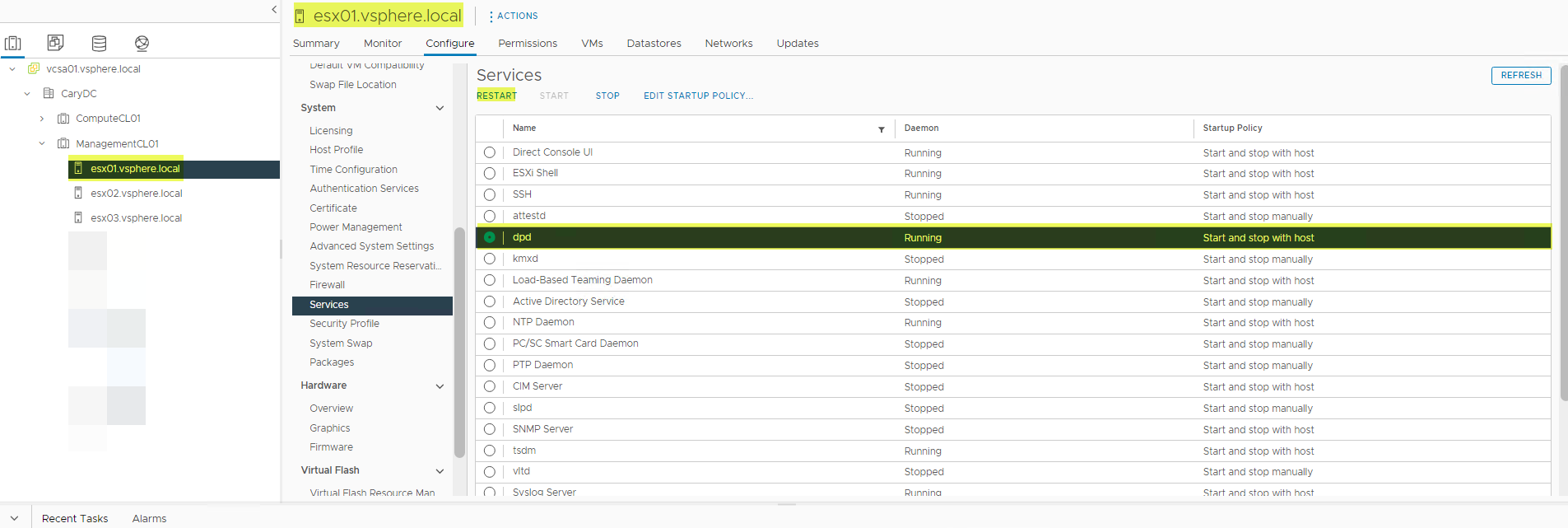
- È possibile che venga visualizzato un errore al riavvio del servizio DPD. In tal caso, riavviare prima il servizio TSDM, quindi il servizio DPD.
- Riavviare il servizio TSDM.
- Riprovare il backup non riuscito.
Soluzione
Versioni interessate:
vSphere 7.0.3 (tutte), 8.0.0
Correzione prevista in una versione futura di vSphere per le versioni vSphere interessate.
Soluzione alternativa per l'errore 2:
Per l'errore 2 in cui DPD restituisce il messaggio "Cannot start full sync due to existing active snapshot", la soluzione alternativa consiste nel reimpostare LWD. LWD può essere reimpostato come segue:
Metodo 1.
-
Modificare il meccanismo di protezione sulla macchina virtuale da VAPD e tornare a LWD come indicato di seguito:
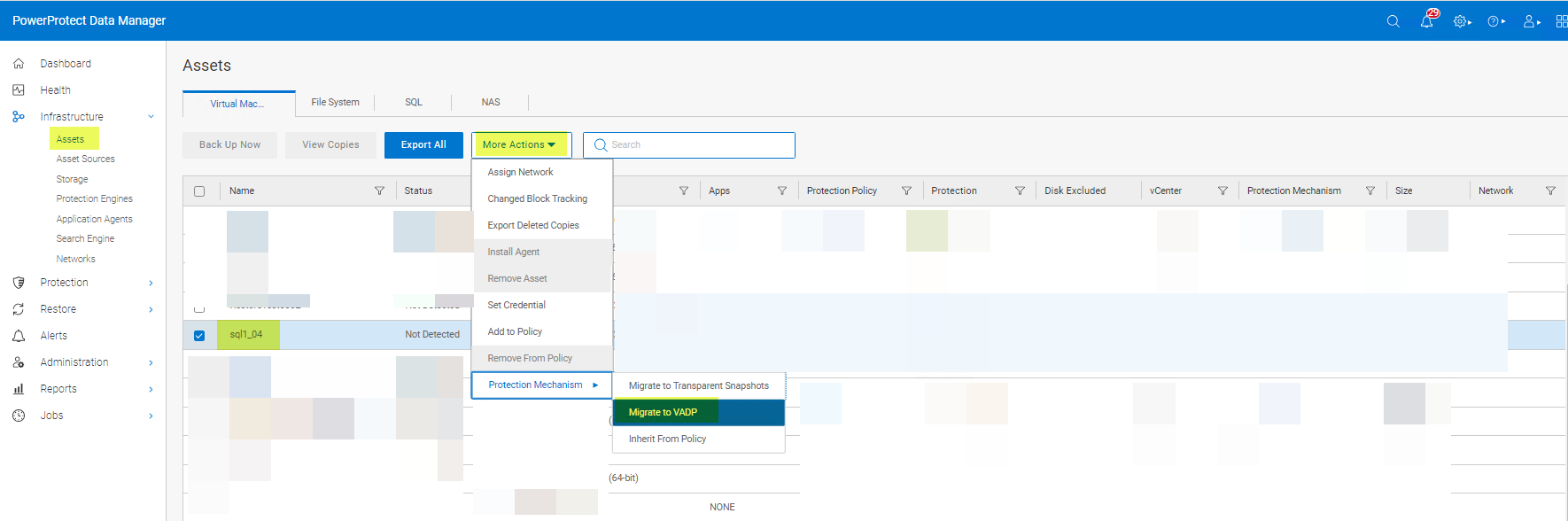
- Ripristinare il meccanismo di protezione in Transparent Snapshots:
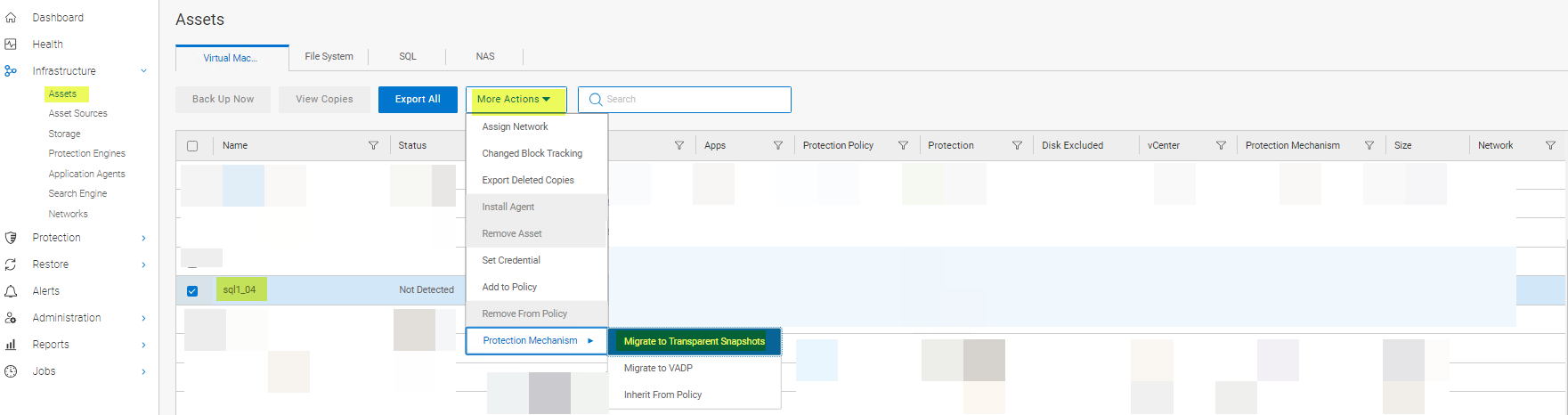
Metodo 2.
Rimuovere la VM dalla policy di protezione e aggiungerla nuovamente. Se la vVersion di PowerProtect Data Manager è 19.12, utilizzare il metodo 1 o il metodo 3. Il metodo 2 non funziona con PowerProtect Data Manager 19.12.
Metodo 3.
Disabilitare e riabilitare LWD utilizzando lo strumento vmconfig.
Soluzione:
Versioni interessate:
7.0.3 (tutte) e 8.0.0
La root cause di questo problema è ancora oggetto di indagine da parte di VMware.
Affected Products
PowerProtect Data ManagerArticle Properties
Article Number: 000217246
Article Type: Solution
Last Modified: 16 Feb 2024
Version: 4
Find answers to your questions from other Dell users
Support Services
Check if your device is covered by Support Services.