Windows Server: In-Band Management of PERC and HBA Controllers Shows Incorrect Information
Summary: This article talks about PERC and HBA Controllers not getting detected or their status is unknown when queried by utilities like PERC CLI or OMSA that use in-band management.
This article applies to
This article does not apply to
This article is not tied to any specific product.
Not all product versions are identified in this article.
Symptoms
Indications of the issues:
- Install the Windows server operating system or WinPE on the server.
- Run the commands to check the health status or retrieve information of the PERC controllers. Utilities such as PERC CLI and OpenManage Server Administrator (OMSA) show incorrect information.
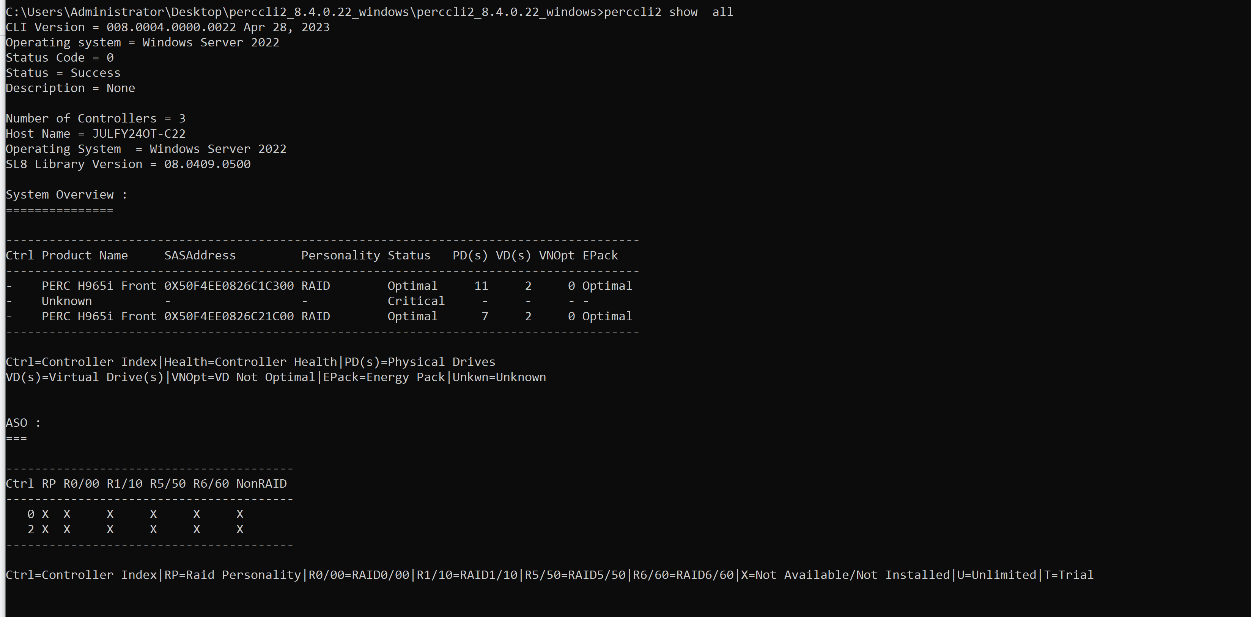
PERC CLI output showing the product description as Unknown:
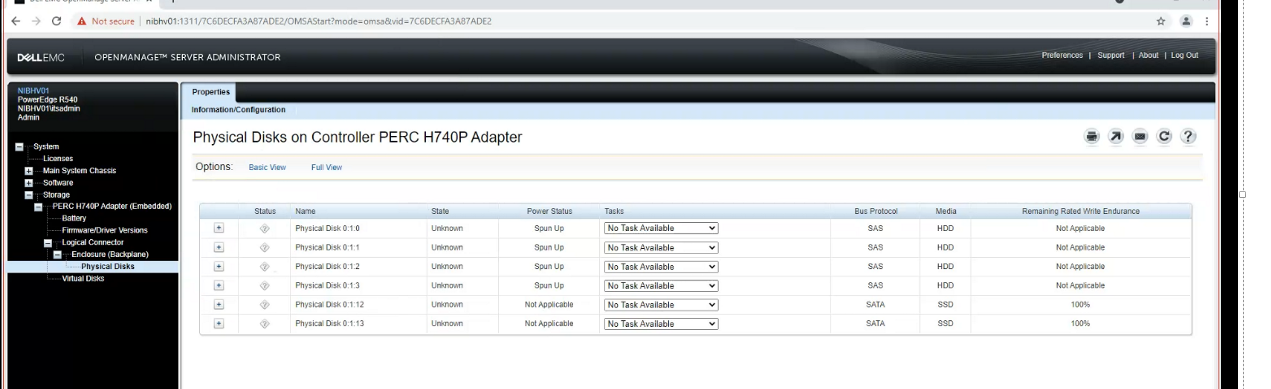
OpenManage Server Administrator showing disk state as Unknown
The CIOCTLcommands fail with error code0x8 ERROR_NOT_ENOUGH_MEMORYorcontroller NOT FOUND Error.
Output from
Storelibdebug.txt
Tue Jul 20 09:13:19.360 2021 : 1828: SendIoctl: Exit: retVal 0x8017, GetLastError() 0x8
Tue Jul 20 09:13:19.361 2021 : 1828: DiscoverCtrl: GetDriverCtrlId failed for scsi port 0. rval 0x8017
8 (0x8) Error code in window OS
ERROR_NOT_ENOUGH_MEMORY : Not enough memory resources are available to process this command
Dell management applications, OMSA and OpenManage Enterprise, fail to report the health status of storage controllers and drives. The result is the failure of Dell Server health management software and solutions for customers.
Affects:
The following PERC 9 Controllers with inbox driver have a limitation of using the first 4 GB of physical memory for SRB extension and uncache extension.
H730
H330
HBA330
Affects:
All Windows Server and WinPE versions
Note: iDRAC reporting is not impacted.
Cause
The cause is no available pages within the first 4 GB physical memory location resulting in IOCTL failure.
Due to unavailability of required memory, the storport driver fails to build the SRB packet to complete the required IOCTL request. As a result, IOCTL calls fail with insufficient memory error. (Error code: 8)
This issue occurs due to a limitation of the storage controller. They can only deal with the address of the first 4 GB of physical memory for SRB extension and uncache extension.
Resolution
A reboot may temporarily resolve the issue.
This limitation is remediated with Out-Of-Box drivers for specific adapters only.
For PERC10 and later, use the links below:
- Windows Server 2019: February 13, 2024 - KB5034768 (OS Build 17763.5458) - Microsoft Support
- Windows Server 2022: February 13, 2024 - KB5034770 (OS Build 20348.2322) - Microsoft Support
- WinPE 22000: March 12, 2024 - KB5035854 (OS Build 22000.2836) - Microsoft Support

NOTE: Out-Of-Box drivers are not available for the controllers listed below. There is no solution for PERC9 HBA family controllers.
- PERC H730P MX
- PERC H730P Adapter
- PERC H730 Adapter
- PERC H730P Mini
- PERC H730 Mini
- PERC H330 Adapter
- PERC H330 MX
- PERC H330 Mini
- HBA330 MX
- HBA330 MMZ
- HBA330 Mini
- HBA330 Adapter
Affected Products
PERC9/SAS HBAs, HBA330 MMZ, HBA330 MX, PowerEdge RAID Controller H730P MX, PowerEdge RAID Controller H730, PowerEdge RAID Controller H730PArticle Properties
Article Number: 000220053
Article Type: Solution
Last Modified: 19 May 2026
Version: 5
Find answers to your questions from other Dell users
Support Services
Check if your device is covered by Support Services.