140 W Power Delivery from the Dell U3224KB Monitor is Not Working
Summary: The following article provides information about the conditions required to support 140 W power delivery on Dell U3224KB monitors.
This article applies to
This article does not apply to
This article is not tied to any specific product.
Not all product versions are identified in this article.
Symptoms
Dell U3224KB 32-inch ultrasharp flat panel monitors may experience an issue where Power Delivery (PD) from the monitor to a device does not work.
What is Power Delivery?
Power delivery from a monitor is a power specification. The monitor supplies additional power through a USB Type-C port on the monitor. This additional power source is available to external devices that connect to that port on the monitor. For example:
- Docks
- Hubs
- Multiport adapters
- Smartphones
- Tablets
- Laptops (Sometimes)
Cause
The following conditions must be met for power delivery on the Dell U3224KB monitor to supply 140 W:
- The cable is plugged from the device to the correct USB type-C style port on the back of the monitor that supports power delivery.
- The device supports the Thunderbolt 4 protocol and has a thunderbolt 4 capable port on it.
- The cable in use between the device and the monitor should support Thunderbolt 4.
Resolution
Note: Microsoft Windows Operating Systems released prior to Windows 10 do not support the Thunderbolt 4 upstream port technology.
The following instructions ensure that the device supports 140 W PD. That it uses the Thunderbolt 4 upstream power delivery port on the Dell U3224KB monitor:
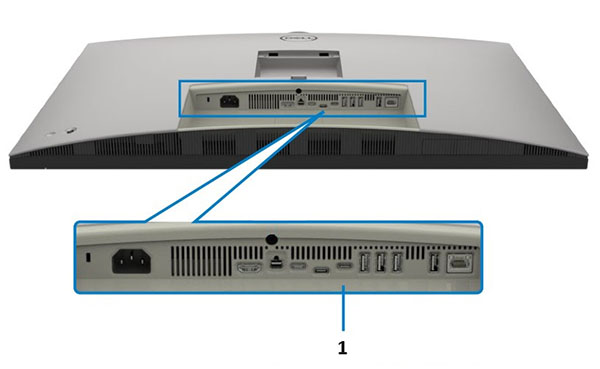
| 1 | Thunderbolt 4 Upstream Power Delivery (PD) Port |
-
Connect the device to the correct Thunderbolt 4 upstream port on the monitor.
-
Ensure that the device has a Thunderbolt 4 port available to connect to.
-
Ensure that the cable connecting the device to the monitor has a Thunderbolt 4 rating.
-
The maximum resolution of the monitor is
6144 x 3456 at 60 HzDisplay Stream Compression (DSC). -
This monitor fully supports Thunderbolt 4.0 technology which provides 140 W power delivery. Dell calls out the products it recommends using with this technology in the monitors manual:
-
Open and read the monitors manual.
Note: The Thunderbolt 4 upstream port can provide more than 100 W. The equipment and accessory cables that connect to it should have a fire enclosure of V1 or higher level. The wire rating should be VW-1.
Affected Products
Dell U3224KBArticle Properties
Article Number: 000221017
Article Type: Solution
Last Modified: 19 May 2026
Version: 5
Find answers to your questions from other Dell users
Support Services
Check if your device is covered by Support Services.