Unresponsive Touchpad Edge on Dell Latitude 2-in-1 Laptop
Summary: Learn about the unresponsive edges of the touchpad on a Dell Latitude 9440 2-in-1 or Latitude 9450 2-in-1 laptop. Learn where the touchpad is designed to operate.
This article applies to
This article does not apply to
This article is not tied to any specific product.
Not all product versions are identified in this article.
Symptoms
The touchpad of a Latitude 9440 2-in-1 or Latitude 9450 2-in-1 Dell laptop is designed to have an inoperative area surrounding the active area. This area does not respond to:
- Moving your finger on the inoperative area
- Clicking the left or right button in the inoperative area
A dragging input may encounter an unexpected release when your finger reaches the edge area of the touchpad.
The inoperative edges are:
- 10 mm (0.3937 in) from the top
- 3 mm (0.1181 in) from the left and right sides
- 9 mm (0.3543 in) from the bottom
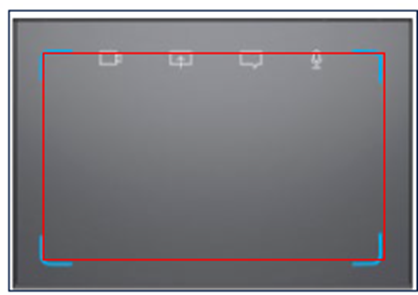
Figure 1: Inactive area on the edge of the touchpad
Affected Platforms:
- Latitude 9440 2-in-1
- Latitude 9450 2-in-1
Cause
Not applicable
Resolution
The touchpad is working as designed.
Affected Products
Latitude 9440 2-in-1, Latitude 9450 2-in-1Article Properties
Article Number: 000223569
Article Type: Solution
Last Modified: 20 May 2026
Version: 4
Find answers to your questions from other Dell users
Support Services
Check if your device is covered by Support Services.