VxRail: Upgrade Failed From 7.0.410 to 8.0.201 With Error "Internal Server Error"
Summary: VxRail upgrade failed from 7.0.410 to 8.0.201 with error "Internal Server Error."
This article applies to
This article does not apply to
This article is not tied to any specific product.
Not all product versions are identified in this article.
Symptoms
VxRail upgrade from 7.0.410 to 8.0.201 fails with error:
"Failure occurred while running an upgrade for bundle: VXRAIL_COMPOSITE-8.0.201-28354422_for_7.0.x.zip. The error message: Trigger set customized depot meets exception, detail: Meet error in vlcm service request exchange, please check log for detail.{"message": "Internal Server Error"} . "
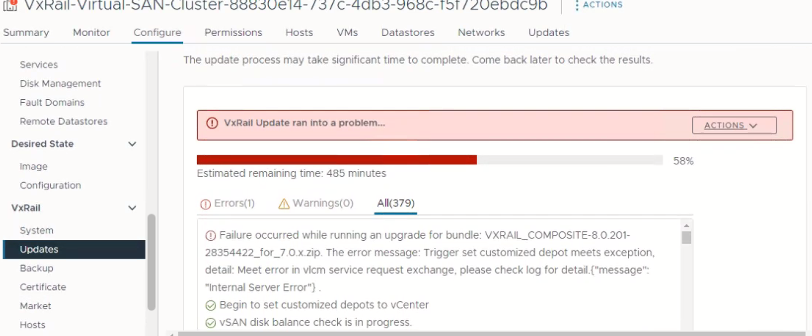
vCenter and VxRail manager had been upgraded and failed on the ESXi upgrade stage.
Logs:
"2024-03-17 01:48:49,708" microservice.vlcm "2024-03-17T01:48:49.139789867Z stderr F     depot_service.add_depot(depot_url)"
"2024-03-17 01:48:49,708" microservice.vlcm "2024-03-17T01:48:49.139792535Z stderr F   File ""/home/app/services/online_depot_service.py"", line 47, in add_depot"
"2024-03-17 01:48:49,708" microservice.vlcm "2024-03-17T01:48:49.139794932Z stderr F     raise Exception(response.content)"
"2024-03-17 01:48:49,708" microservice.vlcm "2024-03-17T01:48:49.139798031Z stderr F Exception: b'{""error_type"":""INVALID_ARGUMENT"",""messages"":[
{""args"":[""https://vxmxxx/vlcm/depot/vlcm/components/ESXi-8.0.2_22380479-72deb405/index.xml""],""default_message"":""Online Depot URL \'https://vxman/vlcm/depot/vlcm/components/ESXi-8.0.2_22380479-72deb405/index.xml\' is not valid or cannot be reached now."",""localized"":""Online Depot URL \'https://vxmxxx/vlcm/depot/vlcm/components/ESXi-8.0.2_22380479-72deb405/index.xml\' is not valid or cannot be reached now."",""id"":""com.vmware.vcIntegrity.lifecycle.depots.online.Invalid""}
]}'"
In the above log file, we can see that the VxRail Manger server was shown as "vxmxxx" instead of the fully qualified domain name (FQDN) "vxmxxx.<domain>."
This causes issues accessing "https://vxman/vlcm/depot/vlcm/components/ESXi-8.0.2_22380479-72deb405/index.xml" due to SSL verification.
Checking with the command below it shows the short name:
hostname -f
Manually setting the name to FQDN makes no change to the error. Cause
The /etc./hosts file was customized:
10.10.10.10 vxmxxx vxmxxx.test.com
The recommended format is to place the long name first such as:
10.10.10.10 vxmxxx.test.com vxmxxx
Resolution
To resolve this issue, modify the hosts file.
- Either remove the short name or place it after the FQDN.
- The command
"hostname -f"will show the long name and VxRail Manager will now the use the long name for the API call.
Affected Products
VxRail, VxRail Appliance Series, VxRail SoftwareArticle Properties
Article Number: 000224161
Article Type: Solution
Last Modified: 20 May 2026
Version: 3
Find answers to your questions from other Dell users
Support Services
Check if your device is covered by Support Services.