DW5932e WWANカード搭載のDellコンピューターでSIMカードを挿入するとインターネットに接続できない
Summary: この記事では、DW5932e WWANカードが取り付けられているLatitudeおよびPrecisionワークステーションで、SIMカードを挿入した後にインターネットに接続できないことについて説明します。
This article applies to
This article does not apply to
This article is not tied to any specific product.
Not all product versions are identified in this article.
Symptoms
影響を受けるプラットフォーム:
- Latitude 5350
- Latitude 5450
- Latitude 5550
- Latitude 7030 Rugged Extremeタブレット
- Latitude 7350
- Latitude 7350デタッチャブル
- Latitude 7450
- Latitude 7650
- Latitude 9450
- Dell Precision 3490
- Dell Precision 3590
- Dell Precision 3591
Windowsの[ネットワークとインターネット]設定からセルラー接続をオンにすると、コンピューターがインターネットに接続されていない。
影響を受けるWWANカード:
- DW5932e
Cause
ユーザーがWindows Updateを介してアップデートした場合、WWANドライバーが完全にはアップデートされないと考えられます。
Resolution
DellサポートWebサイトからWWANドライバーをダウンロードして手動でインストールします。
DW5932eドライバーの最新バージョンは、3.2.0.16です。
このドライバーをインストールすると、 デバイス マネージャーに バージョンが 3.1.0.8と表示されます。
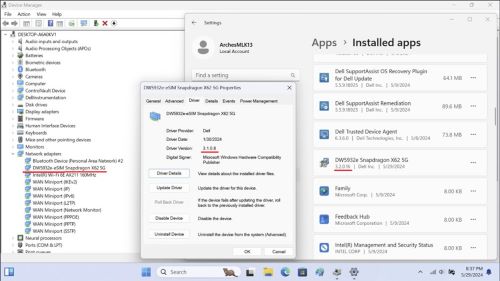
注:
- ドライバーのインストール中は、電源を切ったり、スリープ状態にしたり、休止状態にしたりしないでください。
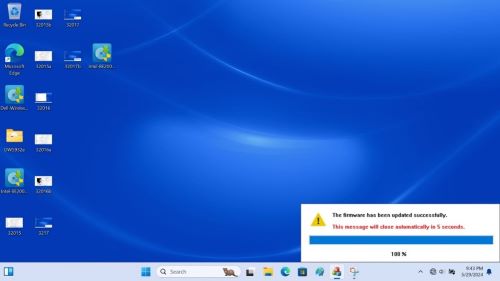
- インストールが完了するまでに約2〜3分かかり、画面に進行状況ステータスが表示されます。
- 100%に達するまで待ちます。そうしないと、インストールが不完全になる可能性があります。
Affected Products
Latitude 7030 Rugged Extreme Tablet, Latitude 5350, Latitude 7350, Latitude 7350 Detachable, Latitude 5450, Latitude 7450, Latitude 9450 2-in-1, Latitude 5550, Precision 3490, Precision 3590, Mobile Precision 3591Article Properties
Article Number: 000225950
Article Type: Solution
Last Modified: 23 Apr 2025
Version: 5
Find answers to your questions from other Dell users
Support Services
Check if your device is covered by Support Services.