DW5932e WWAN 카드가 장착된 Dell 컴퓨터가 SIM 카드를 삽입한 후 인터넷에 연결할 수 없음
Summary: 이 문서에서는 DW5932e WWAN 카드가 설치된 Latitude 및 Precision 워크스테이션에서 SIM 카드를 삽입한 후 인터넷에 연결할 수 없는 문제에 대한 정보를 제공합니다.
This article applies to
This article does not apply to
This article is not tied to any specific product.
Not all product versions are identified in this article.
Symptoms
해당되는 플랫폼:
- 래티튜드 5350
- Latitude 5450
- Latitude 5550
- Latitude 7030 Rugged Extreme 태블릿
- Latitude 7350
- Latitude 7350 분리형
- 래티튜드 7450
- 래티튜드 7650
- 래티튜드 9450
- 프리시전 3490
- 프리시전 3590
- Precision 3591
컴퓨터가 인터넷에 연결되어 있지 않은 경우 Windows 네트워크 및 인터넷 설정에서 셀룰러 연결을 켤 때,
영향을 받는 WWAN 카드:
- DW5932e
Cause
사용자가 Windows 업데이트를 통해 업데이트할 때 WWAN 드라이버가 완전히 업데이트되지 않는 것으로 의심됩니다.
Resolution
Dell 지원 웹사이트에서 WWAN 드라이버를 다운로드하여 수동으로 설치합니다.
최신 드라이버 DW5932e 드라이버 버전은 3.2.0.16입니다.
이 드라이버를 설치 하면 장치 관리자 에 버전이 3.1.0.8로 표시됩니다.
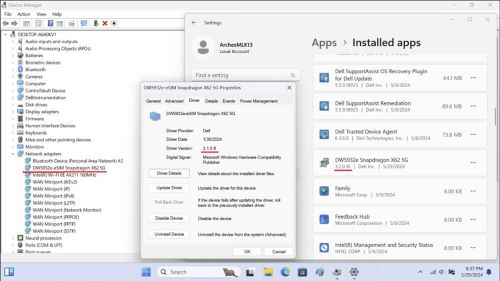
참고:
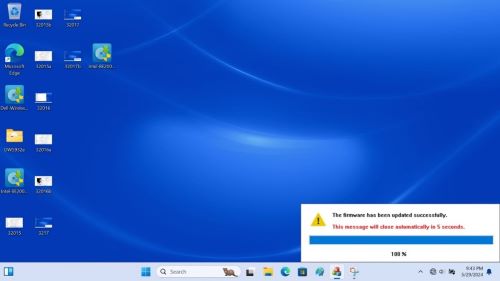
- 드라이버를 설치하는 동안 전원을 끄거나, 절전 모드로 전환하거나, 최대 절전 모드로 전환하지 마십시오.
- 설치를 완료하는 데 약 2-3분이 소요되며 화면에 진행 상태가 표시됩니다.
- 100%가 될 때까지 기다리지 않으면 설치가 완료되지 않을 수 있습니다.
Affected Products
Latitude 7030 Rugged Extreme Tablet, Latitude 5350, Latitude 7350, Latitude 7350 Detachable, Latitude 5450, Latitude 7450, Latitude 9450 2-in-1, Latitude 5550, Precision 3490, Precision 3590, Mobile Precision 3591Article Properties
Article Number: 000225950
Article Type: Solution
Last Modified: 23 Apr 2025
Version: 5
Find answers to your questions from other Dell users
Support Services
Check if your device is covered by Support Services.