PowerFlex:網路路徑取消資格警示
Summary: PowerFlex 3.6 版及以上版本會偵測到連接埠或插槽何時頻繁中斷連線 (變動),並主動取消路徑資格,防止整個系統出現一般中斷。客戶必須與內部團隊一起調查中斷的來源。
This article applies to
This article does not apply to
This article is not tied to any specific product.
Not all product versions are identified in this article.
Symptoms
使用者可能會看到一或多個警示,例如:
- 一條路徑被取消資格:「x.x.x.x 和 x.x.x.x 之間的路徑」(此警示的嚴重程度為「次要」)
- 或者幾個路徑被取消資格:「x.x.x.x 與 x.x.x.x、x.x.x.x 和 x.x.x.x 之間的路徑已取消資格」(此警示的嚴重程度為「重大」)
PowerFlex 3.6:簡報伺服器中的警示
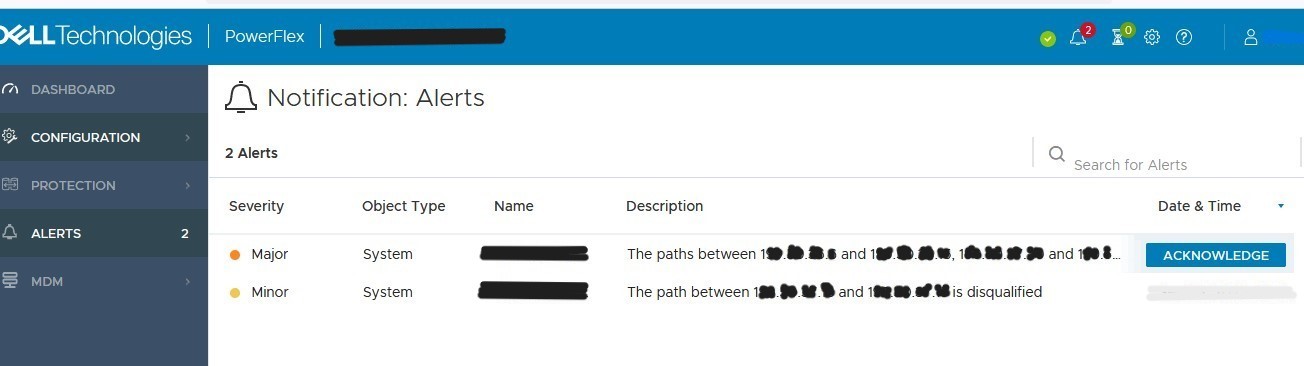
PowerFlex 4.x:PowerFlex Manager 中的警示

Cause
當連接埠或插槽頻繁中斷連線 (變動) 時,就會出現網路路徑取消資格警示,這可能會在 PowerFlex 的完全分散式架構中導致系統效能問題。PowerFlex 會偵測到此問題,並主動取消路徑資格,防止整個系統出現一般中斷情形。連接埠變動的最常見原因包括:網路卡故障、纜線問題或網路中斷
Resolution
若要隔離問題來源,請按照下列步驟操作:
- Ping 警示中所列元件的 IP 位址。如果 ping 成功,則無需執行任何其他故障排除。
- 開啟至主要 MDM 的 SSH 工作階段,然後輸入下列命令:
scli --query_port_flapping_status --all
通常,在問題來源解決後,連接埠會自動重新開機。除非連接埠在交換器上進入錯誤停用狀態,否則使用者不需要手動啟動連接埠。如果發生這種情況,在交換器連接埠上執行關機與無關機應能解決問題。
埠重新連線后,警報應隨著時間的推移自行清除;但是,如果使用者必須清除警報,以下步驟將有助於實現此目的:
-
若要清除 PowerFlex 版本 3.x 及更舊版本的警示,請按照下列步驟操作:
- 重設振蕩失敗計數器參數 KB 中的步驟 PowerFlex 如何重設振蕩錯誤 和 PowerFlex 如何故障診斷振盪故障計數器參數 SIO01.03.0000001-2
- 將簡報伺服器重新開機 (此作業沒有影響,應該只需要幾分鐘):有兩種方法可以實現此目的:
- 透過 vSphere:存取簡報伺服器 VM > 重新開機 VM
- 透過 CLI:開啟 SSH 至簡報伺服器 IP> 執行以下命令:
# systemctl stop mgmt-server
# systemctl start mgmt-server
-
若要清除 PowerFlex 4.0 版及更新版本中的警示,請依照本文 PowerFlex 管理平台 - 如何從 4.X PowerFlex Manager UI 手動清除警示中所列的步驟操作
如果在調查期間需要其他支援,請使用 PowerFlex 支援案例建立案例並提供下列項目:
- 警示的螢幕擷取畫面
- 主要 MDM Get_Info記錄 (KB 中會列出收集這些記錄的步驟清單。 如何 產生get_info記錄
Additional Information
https://www.youtube.com/watch?v=eABbCq-a9Yc

請參閱此影片:
Dell PowerFlex 中的主動式網路取消資格:增強系統效能
持續時間:00:05:18 (小時:分鐘:秒)
當可用時,您可以使用此影像播放器上的 CC 圖示來選擇隱藏式輔助字幕 (字幕) 語言設定。
您也可以在 YouTube 上觀看此影片。
Affected Products
PowerFlex rack, PowerFlex Appliance, PowerFlex custom node, PowerFlex appliance R650, PowerFlex appliance R6525, PowerFlex appliance R660, PowerFlex appliance R6625, Powerflex appliance R750, PowerFlex appliance R760, PowerFlex appliance R7625
, PowerFlex custom node, PowerFlex custom node R650, PowerFlex custom node R6525, PowerFlex custom node R660, PowerFlex custom node R6625, PowerFlex custom node R750, PowerFlex custom node R760, PowerFlex custom node R7625, PowerFlex rack connectivity, PowerFlex rack HW, PowerFlex rack RCM Software, PowerFlex appliance R640, PowerFlex appliance R740XD, PowerFlex appliance R7525, PowerFlex appliance R840
...
Article Properties
Article Number: 000226092
Article Type: Solution
Last Modified: 04 Aug 2026
Version: 8
Find answers to your questions from other Dell users
Support Services
Check if your device is covered by Support Services.