Spiegazione delle metriche di capacità effettiva del plug-in VSI PowerMax
Summary: Spiegazione delle metriche di capacità effettiva del plug-in VSI PowerMax
This article applies to
This article does not apply to
This article is not tied to any specific product.
Not all product versions are identified in this article.
Instructions
In Dell Virtual Storage Integrator (VSI) for VMware vSphere Client, la capacità effettiva mostra le metriche:
- Utilizzata da VMware , calcolata in base alla somma della capacità del volume PowerMax e del file system utilizzata dai datastore VMware (come VMFS, NFS e così via) e dalle macchine virtuali.
Utilizzata da VMware = Capacità utilizzata effettiva totale da risorse VMware/Capacità utilizzata effettiva totale
Nella schermata riportata di seguito, questo valore è 0,9% (arrotondato) = 0,07 TB (70 GB)/7,7 TB (7.884,8 GB) x100
(7,7 TB×1.024 GB/TB=7.884 GB)
- Utilizzata da Non VMware = rappresenta la capacità NON utilizzata da VMware = Total Effective Used Capacity: utilizzata da VMWare.
Nella schermata riportata di seguito, questo valore è 7,7 TB - 0,1 TB (70 GB) = 7,6 (ARROTONDATO 7,67)
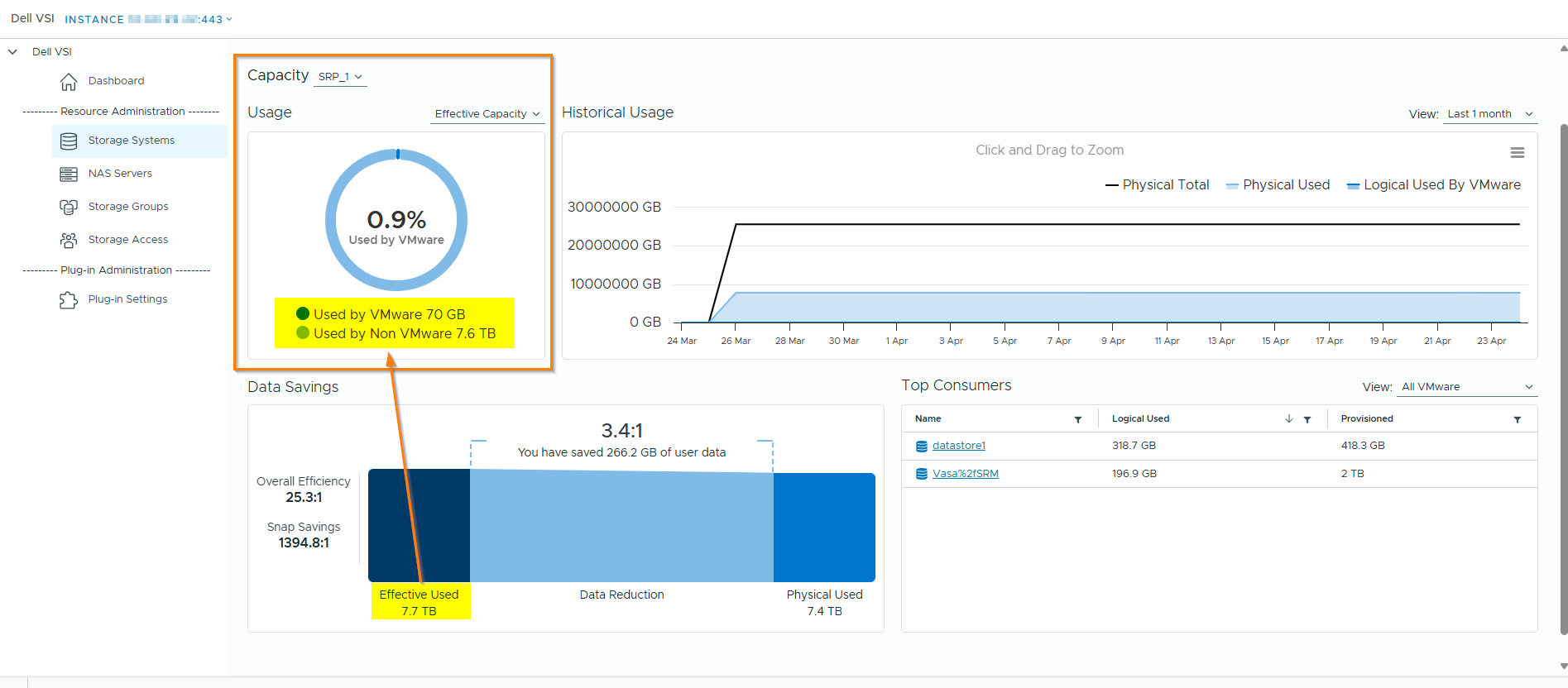
La metrica Effective used presente nella sezione Data Savings mostra la capacità utilizzata effettiva combinata di "Used by VMWare" e "Used by Non VMWare".
Affected Products
VSI for VMware vSphere Web ClientArticle Properties
Article Number: 000312706
Article Type: How To
Last Modified: 30 Apr 2025
Version: 2
Find answers to your questions from other Dell users
Support Services
Check if your device is covered by Support Services.