Dell and Alienware Monitors Experience Video Loss When Dolby Vision HDR is Enabled
Summary: Information about video loss that may occur when the Dolby Vision High Dynamic Range (HDR) feature is activated.
This article applies to
This article does not apply to
This article is not tied to any specific product.
Not all product versions are identified in this article.
Symptoms
A brief video interruption may occur when switching between windows or if a particular window requires more desktop space. This behavior is seen when Dolby Vision HDR (10-bit depth) is enabled on the monitor. When the display is set to Dolby Vision mode, Windows attempts to use the Dolby Vision HDR features for the active application or window, especially if it occupies additional desktop space. If an application that does not support Dolby Vision HDR (like the Command Line) becomes active, Windows switches to standard HDR. This change necessitates a screen refresh, causing the display to briefly power off and on.
Affected Monitors:
- AW3225QF
- AW2725Q
- AW2725QF
- S3225QC
Cause
This happens because of the way Dolby Vision HDR is supported in Windows.
Resolution
Dolby Vision HDR
This is an anticipated behavior, as both the video driver and monitor must refresh.
If the video refresh is bothersome, you can turn off Dolby Vision HDR in the monitor's On-Screen Display (OSD) menu and use the Smart HDR feature.
If you choose to use the Dolby Vision HDR feature, the following workaround may be effective when using a browser:
- Disable the Hardware acceleration within the browser.
An example for Chrome: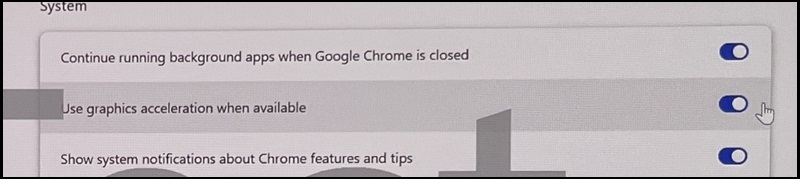
An example for Microsoft Edge: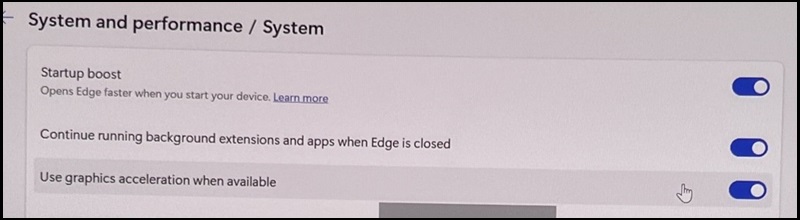
- Enable Integer Scaling in the AMD software (if you have an AMD Graphics card).
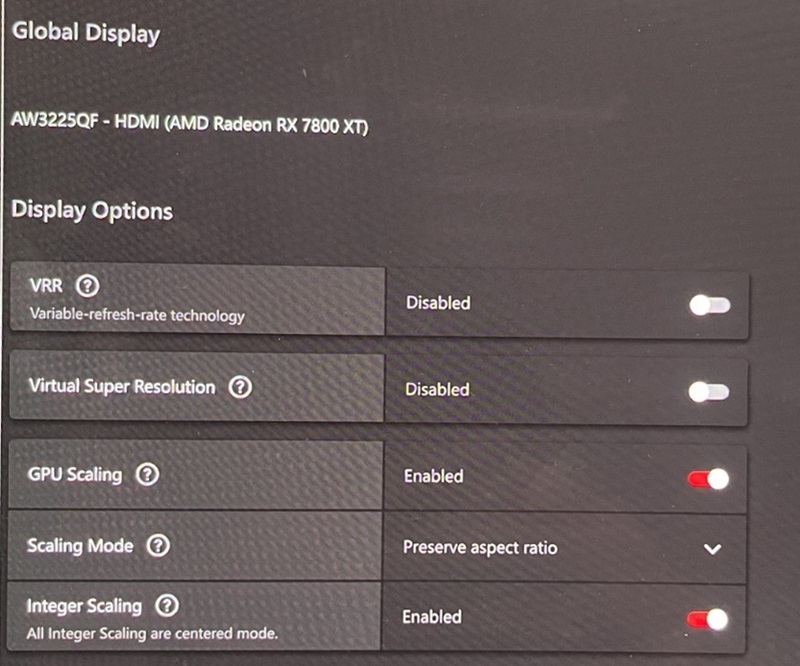
See your monitor's User Manual for more information.
If you still have questions or issues, contact Dell Technical Support.
Affected Products
Alienware 27 4K QD-OLED Gaming Monitor AW2725Q, Alienware 27 4K Dual-Resolution Gaming Monitor AW2725QF, Alienware 32 4K QD OLED Gaming Monitor AW3225QF, Dell 32 Plus 4K QD-OLED Monitor S3225QCArticle Properties
Article Number: 000345015
Article Type: Solution
Last Modified: 04 Sept 2025
Version: 2
Find answers to your questions from other Dell users
Support Services
Check if your device is covered by Support Services.