Dell Security Management Server Virtual Upgrade が Interfaces.d で失敗する
Summary: Dell Security Management Server Virtual アプライアンスのアップグレードが interfaces.d ディレクトリを参照するエラーで失敗します。
This article applies to
This article does not apply to
This article is not tied to any specific product.
Not all product versions are identified in this article.
Symptoms
対象製品:
- Dell Security Management Server Virtual
影響を受けるバージョン:
- v10.2.9~v10.2.11
対象オペレーティング システム:
- Linux
Dell Security Management Server Virtual のアップグレードが停止し、 Failed to restore from backup file: というメッセージが表示されます。これは、etc/network/interfaces ディレクトリ内のファイルのリストアを試行した後に発生します。
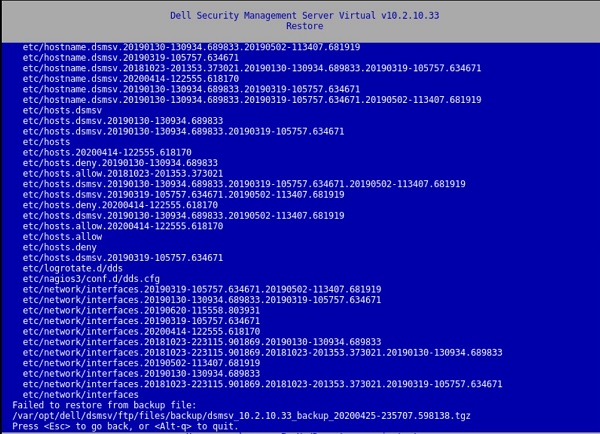
図1: (英語のみ)Restoreは、 Failed to restore from backup file を返します。
次のキーの結果をウィンドウで押します。
[Errno 21] Is a directory:
‘/etc/network/interfaces.d’.
このエラーは、/var/log/messagesファイルにも存在します。
![[Errno 21]ディレクトリは次のとおりです。「/etc/network/interfaces.d」](https://supportkb.dell.com/img/ka06P000000Put3QAC/ka06P000000Put3QAC_ja_6.jpeg)
図2:(英語のみ)[Errno 21] Is a directory: ‘/etc/network/interfaces.d’
Cause
-
Resolution
この問題を解決するには、手順に従って interfaces.d ディレクトリの名前を変更します。
- Dell Security Management Server Virtual Console にログインします。
- Dell Security Management Server Virtual管理コンソールで、[Launch Shell]を選択します。
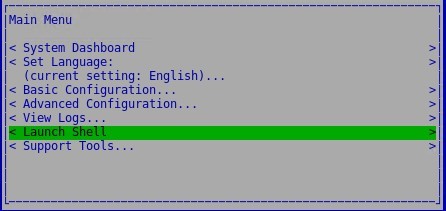
図3:(英語のみ)シェルの起動
- コマンド
su dellsupportをdellsupport使用して、ユーザー アカウントに切り替えます。

図4:(英語のみ)に切り替える dellsupport
dellsupportユーザーのパスワードを入力します。デフォルトでは、このパスワードはdellsupportです。

図5:(英語のみ)パスワードを入力します
- 次のコマンドを使用して、interfaces.dディレクトリの名前を変更します。
sudo mv /etc/network/interfaces.d /etc/network/interfaces.old

図6:(英語のみ)sudo mv /etc/network/interfaces.d /etc/network/interfaces.oldと入力する
- と入力
exitするか、2回使用してシェルを終了し、ユーザー インターフェイスを使用ctrl-dしてアップグレードを実行します。
サポートに問い合わせるには、「Dell Data Securityのインターナショナル サポート電話番号」を参照してください。
TechDirectにアクセスして、テクニカル サポート リクエストをオンラインで生成します。
さらに詳しい情報やリソースについては、「デル セキュリティ コミュニティー フォーラム」に参加してください。
Additional Information
Videos
Affected Products
Dell EncryptionArticle Properties
Article Number: 000131146
Article Type: Solution
Last Modified: 06 Jul 2023
Version: 10
Find answers to your questions from other Dell users
Support Services
Check if your device is covered by Support Services.