Wake From Sleep with Dell Dual Video USB3.0 (D1000), Dell USB 3.0 (D3100), or Dell Universal (D6000 series) Docking Stations
Summary: This article contains information about D1000, D3100, and D6000 docking stations and wake from sleep issues.
This article applies to
This article does not apply to
This article is not tied to any specific product.
Not all product versions are identified in this article.
Symptoms
Wake From Sleep
When attempting to wake a system from sleep when connected to a Dell Dual Video USB3.0 (D1000), Dell USB 3.0 (D3100), or Dell Universal (D6000 series) Docking Station when using the dock to also charge the system. You find that you are unable to wake the unit from sleep, if you disconnect the system from the docking station.
Cause
The system is working as intended.
Resolution
This feature is only functional when an AC power adapter is connected. If the AC power adapter is removed during Standby, the system setup removes power from all the USB ports to conserve battery power as shown below.
| Platform connected by | Power supply prerequisites | BIOS setting prerequisites |
|---|---|---|
| USB Type-A | Power adapter plug on platform | Enable "USB wake support" |
| USB Type-C | Power adapter plug on D6000 | Enable "USB wake support" |
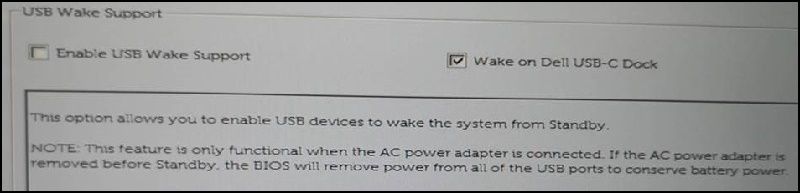
System BIOS (F2 on Boot up) information about USB ports being disabled.
USB Wake Support Note.
Affected Products
Dell Dual Video USB3.0 Docking Station D1000, Dell Universal Dock D6000, Dell USB3.0 dock D3100Article Properties
Article Number: 000130111
Article Type: Solution
Last Modified: 05 Nov 2025
Version: 6
Find answers to your questions from other Dell users
Support Services
Check if your device is covered by Support Services.